Skip to comparison
versus.deals
Menu
Browse versus.deals
MICE · YOUR NEXT FACE-OFF

ASUS ROG Harpe Ace Extreme vs ASUS ROG Keris II Origin

Real specs. Clear sources.Exact models · UK & US buying links

Compared products

YOUR FIRST CHOICE

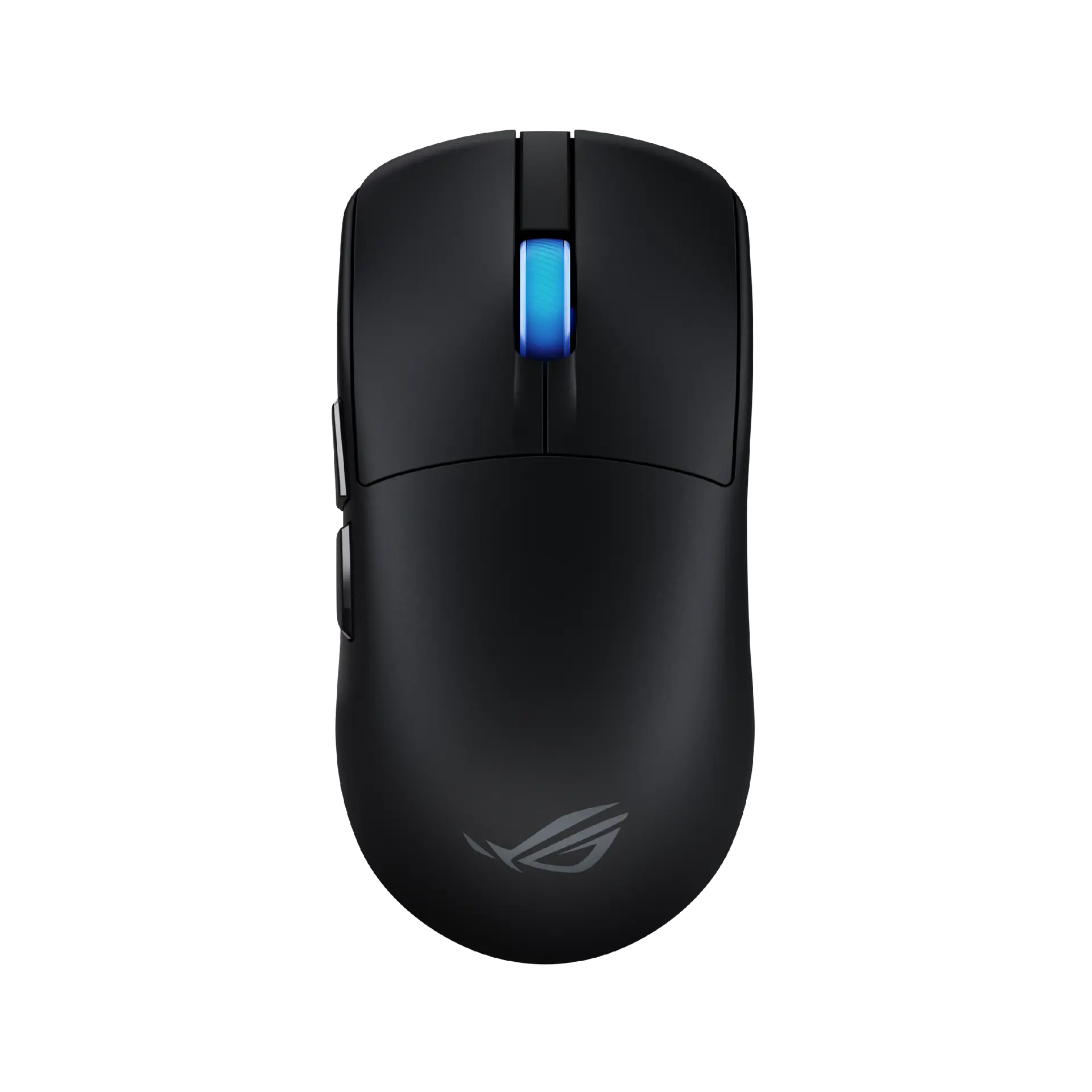
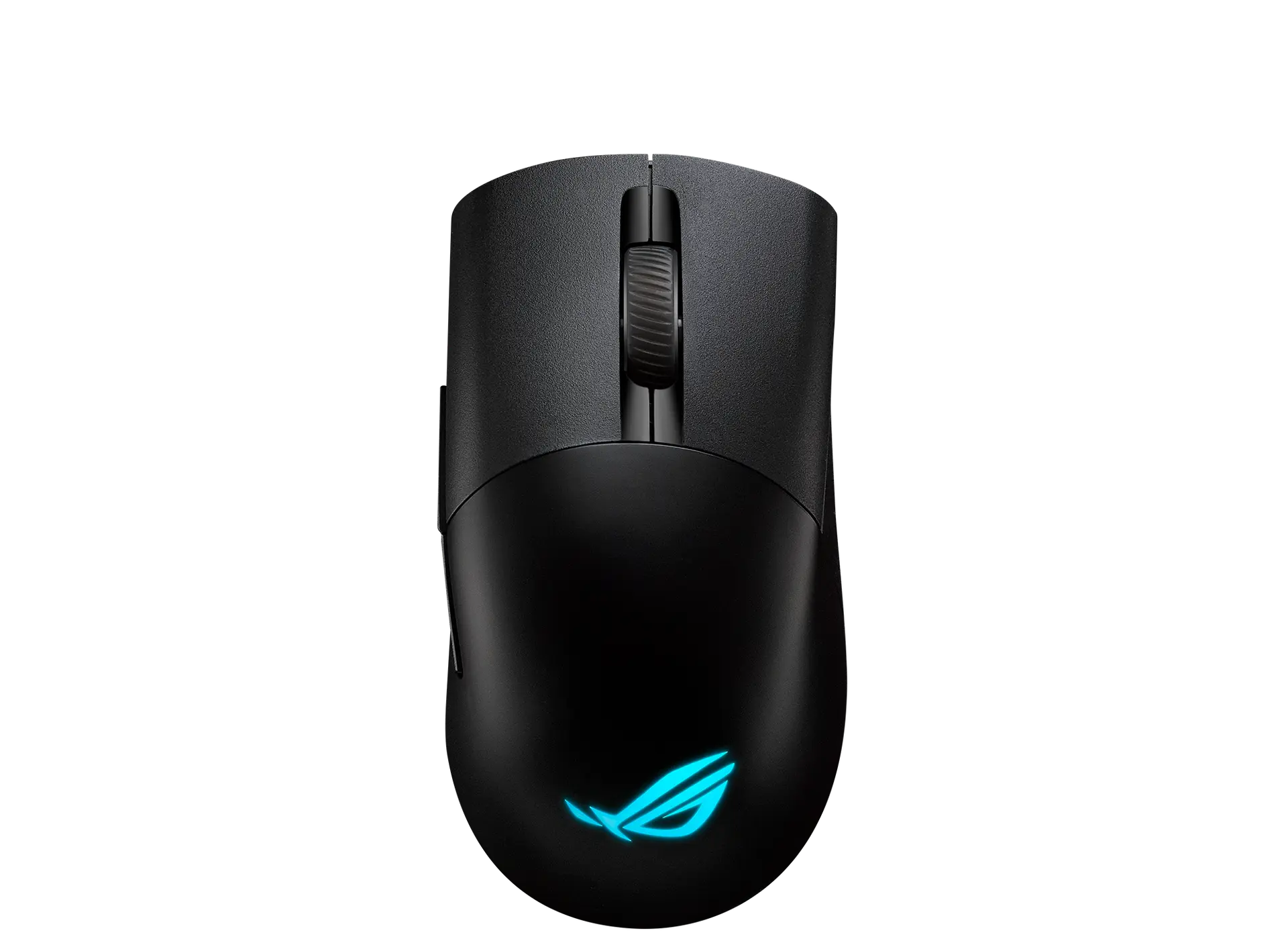
ASUS ROG Harpe Ace Extreme

Black · 90MP03U0-BMUA00 · UK manufacturer configuration
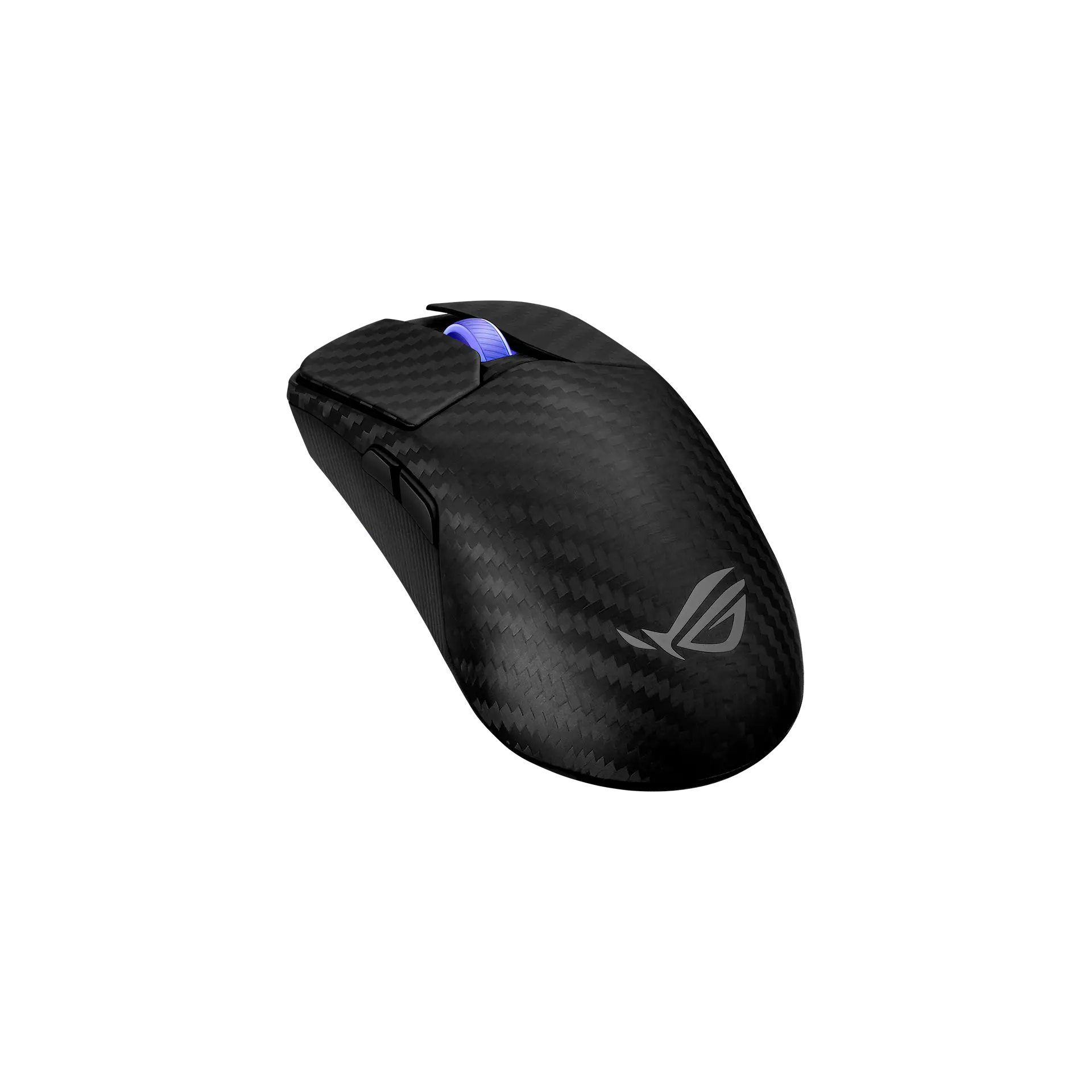
ASUS ROG Harpe Ace Extreme wireless mouse in black carbon fiber, angled top view showing the woven carbon shell, blue-lit scroll wheel, left side buttons and ROG logo
Exact model & source notes

The ROG Harpe Ace Extreme is ASUS's 47 g carbon fiber composite wireless mouse with the 42,000 DPI ROG AimPoint Pro sensor, ROG Optical Micro Switches and an included Polling Rate Booster for 8000 Hz wireless polling.

Specifications checked 28 Sept 2026.

Amazon links open search results. Check the exact variant, current price and availability with the retailer.

Manufacturer specifications

WHICH SUITS YOU?

Choose the ROG Harpe Ace Extreme for

  • A symmetric shape
  • Higher stated maximum wireless report rate: 8,000 Hz vs 1,000 Hz
  • Longer stated body length: 127.5 mm vs 121 mm

Choose the ROG Keris II Origin for

  • A right-hand shape
  • Shorter stated body length: 121 mm vs 127.5 mm
Built from verified specifications that differ. Not a rating or a recommendation.
See the 11 verified differences
THE CONTENDER

ASUS ROG Keris II Origin

Black · P722 · UK manufacturer configuration

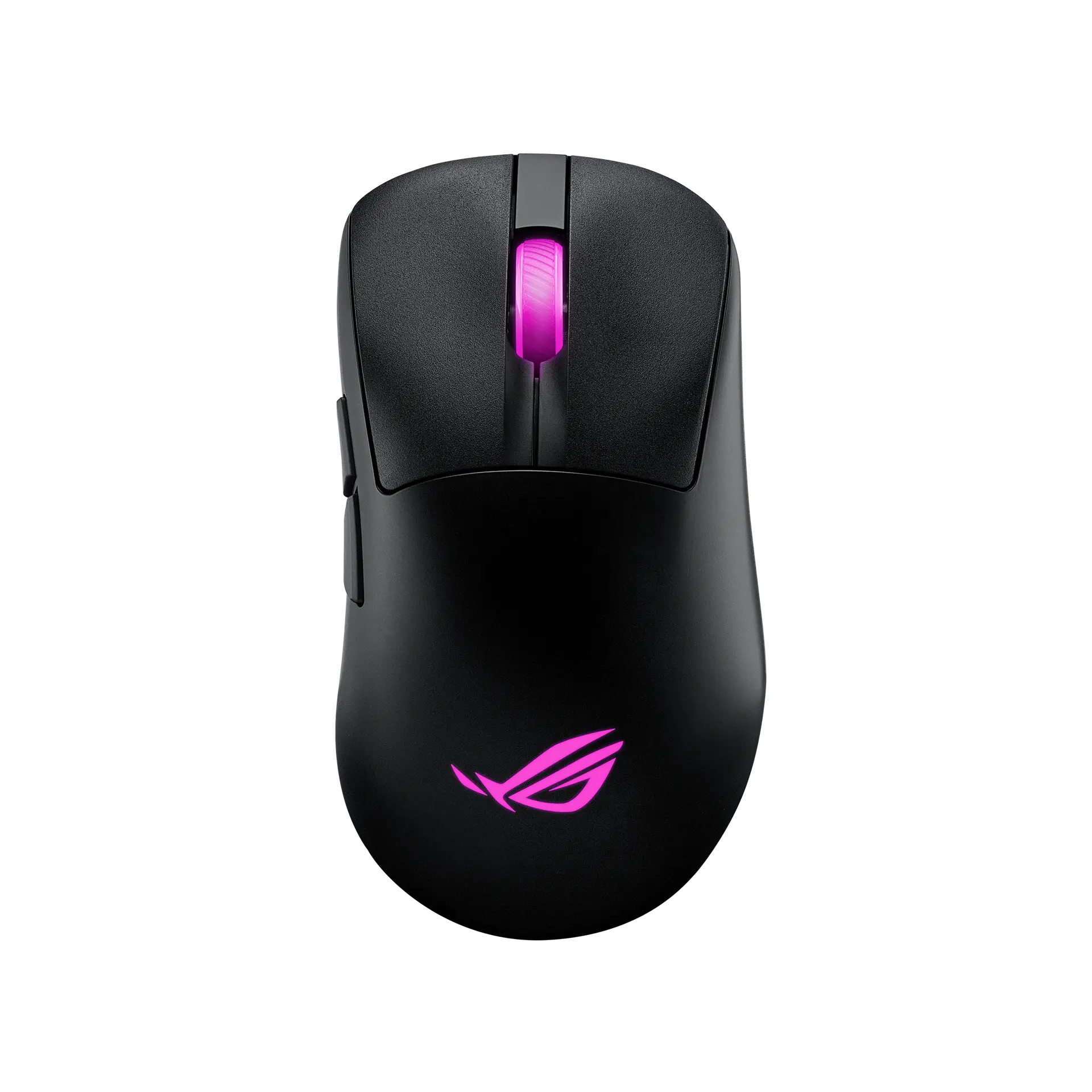
ASUS ROG Keris II Origin wireless mouse in black, top view showing the magenta-lit scroll wheel and ROG logo and the left side buttons
Exact model & source notes

The ROG Keris II Origin is ASUS's 65 g right-handed ergonomic wireless mouse with 3-zone RGB lighting, the 42,000 DPI ROG AimPoint Pro sensor, swappable ROG Micro Switches II and tri-mode connectivity.

Specifications checked 27 Sept 2026.

Amazon links open search results. Check the exact variant, current price and availability with the retailer.

Manufacturer specifications

ROG Harpe Ace Extreme UK & US retailers

UK & US price history: no verified listing yet

ROG Keris II Origin UK & US retailers

UK & US price history: no verified listing yet

Search links open retailer results, not a matched listing; eBay listings are checked daily. As an Amazon Associate I earn from qualifying purchases. As an eBay Partner, we may be compensated if you make a purchase.

THE DIFFERENCES, MADE VISIBLE

Visual facts

Differences first. Select a topic for its graphic, sources and conditions.

How to read this comparison
  • Manufacturer facts for the exact models shown. Not a quality rating or a test result.
  • “Different” means the known values differ, not that one is better.
  • Missing or conflicting evidence is marked and never counts as a difference. Source chips hold each fact’s sources and conditions.
SPECIFICATIONS SIDE BY SIDE8 topics
SELECTED TOPIC
01 / 08

Hand orientation

Check the exact configuration and source conditions for your use.

ASUS ROG Harpe Ace ExtremeAmbidextrous shape; side buttons on the left only

Manufacturer specification · ASUS files the model under Ambidextrous mice; the official gallery shows the forward and backward buttons on the left side and a textured right side without buttons, so the side-button layout suits right-handed use. Not a grip or comfort test.

ASUS ROG Keris II OriginRight-handed ergonomic shape; side buttons on the left

Manufacturer specification · ASUS files the model under Ergonomic Right-Handed mice and describes a right-side ring-finger ledge; the official views show the side buttons on the left. Not a grip or comfort test.

Explore the full specifications

Choose the grip, then check the connection. Left-side thumb controls are not a mirrored left-handed layout. Check the receiver or USB connection, battery requirements and your preferred shape. DPI is tracking resolution, not an accuracy score; no gaming winner is inferred.

WHAT CHANGES BETWEEN THEM?

Key differences

Full specifications ↓

11 verified differences, most decision-relevant first. 7 are also drawn in Visual facts above. Missing information stays separate.

Hand orientation

In Visual facts
ASUS ROG Harpe Ace ExtremeAmbidextrous shape; side buttons on the left only
ASUS ROG Keris II OriginRight-handed ergonomic shape; side buttons on the left
Sources
ASUS ROG Harpe Ace Extreme

Manufacturer specification · ASUS files the model under Ambidextrous mice; the official gallery shows the forward and backward buttons on the left side and a textured right side without buttons, so the side-button layout suits right-handed use. Not a grip or comfort test.

ROG Harpe Ace Extreme — ASUS ROG UK tech specsROG Harpe Ace Extreme — ASUS ROG USA product overview and footnotes
ASUS ROG Keris II Origin

Manufacturer specification · ASUS files the model under Ergonomic Right-Handed mice and describes a right-side ring-finger ledge; the official views show the side buttons on the left. Not a grip or comfort test.

ROG Keris II Origin Gaming Mouse — ASUS ROG UK tech specsROG Keris II Origin Gaming Mouse — ASUS ROG UK product overview and footnotes

Check the exact configuration and source conditions for your use.

Main switch technology

In Visual facts
ASUS ROG Harpe Ace ExtremeROG Optical Micro Switches
ASUS ROG Keris II OriginROG Micro Switch II in ROG Push-Fit Switch Socket II
Sources
ASUS ROG Harpe Ace Extreme

Manufacturer specification · ASUS says switches within 5 gram-force deviation are paired for left/right consistency.

ROG Harpe Ace Extreme — ASUS ROG UK tech specsROG Harpe Ace Extreme — ASUS ROG USA product overview and footnotesROG Harpe Ace Extreme — ASUS ROG USA tech specs
ASUS ROG Keris II Origin

Manufacturer specification · ASUS says the sockets accept 3-pin mechanical and 5-pin optical switches; two spare ROG Micro Switches II and a switch clip are in the box.

ROG Keris II Origin Gaming Mouse — ASUS ROG UK tech specsROG Keris II Origin Gaming Mouse — ASUS ROG UK product overview and footnotesROG Keris II Origin Gaming Mouse — ASUS ROG USA tech specs

Switch actuation and button tensioning describe different parts of a click mechanism. Read the documented technology; its name alone does not establish latency, durability or feel.

Maximum wireless report rate

In Visual facts
ASUS ROG Harpe Ace Extreme8000 Hz
ASUS ROG Keris II Origin1000 Hz
Sources
ASUS ROG Harpe Ace Extreme

Manufacturer specification · 2.4 GHz RF with the included ROG Polling Rate Booster; the quick start guide marks 2000, 4000 and 8000 Hz as needing the booster and not supported over Bluetooth. ASUS asks users to update to firmware 1.00.15.

ROG Harpe Ace Extreme — ASUS ROG UK tech specsROG Harpe Ace Extreme — ASUS ROG USA product overview and footnotesROG Harpe Ace Extreme — ASUS ROG USA tech specsROG Harpe Ace Extreme (P718) Quick Start Guide Q23645, first edition May 2024 — ASUS download PDF
ASUS ROG Keris II Origin

Manufacturer specification · The quick start guide's polling-rate options without the booster stop at 1000 Hz (500 and 1000 Hz not supported over Bluetooth); 2000 Hz and above need the ROG Polling Rate Booster.

ROG Keris II Origin Quick Start Guide Q26018, first edition March 2025 — ASUS download PDF

Check the connection and receiver: supplied, wired and optional-accessory limits can differ. Report frequency is not measured click latency, and maximum battery life may use another setting.

Customisation software

In Visual facts
ASUS ROG Harpe Ace ExtremeArmoury Crate (Armoury Crate Gear)
ASUS ROG Keris II OriginArmoury Crate; Gear Link (web browser)
Sources
ASUS ROG Harpe Ace Extreme

Manufacturer specification · ASUS says Armoury Crate Gear adjusts performance and surface calibration, maps buttons and sets RGB lighting.

ROG Harpe Ace Extreme — ASUS ROG UK tech specsROG Harpe Ace Extreme — ASUS ROG USA product overview and footnotes
ASUS ROG Keris II Origin

Manufacturer specification · ASUS lists Armoury Crate in the specification table and promotes browser-based setup with Gear Link on the overview.

ROG Keris II Origin Gaming Mouse — ASUS ROG UK tech specsROG Keris II Origin Gaming Mouse — ASUS ROG UK product overview and footnotes

Stored profiles, sensitivity settings and software assignments are different capabilities. An unspecified profile count is not zero; check the software and firmware conditions.

Battery life

In Visual facts
ASUS ROG Harpe Ace Extreme2.4 GHz RF: 70 hours (lighting off) or 53 hours (default lighting); Bluetooth: 98 hours (lighting off) or 67 hours (default lighting)
ASUS ROG Keris II Origin2.4 GHz RF: up to 127 hours (lighting off) or 82 hours (default lighting); Bluetooth: up to 192 hours (lighting off) or 91 hours (default lighting)
Sources
ASUS ROG Harpe Ace Extreme

Manufacturer specification · ASUS's ratings; report rate is not stated.

ROG Harpe Ace Extreme — ASUS ROG USA product overview and footnotes
ASUS ROG Keris II Origin

Manufacturer specification · ASUS rates the 2.4 GHz RF figures at a 1000 Hz polling rate. Its overview footnote gives the Bluetooth figures at 1000 Hz as well, but ASUS's quick start guide marks 500 Hz and 1000 Hz as not supported over Bluetooth, so the polling rate behind the Bluetooth figures is unresolved.

ROG Keris II Origin Gaming Mouse — ASUS ROG UK product overview and footnotesROG Keris II Origin Quick Start Guide Q26018, first edition March 2025 — ASUS download PDF

Manufacturer claims for the stated mode and equipment. Read each test condition; this is not measured everyday battery life.

Show 5 more verified differences
ASUS ROG Harpe Ace ExtremeScroll wheel (Aura Sync)
ASUS ROG Keris II Origin3-zone RGB: ROG logo, scroll wheel and side markings (Aura Sync)
Sources
ASUS ROG Harpe Ace Extreme

Manufacturer specification · ASUS says it works with Windows Dynamic Lighting.

ROG Harpe Ace Extreme — ASUS ROG UK tech specsROG Harpe Ace Extreme — ASUS ROG USA product overview and footnotes
ASUS ROG Keris II Origin

Manufacturer specification · Each zone is individually programmable; pre-cut grip tape lets the lighting show through, per ASUS.

ROG Keris II Origin Gaming Mouse — ASUS ROG UK tech specsROG Keris II Origin Gaming Mouse — ASUS ROG UK product overview and footnotesROG Keris II Origin Gaming Mouse — ASUS ROG USA tech specs

Check the exact configuration and source conditions for your use.

Glide feet

ASUS ROG Harpe Ace ExtremeCorning Gorilla Glass mouse feet and 100% PTFE mouse feet sets included
ASUS ROG Keris II Origin100% PTFE; 2 replaceable mouse feet included
Sources
ASUS ROG Harpe Ace Extreme

Manufacturer specification · ASUS does not recommend the glass feet with a glass mouse pad, and says to remove the pre-installed feet before fitting the bundled ones.

ROG Harpe Ace Extreme — ASUS ROG UK tech specsROG Harpe Ace Extreme — ASUS ROG USA product overview and footnotesROG Harpe Ace Extreme (P718) Quick Start Guide Q23645, first edition May 2024 — ASUS download PDF

Check the exact configuration and source conditions for your use.

Listed package

ASUS ROG Harpe Ace ExtremeMouse; Omni Receiver; ROG Polling Rate Booster; wireless receiver extender; ROG Paracord; mouse grip tape (4 pieces, one-time stick); glass mouse feet set; 100% PTFE mouse feet set; mouse case; display stand; cleaning kit; thank-you card; warranty card; quick start guide; ROG logo sticker
ASUS ROG Keris II OriginMouse; wireless receiver; USB dongle extender; micro-switch clip; 2 ROG Micro Switches II; mouse grip tape set; 2 replaceable mouse feet; 2-metre ROG Paracord; warranty booklet; quick start guide; ROG sticker; thank-you card
Sources
ASUS ROG Harpe Ace Extreme

Manufacturer specification · Manufacturer box contents. ASUS says grip tape, mouse feet and the Polling Rate Booster are consumables not covered by warranty. Check the seller's listing.

ROG Harpe Ace Extreme — ASUS ROG UK tech specsROG Harpe Ace Extreme — ASUS ROG USA product overview and footnotesROG Harpe Ace Extreme — ASUS ROG USA tech specs
ASUS ROG Keris II Origin

Manufacturer specification · Manufacturer box contents; the ROG Polling Rate Booster is not included. ASUS says grip tape and mouse feet are consumables not covered by warranty. Check the seller's listing.

ROG Keris II Origin Gaming Mouse — ASUS ROG UK tech specsROG Keris II Origin Gaming Mouse — ASUS ROG UK product overview and footnotesROG Keris II Origin Gaming Mouse — ASUS ROG USA tech specs

Check the exact configuration and source conditions for your use.

Dimensions

ASUS ROG Harpe Ace Extreme127.5 × 63.7 × 39.6 mm (length × width × height)
ASUS ROG Keris II Origin121 × 67 × 42 mm (length × width × height)
Sources
ASUS ROG Harpe Ace Extreme

Manufacturer specification · Mouse body as listed by ASUS.

ROG Harpe Ace Extreme — ASUS ROG UK tech specsROG Harpe Ace Extreme — ASUS ROG USA tech specs
ASUS ROG Keris II Origin

Manufacturer specification · Mouse body as listed by ASUS.

ROG Keris II Origin Gaming Mouse — ASUS ROG UK tech specsROG Keris II Origin Gaming Mouse — ASUS ROG USA tech specs

A size or weight trade-off; it does not establish the better product.

Small physical differences (1)
Missing or non-comparable evidence (6)

Scroll wheel

ASUS ROG Harpe Ace ExtremeTTC Gold scroll wheel encoder
ASUS ROG Keris II OriginNot verified
Sources
ASUS ROG Harpe Ace Extreme

Manufacturer specification · ASUS rates the encoder for up to 1 million cycles.

ROG Harpe Ace Extreme — ASUS ROG USA product overview and footnotes
ASUS ROG Keris II Origin

No source recorded for this side.

Evidence is missing or conflicting on at least one side. This is not a verified difference.

Maximum report rate with optional accessory

ASUS ROG Harpe Ace ExtremeNot verified
ASUS ROG Keris II Origin8000 Hz
Sources
ASUS ROG Harpe Ace Extreme

No source recorded for this side.

ASUS ROG Keris II Origin

Manufacturer specification · With the ROG Polling Rate Booster, which ASUS says is sold separately and not included; ASUS lists 8000 Hz for both USB and 2.4 GHz RF with the booster.

ROG Keris II Origin Gaming Mouse — ASUS ROG UK tech specsROG Keris II Origin Gaming Mouse — ASUS ROG UK product overview and footnotesROG Keris II Origin Gaming Mouse — ASUS ROG USA tech specsROG Keris II Origin Quick Start Guide Q26018, first edition March 2025 — ASUS download PDF

Evidence is missing or conflicting on at least one side. This is not a verified difference.

Published acceleration threshold

ASUS ROG Harpe Ace Extreme50 G
ASUS ROG Keris II OriginNot verified
Sources
ASUS ROG Harpe Ace Extreme

Manufacturer specification · ASUS's maximum acceleration rating; test surface not stated.

ROG Harpe Ace Extreme — ASUS ROG USA product overview and footnotes
ASUS ROG Keris II Origin

No source recorded for this side.

Evidence is missing or conflicting on at least one side. This is not a verified difference.

Published tracking speed

ASUS ROG Harpe Ace Extreme750 IPS
ASUS ROG Keris II OriginNot verified
Sources
ASUS ROG Harpe Ace Extreme

Manufacturer specification · ASUS's maximum speed rating; test surface not stated.

ROG Harpe Ace Extreme — ASUS ROG USA product overview and footnotes
ASUS ROG Keris II Origin

No source recorded for this side.

Evidence is missing or conflicting on at least one side. This is not a verified difference.

Weight

ASUS ROG Harpe Ace Extreme47 g
ASUS ROG Keris II Origin65 g
Sources
ASUS ROG Harpe Ace Extreme

Manufacturer specification · ASUS lists "~47g" and a 47-gram design without stating whether the cable or receiver is included.

ROG Harpe Ace Extreme — ASUS ROG UK tech specsROG Harpe Ace Extreme — ASUS ROG USA product overview and footnotesROG Harpe Ace Extreme — ASUS ROG USA tech specs
ASUS ROG Keris II Origin

Manufacturer specification · ASUS states a 65-gram design without stating whether the cable or receiver is included; the spec table has no weight row.

ROG Keris II Origin Gaming Mouse — ASUS ROG UK product overview and footnotes

The manufacturer sources do not establish the same cable weighing basis. Both published masses remain visible with their conditions, but are not ranked.

13 shared fields have the same recorded value.

WHAT EACH CHOICE ASKS OF YOU

What it brings and what to check

ASUS ROG Harpe Ace Extreme

What it brings

  • The box includes a Polling Rate Booster, an Omni Receiver, both glass and PTFE feet, a case, a display stand and a cleaning kit.
  • ASUS lists a 100–42,000 DPI range with track-on-glass, 100-million-click optical switches, a TTC Gold wheel encoder and five onboard profiles.

What to check

  • ASUS rates battery life at 70 hours in 2.4 GHz mode with lighting off (53 hours with default lighting), and rates above 1000 Hz need the booster and are not available over Bluetooth.
  • Despite the ambidextrous classification the side buttons are on the left only; ASUS does not state the weight's cable basis or publish a button count.

ASUS ROG Keris II Origin

What it brings

  • Push-Fit Switch Socket II takes 3-pin mechanical and 5-pin optical switches, and two spare ROG Micro Switches II come in the box.
  • ASUS rates the battery at up to 127 hours on 2.4 GHz at 1000 Hz and up to 192 hours on Bluetooth, both with lighting off, and lists five onboard profiles and individually programmable 3-zone RGB.

What to check

COMPARE THE DETAILS

Full specifications

How we verify
31 of 31 specifications Sources in each row
Source-backed specifications for ASUS ROG Harpe Ace Extreme and ASUS ROG Keris II Origin
SpecificationASUS ROG Harpe Ace ExtremeASUS ROG Keris II Origin
WeightDifferent
Sources
ASUS ROG Harpe Ace Extreme

Manufacturer specification · ASUS lists "~47g" and a 47-gram design without stating whether the cable or receiver is included.

ROG Harpe Ace Extreme — ASUS ROG UK tech specsROG Harpe Ace Extreme — ASUS ROG USA product overview and footnotesROG Harpe Ace Extreme — ASUS ROG USA tech specs
ASUS ROG Keris II Origin

Manufacturer specification · ASUS states a 65-gram design without stating whether the cable or receiver is included; the spec table has no weight row.

ROG Keris II Origin Gaming Mouse — ASUS ROG UK product overview and footnotes
47 g65 g
DimensionsDifferent
Sources
ASUS ROG Harpe Ace Extreme

Manufacturer specification · Mouse body as listed by ASUS.

ROG Harpe Ace Extreme — ASUS ROG UK tech specsROG Harpe Ace Extreme — ASUS ROG USA tech specs
ASUS ROG Keris II Origin

Manufacturer specification · Mouse body as listed by ASUS.

ROG Keris II Origin Gaming Mouse — ASUS ROG UK tech specsROG Keris II Origin Gaming Mouse — ASUS ROG USA tech specs
127.5 × 63.7 × 39.6 mm (length × width × height)121 × 67 × 42 mm (length × width × height)
Body lengthDifferent
Sources
ASUS ROG Harpe Ace Extreme

Manufacturer specification

ROG Harpe Ace Extreme — ASUS ROG UK tech specs
ASUS ROG Keris II Origin

Manufacturer specification

ROG Keris II Origin Gaming Mouse — ASUS ROG UK tech specs
127.5 mm121 mm
Body widthDifferent
Sources
ASUS ROG Harpe Ace Extreme

Manufacturer specification · ASUS's listed width; ASUS does not state the measurement basis.

ROG Harpe Ace Extreme — ASUS ROG UK tech specs
ASUS ROG Keris II Origin

Manufacturer specification · ASUS's listed width; ASUS does not state the measurement basis.

ROG Keris II Origin Gaming Mouse — ASUS ROG UK tech specs
63.7 mm67 mm
Hand orientationDifferent
Sources
ASUS ROG Harpe Ace Extreme

Manufacturer specification · ASUS files the model under Ambidextrous mice; the official gallery shows the forward and backward buttons on the left side and a textured right side without buttons, so the side-button layout suits right-handed use. Not a grip or comfort test.

ROG Harpe Ace Extreme — ASUS ROG UK tech specsROG Harpe Ace Extreme — ASUS ROG USA product overview and footnotes
ASUS ROG Keris II Origin

Manufacturer specification · ASUS files the model under Ergonomic Right-Handed mice and describes a right-side ring-finger ledge; the official views show the side buttons on the left. Not a grip or comfort test.

ROG Keris II Origin Gaming Mouse — ASUS ROG UK tech specsROG Keris II Origin Gaming Mouse — ASUS ROG UK product overview and footnotes
Ambidextrous shape; side buttons on the left onlyRight-handed ergonomic shape; side buttons on the left
Glide feetDifferent
Sources
ASUS ROG Harpe Ace Extreme

Manufacturer specification · ASUS does not recommend the glass feet with a glass mouse pad, and says to remove the pre-installed feet before fitting the bundled ones.

ROG Harpe Ace Extreme — ASUS ROG UK tech specsROG Harpe Ace Extreme — ASUS ROG USA product overview and footnotesROG Harpe Ace Extreme (P718) Quick Start Guide Q23645, first edition May 2024 — ASUS download PDF
Corning Gorilla Glass mouse feet and 100% PTFE mouse feet sets included100% PTFE; 2 replaceable mouse feet included
Sensor model / type
Sources
ASUS ROG Harpe Ace Extreme

Manufacturer specification · ASUS's sensor name, with < 1% deviation and track-on-glass technology. The supplier is not stated.

ROG Harpe Ace Extreme — ASUS ROG USA product overview and footnotes
ASUS ROG Keris II Origin

Manufacturer specification · ASUS's sensor name, with track-on-glass technology. The supplier is not stated.

ROG Keris II Origin Gaming Mouse — ASUS ROG UK product overview and footnotes
ROG AimPoint Pro optical sensorROG AimPoint Pro optical sensor
42000 DPI42000 DPI
Minimum sensitivity
Sources
ASUS ROG Keris II Origin

Manufacturer specification · ASUS's quick start guide gives the resolution as 100 DPI to 42000 DPI.

ROG Keris II Origin Quick Start Guide Q26018, first edition March 2025 — ASUS download PDF
100 DPI100 DPI
DPI presets
Sources
ASUS ROG Harpe Ace Extreme

Manufacturer specification · DPI 1–4 default to 400 / 800 / 1600 (default) / 3200 DPI and can be customised in Armoury Crate or with DPI On-The-Scroll.

ROG Harpe Ace Extreme (P718) Quick Start Guide Q23645, first edition May 2024 — ASUS download PDF
ASUS ROG Keris II Origin

Manufacturer specification · DPI 1–4 default to 400 / 800 / 1600 (default) / 3200 DPI and can be customised in Armoury Crate or with DPI On-The-Scroll.

ROG Keris II Origin Quick Start Guide Q26018, first edition March 2025 — ASUS download PDF
4 settings4 settings
Maximum wireless report rateDifferent
Sources
ASUS ROG Harpe Ace Extreme

Manufacturer specification · 2.4 GHz RF with the included ROG Polling Rate Booster; the quick start guide marks 2000, 4000 and 8000 Hz as needing the booster and not supported over Bluetooth. ASUS asks users to update to firmware 1.00.15.

ROG Harpe Ace Extreme — ASUS ROG UK tech specsROG Harpe Ace Extreme — ASUS ROG USA product overview and footnotesROG Harpe Ace Extreme — ASUS ROG USA tech specsROG Harpe Ace Extreme (P718) Quick Start Guide Q23645, first edition May 2024 — ASUS download PDF
ASUS ROG Keris II Origin

Manufacturer specification · The quick start guide's polling-rate options without the booster stop at 1000 Hz (500 and 1000 Hz not supported over Bluetooth); 2000 Hz and above need the ROG Polling Rate Booster.

ROG Keris II Origin Quick Start Guide Q26018, first edition March 2025 — ASUS download PDF
8000 Hz1000 Hz
Maximum wired report rate
Sources
ASUS ROG Harpe Ace Extreme

Manufacturer specification · ASUS lists the USB report rate as 8000 Hz with the ROG Polling Rate Booster.

ROG Harpe Ace Extreme — ASUS ROG UK tech specsROG Harpe Ace Extreme — ASUS ROG USA tech specs
ASUS ROG Keris II Origin

No source recorded.

8000 HzNot provided
Published tracking speed
Sources
ASUS ROG Harpe Ace Extreme

Manufacturer specification · ASUS's maximum speed rating; test surface not stated.

ROG Harpe Ace Extreme — ASUS ROG USA product overview and footnotes
ASUS ROG Keris II Origin

No source recorded.

750 IPSNot provided
Published acceleration threshold
Sources
ASUS ROG Harpe Ace Extreme

Manufacturer specification · ASUS's maximum acceleration rating; test surface not stated.

ROG Harpe Ace Extreme — ASUS ROG USA product overview and footnotes
ASUS ROG Keris II Origin

No source recorded.

50 GNot provided
On-mouse adjustments
Sources
ASUS ROG Harpe Ace Extreme

Manufacturer specification · Button combinations on the mouse, per the quick start guide.

ROG Harpe Ace Extreme (P718) Quick Start Guide Q23645, first edition May 2024 — ASUS download PDF
DPI On-The-Scroll; polling rate; lift-off distance (Low / High); hardware resetDPI On-The-Scroll; polling rate; lift-off distance (Low / High); hardware reset
Maximum report rate with optional accessory
Sources
ASUS ROG Harpe Ace Extreme

No source recorded.

ASUS ROG Keris II Origin

Manufacturer specification · With the ROG Polling Rate Booster, which ASUS says is sold separately and not included; ASUS lists 8000 Hz for both USB and 2.4 GHz RF with the booster.

ROG Keris II Origin Gaming Mouse — ASUS ROG UK tech specsROG Keris II Origin Gaming Mouse — ASUS ROG UK product overview and footnotesROG Keris II Origin Gaming Mouse — ASUS ROG USA tech specsROG Keris II Origin Quick Start Guide Q26018, first edition March 2025 — ASUS download PDF
Not provided8000 Hz
Listed controls
Sources
ASUS ROG Harpe Ace Extreme

ASUS's web pages give no button count. Versus counts the buttons labelled in the quick start guide's "Mouse features" diagram (left-click, right-click, forward, backward and DPI) plus the scroll-wheel click, which the guide uses in its key combinations. The separately labelled pairing button, a connection control, is not counted. · Calculated from cited specifications

ROG Harpe Ace Extreme (P718) Quick Start Guide Q23645, first edition May 2024 — ASUS download PDF
ASUS ROG Keris II Origin

ASUS's web pages give no button count. Versus counts the buttons labelled in the quick start guide's "Mouse features" diagram (left-click, right-click, forward, backward and DPI) plus the scroll-wheel click, which the guide uses in its key combinations. The separately labelled pairing button, a connection control, is not counted. · Calculated from cited specifications

ROG Keris II Origin Quick Start Guide Q26018, first edition March 2025 — ASUS download PDF
66
Main switch technologyDifferent
Sources
ASUS ROG Harpe Ace Extreme

Manufacturer specification · ASUS says switches within 5 gram-force deviation are paired for left/right consistency.

ROG Harpe Ace Extreme — ASUS ROG UK tech specsROG Harpe Ace Extreme — ASUS ROG USA product overview and footnotesROG Harpe Ace Extreme — ASUS ROG USA tech specs
ASUS ROG Keris II Origin

Manufacturer specification · ASUS says the sockets accept 3-pin mechanical and 5-pin optical switches; two spare ROG Micro Switches II and a switch clip are in the box.

ROG Keris II Origin Gaming Mouse — ASUS ROG UK tech specsROG Keris II Origin Gaming Mouse — ASUS ROG UK product overview and footnotesROG Keris II Origin Gaming Mouse — ASUS ROG USA tech specs
ROG Optical Micro SwitchesROG Micro Switch II in ROG Push-Fit Switch Socket II
Claimed main-switch durability
Sources
ASUS ROG Harpe Ace Extreme

Manufacturer specification · ASUS's lifespan rating per switch.

ROG Harpe Ace Extreme — ASUS ROG UK tech specsROG Harpe Ace Extreme — ASUS ROG USA product overview and footnotes
ASUS ROG Keris II Origin

Manufacturer specification · ASUS's lifespan rating for the ROG Micro Switch II.

ROG Keris II Origin Gaming Mouse — ASUS ROG UK product overview and footnotes
100 million clicks100 million clicks
Scroll wheel
Sources
ASUS ROG Harpe Ace Extreme

Manufacturer specification · ASUS rates the encoder for up to 1 million cycles.

ROG Harpe Ace Extreme — ASUS ROG USA product overview and footnotes
ASUS ROG Keris II Origin

No source recorded.

TTC Gold scroll wheel encoderNot provided
Connections
Sources
ASUS ROG Harpe Ace Extreme

Manufacturer specification · Selected with a connection mode switch; Bluetooth pairs with up to 3 host devices. ASUS recommends the dongle extender in 2.4 GHz mode.

ROG Harpe Ace Extreme — ASUS ROG UK tech specsROG Harpe Ace Extreme — ASUS ROG USA tech specsROG Harpe Ace Extreme (P718) Quick Start Guide Q23645, first edition May 2024 — ASUS download PDF
ASUS ROG Keris II Origin

Manufacturer specification · ASUS lists 2.4GHz RF, Bluetooth and wired USB, with a bundled ROG Omni Receiver. ASUS's quick start guide describes pairing Bluetooth mode to additional host devices (max. 3).

ROG Keris II Origin Gaming Mouse — ASUS ROG UK tech specsROG Keris II Origin Gaming Mouse — ASUS ROG UK product overview and footnotesROG Keris II Origin Gaming Mouse — ASUS ROG USA tech specsROG Keris II Origin Quick Start Guide Q26018, first edition March 2025 — ASUS download PDF
2.4 GHz RF wireless (ROG Omni Receiver), Bluetooth 5.1 or wired USB 2.0 (USB-C to USB-A ROG Paracord)2.4 GHz RF wireless (ROG Omni Receiver), Bluetooth 5.1 or wired USB 2.0 (USB-C to USB-A ROG Paracord)
Battery lifeDifferent
Sources
ASUS ROG Harpe Ace Extreme

Manufacturer specification · ASUS's ratings; report rate is not stated.

ROG Harpe Ace Extreme — ASUS ROG USA product overview and footnotes
ASUS ROG Keris II Origin

Manufacturer specification · ASUS rates the 2.4 GHz RF figures at a 1000 Hz polling rate. Its overview footnote gives the Bluetooth figures at 1000 Hz as well, but ASUS's quick start guide marks 500 Hz and 1000 Hz as not supported over Bluetooth, so the polling rate behind the Bluetooth figures is unresolved.

ROG Keris II Origin Gaming Mouse — ASUS ROG UK product overview and footnotesROG Keris II Origin Quick Start Guide Q26018, first edition March 2025 — ASUS download PDF
2.4 GHz RF: 70 hours (lighting off) or 53 hours (default lighting); Bluetooth: 98 hours (lighting off) or 67 hours (default lighting)2.4 GHz RF: up to 127 hours (lighting off) or 82 hours (default lighting); Bluetooth: up to 192 hours (lighting off) or 91 hours (default lighting)
Cable length
Sources
ASUS ROG Harpe Ace Extreme

Manufacturer specification · Included ROG Paracord (USB Type-C to Type-A).

ROG Harpe Ace Extreme — ASUS ROG UK tech specsROG Harpe Ace Extreme — ASUS ROG USA tech specs
ASUS ROG Keris II Origin

Manufacturer specification · Included ROG Paracord (USB Type-C to Type-A).

ROG Keris II Origin Gaming Mouse — ASUS ROG UK tech specsROG Keris II Origin Gaming Mouse — ASUS ROG USA tech specs
2 m2 m
Onboard memory
Sources
ASUS ROG Harpe Ace Extreme

Manufacturer specification · The quick start guide describes switching between 5 onboard profiles with a hotkey; ASUS notes onboard memory does not support macros and Windows shortcuts.

ROG Harpe Ace Extreme — ASUS ROG USA product overview and footnotesROG Harpe Ace Extreme (P718) Quick Start Guide Q23645, first edition May 2024 — ASUS download PDF
ASUS ROG Keris II Origin

Manufacturer specification · The quick start guide describes switching between 5 onboard profiles; ASUS notes onboard memory does not support macros and Windows shortcuts.

ROG Keris II Origin Gaming Mouse — ASUS ROG UK product overview and footnotesROG Keris II Origin Quick Start Guide Q26018, first edition March 2025 — ASUS download PDF
YesYes
Onboard profile capacity
Sources
ASUS ROG Harpe Ace Extreme

Manufacturer specification · Profiles 1–5 cycled with a hotkey, each shown with a different lighting effect.

ROG Harpe Ace Extreme (P718) Quick Start Guide Q23645, first edition May 2024 — ASUS download PDF
ASUS ROG Keris II Origin

Manufacturer specification · Profiles 1–5 cycled with a hotkey, per the quick start guide.

ROG Keris II Origin Quick Start Guide Q26018, first edition March 2025 — ASUS download PDF
5 profiles5 profiles
LightingDifferent
Sources
ASUS ROG Harpe Ace Extreme

Manufacturer specification · ASUS says it works with Windows Dynamic Lighting.

ROG Harpe Ace Extreme — ASUS ROG UK tech specsROG Harpe Ace Extreme — ASUS ROG USA product overview and footnotes
ASUS ROG Keris II Origin

Manufacturer specification · Each zone is individually programmable; pre-cut grip tape lets the lighting show through, per ASUS.

ROG Keris II Origin Gaming Mouse — ASUS ROG UK tech specsROG Keris II Origin Gaming Mouse — ASUS ROG UK product overview and footnotesROG Keris II Origin Gaming Mouse — ASUS ROG USA tech specs
Scroll wheel (Aura Sync)3-zone RGB: ROG logo, scroll wheel and side markings (Aura Sync)
Customisation softwareDifferent
Sources
ASUS ROG Harpe Ace Extreme

Manufacturer specification · ASUS says Armoury Crate Gear adjusts performance and surface calibration, maps buttons and sets RGB lighting.

ROG Harpe Ace Extreme — ASUS ROG UK tech specsROG Harpe Ace Extreme — ASUS ROG USA product overview and footnotes
ASUS ROG Keris II Origin

Manufacturer specification · ASUS lists Armoury Crate in the specification table and promotes browser-based setup with Gear Link on the overview.

ROG Keris II Origin Gaming Mouse — ASUS ROG UK tech specsROG Keris II Origin Gaming Mouse — ASUS ROG UK product overview and footnotes
Armoury Crate (Armoury Crate Gear)Armoury Crate; Gear Link (web browser)
ROG Omni Receiver support
Sources
ASUS ROG Harpe Ace Extreme

Manufacturer specification · An Omni Receiver is in the box; ASUS says it connects one keyboard and one mouse wirelessly with a single USB dongle.

ROG Harpe Ace Extreme — ASUS ROG UK tech specsROG Harpe Ace Extreme — ASUS ROG USA product overview and footnotes
ASUS ROG Keris II Origin

Manufacturer specification · ASUS says the bundled Omni Receiver supports multiple-device wireless connections with a single receiver.

ROG Keris II Origin Gaming Mouse — ASUS ROG UK product overview and footnotes
YesYes
Shell materialDifferent
Sources
ASUS ROG Harpe Ace Extreme

Manufacturer specification

ROG Harpe Ace Extreme — ASUS ROG USA product overview and footnotes
ASUS ROG Keris II Origin

Manufacturer specification · ASUS says the buttons have a durable PBT surface.

ROG Keris II Origin Gaming Mouse — ASUS ROG UK product overview and footnotes
Carbon fiber composite top shell and main buttonsPBT
Listed operating systems
Sources
ASUS ROG Harpe Ace Extreme

Manufacturer specification · ASUS's listed OS support.

ROG Harpe Ace Extreme — ASUS ROG UK tech specsROG Harpe Ace Extreme — ASUS ROG USA tech specs
Windows 10; Windows 11Windows 10; Windows 11
Listed packageDifferent
Sources
ASUS ROG Harpe Ace Extreme

Manufacturer specification · Manufacturer box contents. ASUS says grip tape, mouse feet and the Polling Rate Booster are consumables not covered by warranty. Check the seller's listing.

ROG Harpe Ace Extreme — ASUS ROG UK tech specsROG Harpe Ace Extreme — ASUS ROG USA product overview and footnotesROG Harpe Ace Extreme — ASUS ROG USA tech specs
ASUS ROG Keris II Origin

Manufacturer specification · Manufacturer box contents; the ROG Polling Rate Booster is not included. ASUS says grip tape and mouse feet are consumables not covered by warranty. Check the seller's listing.

ROG Keris II Origin Gaming Mouse — ASUS ROG UK tech specsROG Keris II Origin Gaming Mouse — ASUS ROG UK product overview and footnotesROG Keris II Origin Gaming Mouse — ASUS ROG USA tech specs
Mouse; Omni Receiver; ROG Polling Rate Booster; wireless receiver extender; ROG Paracord; mouse grip tape (4 pieces, one-time stick); glass mouse feet set; 100% PTFE mouse feet set; mouse case; display stand; cleaning kit; thank-you card; warranty card; quick start guide; ROG logo stickerMouse; wireless receiver; USB dongle extender; micro-switch clip; 2 ROG Micro Switches II; mouse grip tape set; 2 replaceable mouse feet; 2-metre ROG Paracord; warranty booklet; quick start guide; ROG sticker; thank-you card
FIND YOUR CONTENDERS

More products

Closest mice to this pair by shared key specifications. Not a popularity ranking.

See all 62 mice

Each record represents an explicitly checked model and configuration. Original import: 5 Sept 2026; this is not its verification date. This is not a list of current offers or a popularity ranking.