Skip to comparison
versus.deals
Menu
Browse versus.deals
MICE · YOUR NEXT FACE-OFF

ASUS ROG Keris II Ace vs ASUS ROG Strix Impact III Wireless

Real specs. Clear sources.Exact models · UK & US buying links

Compared products

YOUR FIRST CHOICE

ASUS ROG Keris II Ace

Moonlight White · P714 · UK manufacturer configuration
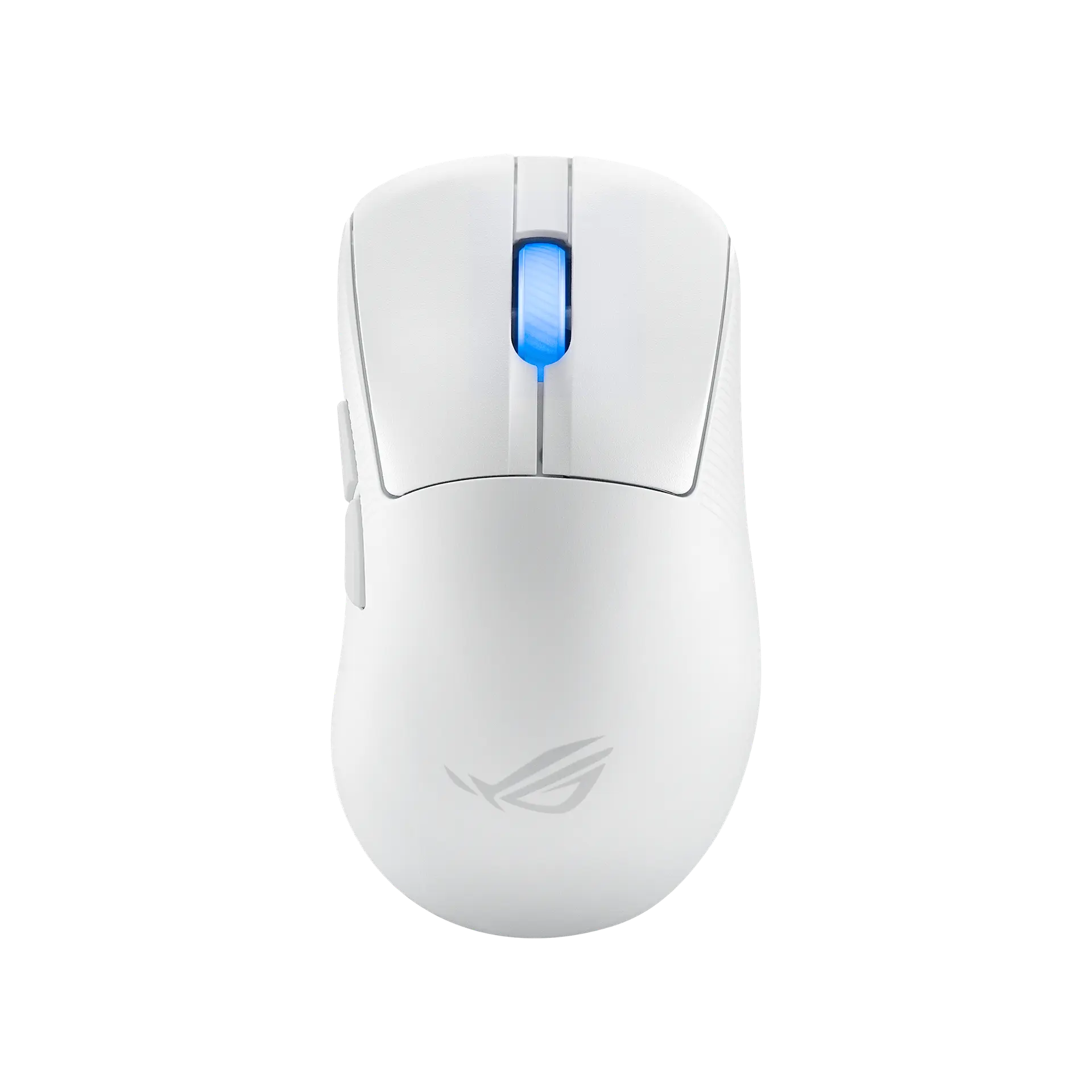
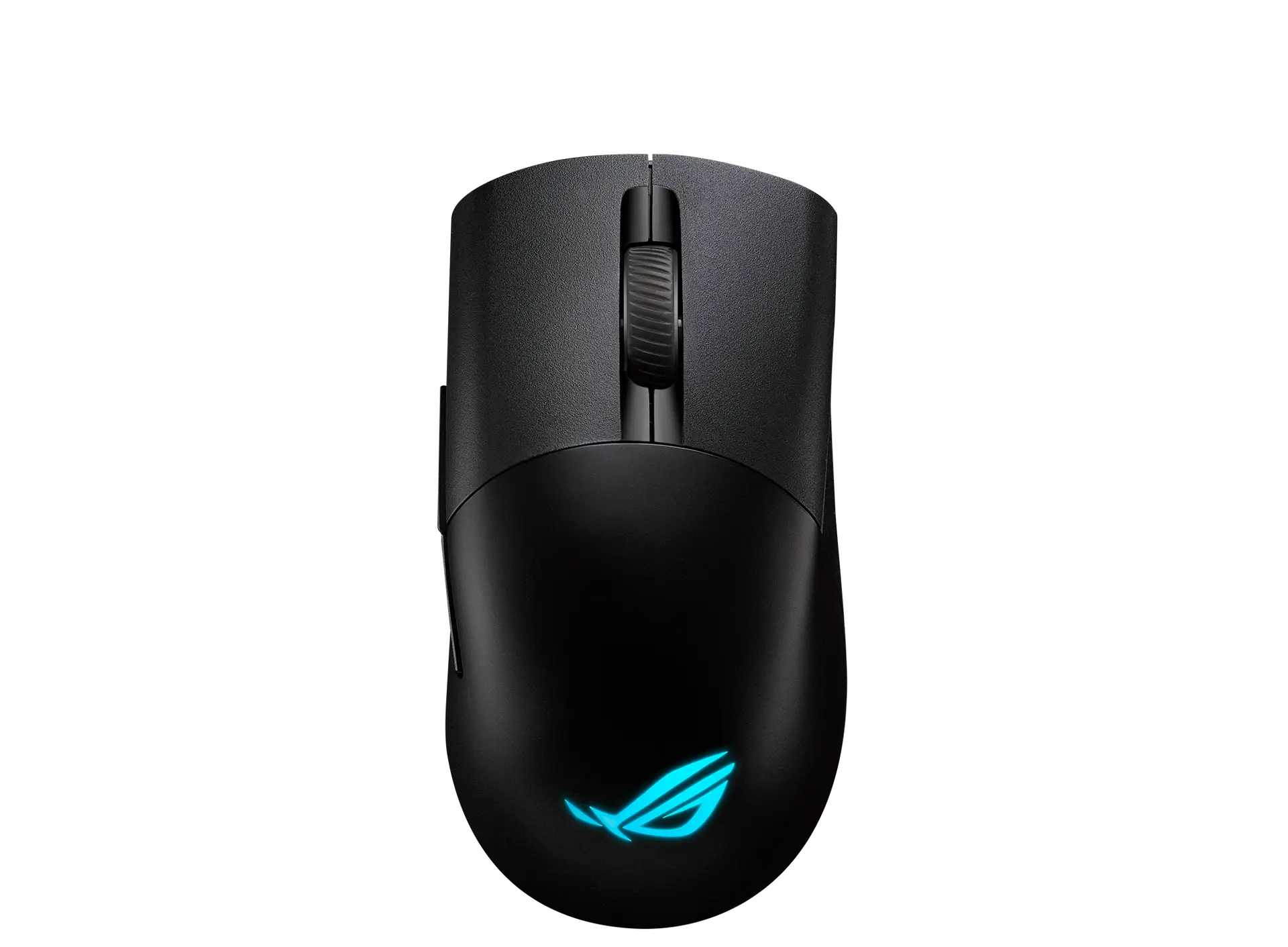
ASUS ROG Keris II Ace wireless mouse in Moonlight White, top view showing the blue-lit scroll wheel, two left side buttons and ROG logo
Exact model & source notes

The ROG Keris II Ace is ASUS's 54 g right-handed ergonomic wireless mouse with the 42,000 DPI ROG AimPoint Pro sensor, ROG Optical Micro Switches, tri-mode connectivity and an included ROG Polling Rate Booster for up to 4000 Hz wireless and 8000 Hz wired.

Specifications checked 27 Sept 2026.

Amazon links open search results. Check the exact variant, current price and availability with the retailer.

Manufacturer specifications

WHICH SUITS YOU?

Choose the ROG Keris II Ace for

  • Both wired and wireless connections
  • A right-hand shape
  • Higher stated maximum wireless report rate: 4,000 Hz vs 1,000 Hz

Choose the ROG Strix Impact III Wireless for

  • A symmetric shape
Built from verified specifications that differ. Not a rating or a recommendation.
See the 14 verified differences
THE CONTENDER

ASUS ROG Strix Impact III Wireless

Black · 90MP03D0-BMAA00 · US manufacturer configuration

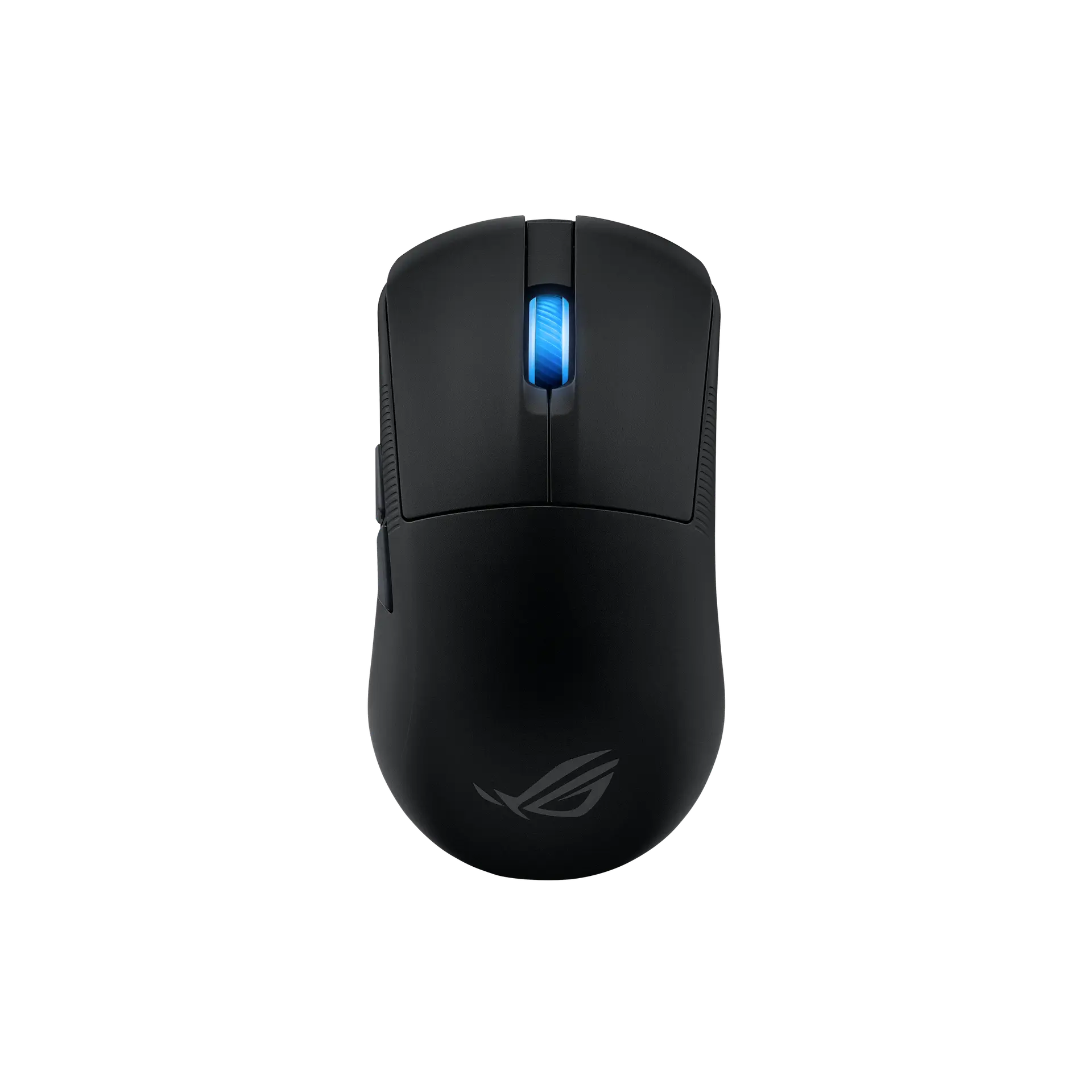
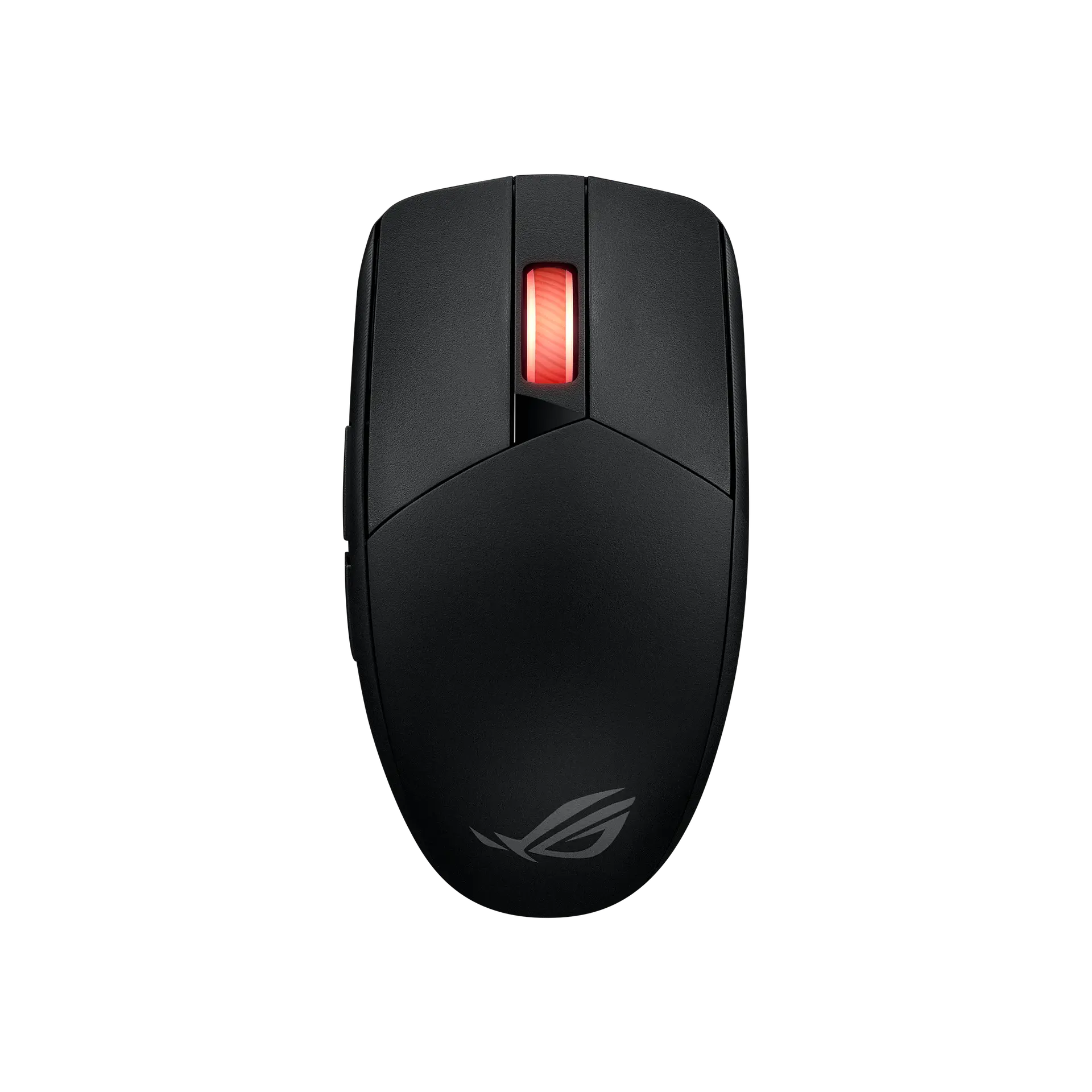
ASUS ROG Strix Impact III Wireless mouse in black, top view showing the red-lit scroll wheel, left side buttons and ROG logo
Exact model & source notes

The ROG Strix Impact III Wireless is ASUS's compact ambidextrous-shaped wireless mouse that runs on one AA or AAA battery: 57 g without battery (72 g with AA), a 36,000 DPI ROG AimPoint sensor, 2.4 GHz and Bluetooth modes, and push-fit swappable switches.

Specifications checked 28 Sept 2026.

Amazon links open search results. Check the exact variant, current price and availability with the retailer.

Manufacturer specifications

ROG Keris II Ace UK & US retailers

UK & US price history: no verified listing yet

ROG Strix Impact III Wireless UK & US retailers

UK & US price history: no verified listing yet

Search links open retailer results, not a matched listing; eBay listings are checked daily. As an Amazon Associate I earn from qualifying purchases. As an eBay Partner, we may be compensated if you make a purchase.

THE DIFFERENCES, MADE VISIBLE

Visual facts

Differences first. Select a topic for its graphic, sources and conditions.

How to read this comparison
  • Manufacturer facts for the exact models shown. Not a quality rating or a test result.
  • “Different” means the known values differ, not that one is better.
  • Missing or conflicting evidence is marked and never counts as a difference. Source chips hold each fact’s sources and conditions.
SPECIFICATIONS SIDE BY SIDE8 topics
SELECTED TOPIC
01 / 08

Connections

Check the exact configuration and source conditions for your use.

ASUS ROG Keris II Ace2.4 GHz RF wireless (receiver), Bluetooth 5.1 or wired USB 2.0 (USB-C to USB-A ROG Paracord)

Manufacturer specification · ASUS lists tri-mode connectivity: wired USB, 2.4 GHz RF and Bluetooth. ASUS's overview also lists the ROG Omni Receiver (multi-device connectivity via one single dongle), and the quick start guide describes pairing Bluetooth mode to additional host devices (max. 3).

ASUS ROG Strix Impact III Wireless2.4 GHz RF wireless (ROG Omni Receiver) or Bluetooth 5.1

Manufacturer specification · ASUS lists Bluetooth 5.1 and RF 2.4GHz and gives the cable as NA; Bluetooth pairs with up to 3 devices.

Explore the full specifications

Choose the grip, then check the connection. Left-side thumb controls are not a mirrored left-handed layout. Check the receiver or USB connection, battery requirements and your preferred shape. DPI is tracking resolution, not an accuracy score; no gaming winner is inferred.

WHAT CHANGES BETWEEN THEM?

Key differences

Full specifications ↓

14 verified differences, most decision-relevant first. 6 are also drawn in Visual facts above. Missing information stays separate.

Connections

In Visual facts
ASUS ROG Keris II Ace2.4 GHz RF wireless (receiver), Bluetooth 5.1 or wired USB 2.0 (USB-C to USB-A ROG Paracord)
ASUS ROG Strix Impact III Wireless2.4 GHz RF wireless (ROG Omni Receiver) or Bluetooth 5.1
Sources
ASUS ROG Keris II Ace

Manufacturer specification · ASUS lists tri-mode connectivity: wired USB, 2.4 GHz RF and Bluetooth. ASUS's overview also lists the ROG Omni Receiver (multi-device connectivity via one single dongle), and the quick start guide describes pairing Bluetooth mode to additional host devices (max. 3).

ROG Keris II Ace — ASUS ROG UK tech specsROG Keris II Ace — ASUS ROG UK product overview and footnotesROG Keris II Ace — ASUS ROG USA tech specsROG Keris II Ace (P714) Quick Start Guide Q23344 — ASUS download PDF
ASUS ROG Strix Impact III Wireless

Manufacturer specification · ASUS lists Bluetooth 5.1 and RF 2.4GHz and gives the cable as NA; Bluetooth pairs with up to 3 devices.

ROG Strix Impact III Wireless — ASUS ROG UK tech specsROG Strix Impact III Wireless — ASUS ROG UK product overview and footnotesROG Strix Impact III Wireless — ASUS ROG USA tech specs

Check the exact configuration and source conditions for your use.

Sensor model / type

In Visual facts
ASUS ROG Keris II AceROG AimPoint Pro optical sensor
ASUS ROG Strix Impact III WirelessROG AimPoint optical sensor
Sources
ASUS ROG Keris II Ace

Manufacturer specification · ASUS's sensor name; ASUS states < 1% deviation and track-on-glass capability. The supplier is not stated.

ROG Keris II Ace — ASUS ROG UK tech specsROG Keris II Ace — ASUS ROG UK product overview and footnotesROG Keris II Ace — ASUS ROG USA tech specs
ASUS ROG Strix Impact III Wireless

Manufacturer specification · ASUS's sensor name, with < 1% deviation. The supplier is not stated.

ROG Strix Impact III Wireless — ASUS ROG UK tech specsROG Strix Impact III Wireless — ASUS ROG UK product overview and footnotesROG Strix Impact III Wireless — ASUS ROG USA tech specs

Sensor settings and manufacturer tracking limits describe capabilities, not independently measured accuracy or gaming performance. Preserve each test surface and software condition.

Hand orientation

In Visual facts
ASUS ROG Keris II AceRight-handed ergonomic shape; side buttons on the left
ASUS ROG Strix Impact III WirelessAmbidextrous shape; side buttons on the left only
Sources
ASUS ROG Keris II Ace

Manufacturer specification · ASUS lists the shape as right-handed and describes an ergonomic shell with a ring-finger ledge on the right; the official views show the forward and back buttons on the left side. Not a grip or comfort test.

ROG Keris II Ace — ASUS ROG UK tech specsROG Keris II Ace — ASUS ROG UK product overview and footnotesROG Keris II Ace — ASUS ROG USA tech specs
ASUS ROG Strix Impact III Wireless

Manufacturer specification · ASUS lists the shape as ambidextrous; the official gallery shows two side buttons on the left and none on the right, so the side-button layout suits right-handed use. Not a grip or comfort test.

ROG Strix Impact III Wireless — ASUS ROG UK tech specsROG Strix Impact III Wireless — ASUS ROG USA tech specs

Check the exact configuration and source conditions for your use.

Main switch technology

In Visual facts
ASUS ROG Keris II AceROG Optical Micro Switches
ASUS ROG Strix Impact III WirelessROG Micro Switches (mechanical); push-fit swappable sockets
Sources
ASUS ROG Keris II Ace

Manufacturer specification · ASUS says left and right switches within a 5 gram-force deviation range are paired for click consistency.

ROG Keris II Ace — ASUS ROG UK tech specsROG Keris II Ace — ASUS ROG UK product overview and footnotesROG Keris II Ace — ASUS ROG USA tech specs
ASUS ROG Strix Impact III Wireless

Manufacturer specification · ASUS's table names the ROG 70M Mechanical Switch; the push-fit sockets accept compatible 3-pin mechanical switches.

ROG Strix Impact III Wireless — ASUS ROG UK tech specsROG Strix Impact III Wireless — ASUS ROG UK product overview and footnotesROG Strix Impact III Wireless — ASUS ROG USA tech specs

Switch actuation and button tensioning describe different parts of a click mechanism. Read the documented technology; its name alone does not establish latency, durability or feel.

Sensor configuration

In Visual facts
ASUS ROG Keris II AceLift-off distance (Low / High)
ASUS ROG Strix Impact III WirelessDPI On-The-Scroll (50 DPI steps); polling rate; lift-off distance (Low / High)
Sources
ASUS ROG Keris II Ace

Manufacturer specification · Source explicitly gives Pairing button+Forward button to cycle Low(red,default)/High(purple) lift-off distance. HardwareDPI/polling/reset controls remain separately represented in on_mouse_adjustments. This neutral sensor label does not transfer physical on-mouse adjustment scope to the peer.

ROG Keris II Ace — ASUS ROG UK product overview and footnotesROG Keris II Ace (P714) Quick Start Guide Q23344 — ASUS download PDF
ASUS ROG Strix Impact III Wireless

Manufacturer specification · Button combinations on the mouse, per ASUS.

ROG Strix Impact III Wireless — ASUS ROG UK product overview and footnotesROG Strix Impact III Wireless Quick Start Guide Q22919 (P520) — ASUS download PDF

Sensor settings and manufacturer tracking limits describe capabilities, not independently measured accuracy or gaming performance. Preserve each test surface and software condition.

Maximum wireless report rate

In Visual facts
ASUS ROG Keris II Ace4000 Hz
ASUS ROG Strix Impact III Wireless1000 Hz
Sources
ASUS ROG Keris II Ace

Manufacturer specification · 2.4 GHz RF, with the included ROG Polling Rate Booster; the quick start guide marks 2000, 4000 and 8000 Hz as needing the booster and not supported over Bluetooth.

ROG Keris II Ace — ASUS ROG UK tech specsROG Keris II Ace — ASUS ROG UK product overview and footnotesROG Keris II Ace — ASUS ROG USA tech specsROG Keris II Ace (P714) Quick Start Guide Q23344 — ASUS download PDF
ASUS ROG Strix Impact III Wireless

Manufacturer specification · The quick start guide's polling-rate hotkey cycles 125 / 250 / 500 / 1000 Hz, with 500 and 1000 Hz not supported over Bluetooth; ASUS's overview footnote says its battery figures keep the polling rate at 1000 Hz, which conflicts with the guide for the Bluetooth figures.

ROG Strix Impact III Wireless — ASUS ROG UK product overview and footnotesROG Strix Impact III Wireless Quick Start Guide Q22919 (P520) — ASUS download PDF

Check the connection and receiver: supplied, wired and optional-accessory limits can differ. Report frequency is not measured click latency, and maximum battery life may use another setting.

Show 8 more verified differences

Power source

ASUS ROG Keris II AceRechargeable battery
ASUS ROG Strix Impact III Wireless1 × AA or AAA (both included, with AAA-to-AA converter); 2.4 GHz RF: 450 hours (lighting off) or 320 hours (default lighting); Bluetooth: 618 hours (lighting off) or 450 hours (default lighting)
Sources
ASUS ROG Keris II Ace

Manufacturer specification · Source-derived power-category interpretation of ASUS’s explicitly named Lithium-ion battery chemistry; this is not a verbatim manufacturer charging-capability statement. Exact chemistry is listed separately. Charge time, capacity, user replaceability and charging protocol/power remain unverified; USB connector shape or wired data operation does not establish them. Original combined source-backed description retained: Lithium-ion; 2.4 GHz RF: up to 107 hours (lighting off) or 67 hours (default lighting); Bluetooth: 134 hours (lighting off) or 89 hours (default lighting). Original condition retained: ASUS's ratings; report rate and other test conditions are not stated.

ROG Keris II Ace — ASUS ROG UK tech specsROG Keris II Ace — ASUS ROG USA tech specs
ASUS ROG Strix Impact III Wireless

Manufacturer specification · ASUS's ratings, measured with an AA lithium battery; ASUS says battery life varies with battery type. The 2.4 GHz RF figures are at a 1000 Hz polling rate. The polling rate behind the Bluetooth figures is unresolved: ASUS's overview footnote says the polling rate stays at 1000 Hz throughout, but ASUS's quick start guide marks 500 Hz and 1000 Hz as not supported over Bluetooth. The magnetic back cover eases replacement. Batteries are not covered by warranty.

ROG Strix Impact III Wireless — ASUS ROG UK tech specsROG Strix Impact III Wireless — ASUS ROG UK product overview and footnotesROG Strix Impact III Wireless Quick Start Guide Q22919 (P520) — ASUS download PDF

Manufacturer claims for the stated mode and equipment. Read each test condition; this is not measured everyday battery life.

Listed package

ASUS ROG Keris II AceMouse; ROG Polling Rate Booster; wireless receiver; USB dongle extender; mouse grip tape set; 2 replaceable mouse feet; 2-metre ROG Paracord; warranty booklet; quick start guide; ROG sticker; thank-you card
ASUS ROG Strix Impact III WirelessMouse; wireless receiver; quick start guide; warranty booklet; AA battery; AAA battery; AAA-to-AA battery converter holder
Sources
ASUS ROG Keris II Ace

Manufacturer specification · Manufacturer box contents. ASUS says the grip tape, mouse feet and Polling Rate Booster are consumables not covered by warranty. Check the seller's listing.

ROG Keris II Ace — ASUS ROG UK tech specsROG Keris II Ace — ASUS ROG UK product overview and footnotesROG Keris II Ace — ASUS ROG USA tech specs
ASUS ROG Strix Impact III Wireless

Manufacturer specification · Manufacturer box contents; no cable is listed. Check the seller's listing.

ROG Strix Impact III Wireless — ASUS ROG UK tech specsROG Strix Impact III Wireless — ASUS ROG USA tech specs

Check the exact configuration and source conditions for your use.

Button surface

ASUS ROG Keris II AcePBT
ASUS ROG Strix Impact III WirelessPBT left and right buttons
Sources
ASUS ROG Keris II Ace

Manufacturer specification · ASUS says the buttons have a durable PBT surface.

ROG Keris II Ace — ASUS ROG UK product overview and footnotes
ASUS ROG Strix Impact III Wireless

Manufacturer specification · ASUS also describes a mechanical button-tension system with zero gap between buttons and switches.

ROG Strix Impact III Wireless — ASUS ROG UK product overview and footnotes

Check the exact configuration and source conditions for your use.

Maximum tracking resolution

ASUS ROG Keris II Ace42000 DPI
ASUS ROG Strix Impact III Wireless36000 DPI
Sources

Sensor settings and manufacturer tracking limits describe capabilities, not independently measured accuracy or gaming performance. Preserve each test surface and software condition.

Claimed main-switch durability

ASUS ROG Keris II Ace100 million clicks
ASUS ROG Strix Impact III Wireless70 million clicks
Sources
ASUS ROG Keris II Ace

Manufacturer specification · ASUS's lifespan rating for the ROG Optical Micro Switches.

ROG Keris II Ace — ASUS ROG UK tech specsROG Keris II Ace — ASUS ROG UK product overview and footnotes
ASUS ROG Strix Impact III Wireless

Manufacturer specification · ASUS's lifespan rating for the supplied switches.

ROG Strix Impact III Wireless — ASUS ROG UK product overview and footnotes

Check the exact configuration and source conditions for your use.

Published tracking speed

ASUS ROG Keris II Ace750 IPS
ASUS ROG Strix Impact III Wireless650 IPS
Sources
ASUS ROG Keris II Ace

Manufacturer specification · ASUS's maximum speed rating; test surface not stated.

ROG Keris II Ace — ASUS ROG UK tech specsROG Keris II Ace — ASUS ROG USA tech specs
ASUS ROG Strix Impact III Wireless

Manufacturer specification · ASUS's maximum speed rating; test surface not stated.

ROG Strix Impact III Wireless — ASUS ROG UK tech specsROG Strix Impact III Wireless — ASUS ROG USA tech specs

Sensor settings and manufacturer tracking limits describe capabilities, not independently measured accuracy or gaming performance. Preserve each test surface and software condition.

Dimensions

ASUS ROG Keris II Ace121 × 67 × 42 mm (length × width × height)
ASUS ROG Strix Impact III Wireless120 × 62 × 39 mm (length × width × height)
Sources
ASUS ROG Keris II Ace

Manufacturer specification · Mouse body as listed by ASUS.

ROG Keris II Ace — ASUS ROG UK tech specsROG Keris II Ace — ASUS ROG USA tech specs
ASUS ROG Strix Impact III Wireless

Manufacturer specification · Mouse body as listed by ASUS.

ROG Strix Impact III Wireless — ASUS ROG UK tech specsROG Strix Impact III Wireless — ASUS ROG USA tech specs

A size or weight trade-off; it does not establish the better product.

Small physical differences (1)
Missing or non-comparable evidence (16)

Maximum wired report rate

ASUS ROG Keris II Ace8000 Hz
ASUS ROG Strix Impact III WirelessNot verified
Sources
ASUS ROG Keris II Ace

Manufacturer specification · ASUS lists the USB report rate as 8000 Hz with the ROG Polling Rate Booster.

ROG Keris II Ace — ASUS ROG UK tech specsROG Keris II Ace — ASUS ROG UK product overview and footnotesROG Keris II Ace — ASUS ROG USA tech specs
ASUS ROG Strix Impact III Wireless

No source recorded for this side.

Evidence is missing or conflicting on at least one side. This is not a verified difference.

Customisation software

ASUS ROG Keris II AceArmoury Crate
ASUS ROG Strix Impact III WirelessArmoury Crate (Armoury Crate Gear)
Sources
ASUS ROG Strix Impact III Wireless

Manufacturer specification · ASUS says Armoury Crate Gear adjusts RGB lighting, performance and surface calibration and maps buttons.

ROG Strix Impact III Wireless — ASUS ROG UK tech specsROG Strix Impact III Wireless — ASUS ROG UK product overview and footnotes

One source states less detail or a rounded figure. This is not a verified difference; check the exact configuration.

Battery capacity

ASUS ROG Keris II AceNot verified
ASUS ROG Strix Impact III WirelessNot verified
Sources
ASUS ROG Keris II Ace

Battery capacity is not established by the complete retained exact UK/US technical inventories or P714 guide. The positive Lithium-ion chemistry and all stated runtimes remain independently recorded. · Manufacturer specification · No capacity is calculated from runtime, weight or connector shape.

ROG Keris II Ace — ASUS ROG UK tech specsROG Keris II Ace — ASUS ROG USA tech specsROG Keris II Ace (P714) Quick Start Guide Q23344 — ASUS download PDF
ASUS ROG Strix Impact III Wireless

No source recorded for this side.

Evidence is missing or conflicting on at least one side. This is not a verified difference.

User-replaceable battery

ASUS ROG Keris II AceNot verified
ASUS ROG Strix Impact III WirelessNot verified
Sources
ASUS ROG Keris II Ace

The retained exact sources do not establish user replaceability. The guide’s generic danger-of-incorrect-replacement warning does not authorise or describe a user replacement procedure. · Manufacturer specification · Neither user-replaceable nor non-replaceable is inferred from chemistry, warning text or wired operation.

ROG Keris II Ace — ASUS ROG UK tech specsROG Keris II Ace — ASUS ROG USA tech specsROG Keris II Ace (P714) Quick Start Guide Q23344 — ASUS download PDF
ASUS ROG Strix Impact III Wireless

No source recorded for this side.

Evidence is missing or conflicting on at least one side. This is not a verified difference.

Claimed Bluetooth runtime, default lighting

ASUS ROG Keris II Ace89 hours
ASUS ROG Strix Impact III WirelessNot verified
Sources
ASUS ROG Keris II Ace

Manufacturer specification · Manufacturer lists 89 hours in Bluetooth mode with default lighting on. Report rate, workload/motion, host/firmware and other test conditions are not stated. This manufacturer claim is not a measured everyday runtime or a matched test against a different mode or lighting condition.

ROG Keris II Ace — ASUS ROG UK product overview and footnotes
ASUS ROG Strix Impact III Wireless

No source recorded for this side.

Evidence is missing or conflicting on at least one side. This is not a verified difference.

Claimed Bluetooth runtime, lighting off

ASUS ROG Keris II Ace134 hours
ASUS ROG Strix Impact III WirelessNot verified
Sources
ASUS ROG Keris II Ace

Manufacturer specification · Manufacturer lists 134 hours in Bluetooth mode with lighting off. Report rate, workload/motion, host/firmware and other test conditions are not stated. This manufacturer claim is not a measured everyday runtime or a matched test against a different mode or lighting condition.

ROG Keris II Ace — ASUS ROG UK product overview and footnotes
ASUS ROG Strix Impact III Wireless

No source recorded for this side.

Evidence is missing or conflicting on at least one side. This is not a verified difference.

Claimed 2.4 GHz runtime, default lighting

ASUS ROG Keris II Ace67 hours
ASUS ROG Strix Impact III WirelessNot verified
Sources
ASUS ROG Keris II Ace

Manufacturer specification · Manufacturer lists 67 hours in 2.4 GHz RF mode with default lighting on. Report rate, workload/motion, host/firmware and other test conditions are not stated. This manufacturer claim is not a measured everyday runtime or a matched test against a different mode or lighting condition.

ROG Keris II Ace — ASUS ROG UK product overview and footnotes
ASUS ROG Strix Impact III Wireless

No source recorded for this side.

Evidence is missing or conflicting on at least one side. This is not a verified difference.

Claimed 2.4 GHz runtime, lighting off

ASUS ROG Keris II Ace107 hours
ASUS ROG Strix Impact III WirelessNot verified
Sources
ASUS ROG Keris II Ace

Manufacturer specification · Up to 107 hours in 2.4 GHz RF mode with lighting off. Report rate, workload/motion, host/firmware and other test conditions are not stated. This manufacturer claim is not a measured everyday runtime or a matched test against a different mode or lighting condition.

ROG Keris II Ace — ASUS ROG UK tech specsROG Keris II Ace — ASUS ROG UK product overview and footnotesROG Keris II Ace — ASUS ROG USA tech specs
ASUS ROG Strix Impact III Wireless

No source recorded for this side.

Evidence is missing or conflicting on at least one side. This is not a verified difference.

Battery chemistry

ASUS ROG Keris II AceLithium-ion
ASUS ROG Strix Impact III WirelessNot verified
Sources
ASUS ROG Keris II Ace

Manufacturer specification · Exact manufacturer Battery Type wording: Lithium-ion battery. Chemistry alone does not establish capacity, charging time, replaceability, charging protocol or runtime under another mode.

ROG Keris II Ace — ASUS ROG UK tech specsROG Keris II Ace — ASUS ROG USA tech specs
ASUS ROG Strix Impact III Wireless

No source recorded for this side.

Evidence is missing or conflicting on at least one side. This is not a verified difference.

Charging time

ASUS ROG Keris II AceNot verified
ASUS ROG Strix Impact III WirelessNot verified
Sources
ASUS ROG Keris II Ace

A complete charging-time measurement/claim is not established by the retained exact sources. The guide’s USB-C-to-A wired-operation instruction is not a charging-time or charging-protocol declaration. · Manufacturer specification · No charging rate, wattage, protocol or time is inferred from the USB connector or Li-ion chemistry.

ROG Keris II Ace — ASUS ROG UK tech specsROG Keris II Ace — ASUS ROG USA tech specsROG Keris II Ace (P714) Quick Start Guide Q23344 — ASUS download PDF
ASUS ROG Strix Impact III Wireless

No source recorded for this side.

Evidence is missing or conflicting on at least one side. This is not a verified difference.

ROG Omni Receiver support

ASUS ROG Keris II AceNot verified
ASUS ROG Strix Impact III WirelessYes
Sources
ASUS ROG Keris II Ace

No source recorded for this side.

ASUS ROG Strix Impact III Wireless

Manufacturer specification · ASUS says the Omni Receiver connects one mouse and one keyboard simultaneously.

ROG Strix Impact III Wireless — ASUS ROG UK product overview and footnotes

Evidence is missing or conflicting on at least one side. This is not a verified difference.

Physical on-mouse adjustments

ASUS ROG Keris II AceDPI (four presets or DPI On-The-Scroll); polling rate; lift-off distance (Low / High); hardware reset
ASUS ROG Strix Impact III WirelessNot verified
Sources
ASUS ROG Keris II Ace

Manufacturer specification · Button combinations on the mouse, without software, per ASUS. Full original controls are retained; QSG specifies sensorLOD low/high, fourDPIsettings/DPIOn-The-Scroll, polling-rate adjustment and hardware reset with its stated button combinations.

ROG Keris II Ace — ASUS ROG UK product overview and footnotesROG Keris II Ace (P714) Quick Start Guide Q23344 — ASUS download PDF
ASUS ROG Strix Impact III Wireless

No source recorded for this side.

Evidence is missing or conflicting on at least one side. This is not a verified difference.

Weight

ASUS ROG Keris II Ace54 g
ASUS ROG Strix Impact III Wireless72 g
Sources
ASUS ROG Keris II Ace

Manufacturer specification · ASUS lists 54 g as the weight without cable and without dongle.

ROG Keris II Ace — ASUS ROG UK tech specsROG Keris II Ace — ASUS ROG UK product overview and footnotesROG Keris II Ace — ASUS ROG USA tech specs
ASUS ROG Strix Impact III Wireless

Manufacturer specification · With the AA battery fitted, per ASUS. ASUS lists 57 g without battery and USB dongle and 68 g with the AAA battery and converter holder; its headline 57 g excludes battery and wireless receiver. There is no cable (listed as NA).

ROG Strix Impact III Wireless — ASUS ROG UK tech specsROG Strix Impact III Wireless — ASUS ROG UK product overview and footnotesROG Strix Impact III Wireless — ASUS ROG USA tech specs

The manufacturer sources do not establish the same cable weighing basis. Both published masses remain visible with their conditions, but are not ranked.

8 shared fields have the same recorded value.

WHAT EACH CHOICE ASKS OF YOU

What it brings and what to check

ASUS ROG Keris II Ace

What it brings

  • The Polling Rate Booster is in the box, so the 4000 Hz wireless and 8000 Hz wired rates need no extra purchase; wired USB, 2.4 GHz and Bluetooth 5.1 are all supported.
  • ASUS publishes a 100–42,000 DPI range with track-on-glass capability, 100-million-click optical switches, PTFE feet, a 2 m paracord and five onboard profiles, and DPI, polling rate and lift-off distance can be changed on the mouse.

What to check

  • Report rates above 2K Hz need the booster attached, and ASUS rates battery life at 107 hours in 2.4 GHz mode only with lighting off (67 hours with default lighting).
  • It is right-handed only, and onboard memory does not support macros or Windows shortcuts.

ASUS ROG Strix Impact III Wireless

What it brings

What to check

COMPARE THE DETAILS

Full specifications

How we verify
39 of 39 specifications Sources in each row
Source-backed specifications for ASUS ROG Keris II Ace and ASUS ROG Strix Impact III Wireless
SpecificationASUS ROG Keris II AceASUS ROG Strix Impact III Wireless
WeightDifferent
Sources
ASUS ROG Keris II Ace

Manufacturer specification · ASUS lists 54 g as the weight without cable and without dongle.

ROG Keris II Ace — ASUS ROG UK tech specsROG Keris II Ace — ASUS ROG UK product overview and footnotesROG Keris II Ace — ASUS ROG USA tech specs
ASUS ROG Strix Impact III Wireless

Manufacturer specification · With the AA battery fitted, per ASUS. ASUS lists 57 g without battery and USB dongle and 68 g with the AAA battery and converter holder; its headline 57 g excludes battery and wireless receiver. There is no cable (listed as NA).

ROG Strix Impact III Wireless — ASUS ROG UK tech specsROG Strix Impact III Wireless — ASUS ROG UK product overview and footnotesROG Strix Impact III Wireless — ASUS ROG USA tech specs
54 g72 g
DimensionsDifferent
Sources
ASUS ROG Keris II Ace

Manufacturer specification · Mouse body as listed by ASUS.

ROG Keris II Ace — ASUS ROG UK tech specsROG Keris II Ace — ASUS ROG USA tech specs
ASUS ROG Strix Impact III Wireless

Manufacturer specification · Mouse body as listed by ASUS.

ROG Strix Impact III Wireless — ASUS ROG UK tech specsROG Strix Impact III Wireless — ASUS ROG USA tech specs
121 × 67 × 42 mm (length × width × height)120 × 62 × 39 mm (length × width × height)
Body lengthDifferent
Sources
ASUS ROG Keris II Ace

Manufacturer specification

ROG Keris II Ace — ASUS ROG UK tech specs
ASUS ROG Strix Impact III Wireless

Manufacturer specification

ROG Strix Impact III Wireless — ASUS ROG UK tech specs
121 mm120 mm
Body widthDifferent
Sources
ASUS ROG Keris II Ace

Manufacturer specification · ASUS's listed width; ASUS does not state the measurement basis.

ROG Keris II Ace — ASUS ROG UK tech specs
ASUS ROG Strix Impact III Wireless

Manufacturer specification · ASUS's listed width; ASUS does not state the measurement basis.

ROG Strix Impact III Wireless — ASUS ROG UK tech specs
67 mm62 mm
Hand orientationDifferent
Sources
ASUS ROG Keris II Ace

Manufacturer specification · ASUS lists the shape as right-handed and describes an ergonomic shell with a ring-finger ledge on the right; the official views show the forward and back buttons on the left side. Not a grip or comfort test.

ROG Keris II Ace — ASUS ROG UK tech specsROG Keris II Ace — ASUS ROG UK product overview and footnotesROG Keris II Ace — ASUS ROG USA tech specs
ASUS ROG Strix Impact III Wireless

Manufacturer specification · ASUS lists the shape as ambidextrous; the official gallery shows two side buttons on the left and none on the right, so the side-button layout suits right-handed use. Not a grip or comfort test.

ROG Strix Impact III Wireless — ASUS ROG UK tech specsROG Strix Impact III Wireless — ASUS ROG USA tech specs
Right-handed ergonomic shape; side buttons on the leftAmbidextrous shape; side buttons on the left only
Glide feet
Sources
ASUS ROG Strix Impact III Wireless

No source recorded.

100% PTFE; two replaceable mouse feet includedNot provided
Weight without battery
Sources
ASUS ROG Keris II Ace

No source recorded.

ASUS ROG Strix Impact III Wireless

Manufacturer specification · Without battery and USB dongle, per ASUS.

ROG Strix Impact III Wireless — ASUS ROG UK tech specsROG Strix Impact III Wireless — ASUS ROG UK product overview and footnotes
Not provided57 g
Sensor model / typeDifferent
Sources
ASUS ROG Keris II Ace

Manufacturer specification · ASUS's sensor name; ASUS states < 1% deviation and track-on-glass capability. The supplier is not stated.

ROG Keris II Ace — ASUS ROG UK tech specsROG Keris II Ace — ASUS ROG UK product overview and footnotesROG Keris II Ace — ASUS ROG USA tech specs
ASUS ROG Strix Impact III Wireless

Manufacturer specification · ASUS's sensor name, with < 1% deviation. The supplier is not stated.

ROG Strix Impact III Wireless — ASUS ROG UK tech specsROG Strix Impact III Wireless — ASUS ROG UK product overview and footnotesROG Strix Impact III Wireless — ASUS ROG USA tech specs
ROG AimPoint Pro optical sensorROG AimPoint optical sensor
42000 DPI36000 DPI
Minimum sensitivity
Sources
ASUS ROG Keris II Ace

Manufacturer specification · ASUS gives the range as 100-42,000 DPI (100 DPI to 42000 DPI in the quick start guide).

ROG Keris II Ace — ASUS ROG UK product overview and footnotesROG Keris II Ace (P714) Quick Start Guide Q23344 — ASUS download PDF
ASUS ROG Strix Impact III Wireless

Manufacturer specification · ASUS gives the range as 100-36,000 DPI; DPI On-The-Scroll adjusts in 50 DPI steps.

ROG Strix Impact III Wireless — ASUS ROG UK product overview and footnotesROG Strix Impact III Wireless Quick Start Guide Q22919 (P520) — ASUS download PDF
100 DPI100 DPI
DPI presets
Sources
ASUS ROG Keris II Ace

Manufacturer specification · DPI 1–4 default to 400 / 800 / 1600 (default) / 3200 DPI, switched with the DPI button and customisable in Armoury Crate or with DPI On-The-Scroll.

ROG Keris II Ace — ASUS ROG UK product overview and footnotesROG Keris II Ace (P714) Quick Start Guide Q23344 — ASUS download PDF
ASUS ROG Strix Impact III Wireless

Manufacturer specification · DPI 1–4 default to 400 / 800 / 1600 (default) / 3200 DPI and can be customised in Armoury Crate or with DPI On-The-Scroll.

ROG Strix Impact III Wireless Quick Start Guide Q22919 (P520) — ASUS download PDF
4 settings4 settings
Maximum wireless report rateDifferent
Sources
ASUS ROG Keris II Ace

Manufacturer specification · 2.4 GHz RF, with the included ROG Polling Rate Booster; the quick start guide marks 2000, 4000 and 8000 Hz as needing the booster and not supported over Bluetooth.

ROG Keris II Ace — ASUS ROG UK tech specsROG Keris II Ace — ASUS ROG UK product overview and footnotesROG Keris II Ace — ASUS ROG USA tech specsROG Keris II Ace (P714) Quick Start Guide Q23344 — ASUS download PDF
ASUS ROG Strix Impact III Wireless

Manufacturer specification · The quick start guide's polling-rate hotkey cycles 125 / 250 / 500 / 1000 Hz, with 500 and 1000 Hz not supported over Bluetooth; ASUS's overview footnote says its battery figures keep the polling rate at 1000 Hz, which conflicts with the guide for the Bluetooth figures.

ROG Strix Impact III Wireless — ASUS ROG UK product overview and footnotesROG Strix Impact III Wireless Quick Start Guide Q22919 (P520) — ASUS download PDF
4000 Hz1000 Hz
Maximum wired report rate
Sources
ASUS ROG Keris II Ace

Manufacturer specification · ASUS lists the USB report rate as 8000 Hz with the ROG Polling Rate Booster.

ROG Keris II Ace — ASUS ROG UK tech specsROG Keris II Ace — ASUS ROG UK product overview and footnotesROG Keris II Ace — ASUS ROG USA tech specs
ASUS ROG Strix Impact III Wireless

No source recorded.

8000 HzNot provided
Published tracking speedDifferent
Sources
ASUS ROG Keris II Ace

Manufacturer specification · ASUS's maximum speed rating; test surface not stated.

ROG Keris II Ace — ASUS ROG UK tech specsROG Keris II Ace — ASUS ROG USA tech specs
ASUS ROG Strix Impact III Wireless

Manufacturer specification · ASUS's maximum speed rating; test surface not stated.

ROG Strix Impact III Wireless — ASUS ROG UK tech specsROG Strix Impact III Wireless — ASUS ROG USA tech specs
750 IPS650 IPS
Published acceleration threshold
Sources
ASUS ROG Keris II Ace

Manufacturer specification · ASUS's maximum acceleration rating; test surface not stated.

ROG Keris II Ace — ASUS ROG UK tech specsROG Keris II Ace — ASUS ROG USA tech specs
ASUS ROG Strix Impact III Wireless

Manufacturer specification · ASUS's maximum acceleration rating; test surface not stated.

ROG Strix Impact III Wireless — ASUS ROG UK tech specsROG Strix Impact III Wireless — ASUS ROG USA tech specs
50 G50 G
Sensor configurationDifferent
Sources
ASUS ROG Keris II Ace

Manufacturer specification · Source explicitly gives Pairing button+Forward button to cycle Low(red,default)/High(purple) lift-off distance. HardwareDPI/polling/reset controls remain separately represented in on_mouse_adjustments. This neutral sensor label does not transfer physical on-mouse adjustment scope to the peer.

ROG Keris II Ace — ASUS ROG UK product overview and footnotesROG Keris II Ace (P714) Quick Start Guide Q23344 — ASUS download PDF
ASUS ROG Strix Impact III Wireless

Manufacturer specification · Button combinations on the mouse, per ASUS.

ROG Strix Impact III Wireless — ASUS ROG UK product overview and footnotesROG Strix Impact III Wireless Quick Start Guide Q22919 (P520) — ASUS download PDF
Lift-off distance (Low / High)DPI On-The-Scroll (50 DPI steps); polling rate; lift-off distance (Low / High)
Listed controls
Sources
ASUS ROG Keris II Ace

ASUS's web pages give no button count. Versus counts the buttons labelled in the quick start guide's "Mouse features" diagram (left-click, right-click, forward, backward and DPI) plus the scroll-wheel click, which the guide uses in its key combinations. The separately labelled pairing button, a connection control, is not counted. · Calculated from cited specifications

ROG Keris II Ace (P714) Quick Start Guide Q23344 — ASUS download PDF
ASUS ROG Strix Impact III Wireless

ASUS's web pages give no button count. Versus counts the buttons labelled in the quick start guide's "Mouse features" diagram (left-click, right-click, forward, backward and DPI) plus the scroll-wheel click, which the guide uses in its key combinations. The separately labelled pairing button, a connection control, is not counted. · Calculated from cited specifications

ROG Strix Impact III Wireless Quick Start Guide Q22919 (P520) — ASUS download PDF
66
Main switch technologyDifferent
Sources
ASUS ROG Keris II Ace

Manufacturer specification · ASUS says left and right switches within a 5 gram-force deviation range are paired for click consistency.

ROG Keris II Ace — ASUS ROG UK tech specsROG Keris II Ace — ASUS ROG UK product overview and footnotesROG Keris II Ace — ASUS ROG USA tech specs
ASUS ROG Strix Impact III Wireless

Manufacturer specification · ASUS's table names the ROG 70M Mechanical Switch; the push-fit sockets accept compatible 3-pin mechanical switches.

ROG Strix Impact III Wireless — ASUS ROG UK tech specsROG Strix Impact III Wireless — ASUS ROG UK product overview and footnotesROG Strix Impact III Wireless — ASUS ROG USA tech specs
ROG Optical Micro SwitchesROG Micro Switches (mechanical); push-fit swappable sockets
Claimed main-switch durabilityDifferent
Sources
ASUS ROG Keris II Ace

Manufacturer specification · ASUS's lifespan rating for the ROG Optical Micro Switches.

ROG Keris II Ace — ASUS ROG UK tech specsROG Keris II Ace — ASUS ROG UK product overview and footnotes
ASUS ROG Strix Impact III Wireless

Manufacturer specification · ASUS's lifespan rating for the supplied switches.

ROG Strix Impact III Wireless — ASUS ROG UK product overview and footnotes
100 million clicks70 million clicks
ConnectionsDifferent
Sources
ASUS ROG Keris II Ace

Manufacturer specification · ASUS lists tri-mode connectivity: wired USB, 2.4 GHz RF and Bluetooth. ASUS's overview also lists the ROG Omni Receiver (multi-device connectivity via one single dongle), and the quick start guide describes pairing Bluetooth mode to additional host devices (max. 3).

ROG Keris II Ace — ASUS ROG UK tech specsROG Keris II Ace — ASUS ROG UK product overview and footnotesROG Keris II Ace — ASUS ROG USA tech specsROG Keris II Ace (P714) Quick Start Guide Q23344 — ASUS download PDF
ASUS ROG Strix Impact III Wireless

Manufacturer specification · ASUS lists Bluetooth 5.1 and RF 2.4GHz and gives the cable as NA; Bluetooth pairs with up to 3 devices.

ROG Strix Impact III Wireless — ASUS ROG UK tech specsROG Strix Impact III Wireless — ASUS ROG UK product overview and footnotesROG Strix Impact III Wireless — ASUS ROG USA tech specs
2.4 GHz RF wireless (receiver), Bluetooth 5.1 or wired USB 2.0 (USB-C to USB-A ROG Paracord)2.4 GHz RF wireless (ROG Omni Receiver) or Bluetooth 5.1
Power sourceDifferent
Sources
ASUS ROG Keris II Ace

Manufacturer specification · Source-derived power-category interpretation of ASUS’s explicitly named Lithium-ion battery chemistry; this is not a verbatim manufacturer charging-capability statement. Exact chemistry is listed separately. Charge time, capacity, user replaceability and charging protocol/power remain unverified; USB connector shape or wired data operation does not establish them. Original combined source-backed description retained: Lithium-ion; 2.4 GHz RF: up to 107 hours (lighting off) or 67 hours (default lighting); Bluetooth: 134 hours (lighting off) or 89 hours (default lighting). Original condition retained: ASUS's ratings; report rate and other test conditions are not stated.

ROG Keris II Ace — ASUS ROG UK tech specsROG Keris II Ace — ASUS ROG USA tech specs
ASUS ROG Strix Impact III Wireless

Manufacturer specification · ASUS's ratings, measured with an AA lithium battery; ASUS says battery life varies with battery type. The 2.4 GHz RF figures are at a 1000 Hz polling rate. The polling rate behind the Bluetooth figures is unresolved: ASUS's overview footnote says the polling rate stays at 1000 Hz throughout, but ASUS's quick start guide marks 500 Hz and 1000 Hz as not supported over Bluetooth. The magnetic back cover eases replacement. Batteries are not covered by warranty.

ROG Strix Impact III Wireless — ASUS ROG UK tech specsROG Strix Impact III Wireless — ASUS ROG UK product overview and footnotesROG Strix Impact III Wireless Quick Start Guide Q22919 (P520) — ASUS download PDF
Rechargeable battery1 × AA or AAA (both included, with AAA-to-AA converter); 2.4 GHz RF: 450 hours (lighting off) or 320 hours (default lighting); Bluetooth: 618 hours (lighting off) or 450 hours (default lighting)
Cable length
Sources
ASUS ROG Keris II Ace

Manufacturer specification · Included ROG Paracord (USB Type-C to Type-A).

ROG Keris II Ace — ASUS ROG UK tech specsROG Keris II Ace — ASUS ROG USA tech specs
ASUS ROG Strix Impact III Wireless

No source recorded.

2 mNot provided
Battery chemistry
Sources
ASUS ROG Keris II Ace

Manufacturer specification · Exact manufacturer Battery Type wording: Lithium-ion battery. Chemistry alone does not establish capacity, charging time, replaceability, charging protocol or runtime under another mode.

ROG Keris II Ace — ASUS ROG UK tech specsROG Keris II Ace — ASUS ROG USA tech specs
ASUS ROG Strix Impact III Wireless

No source recorded.

Lithium-ionNot provided
Claimed 2.4 GHz runtime, lighting off
Sources
ASUS ROG Keris II Ace

Manufacturer specification · Up to 107 hours in 2.4 GHz RF mode with lighting off. Report rate, workload/motion, host/firmware and other test conditions are not stated. This manufacturer claim is not a measured everyday runtime or a matched test against a different mode or lighting condition.

ROG Keris II Ace — ASUS ROG UK tech specsROG Keris II Ace — ASUS ROG UK product overview and footnotesROG Keris II Ace — ASUS ROG USA tech specs
ASUS ROG Strix Impact III Wireless

No source recorded.

107 hoursNot provided
Claimed 2.4 GHz runtime, default lighting
Sources
ASUS ROG Keris II Ace

Manufacturer specification · Manufacturer lists 67 hours in 2.4 GHz RF mode with default lighting on. Report rate, workload/motion, host/firmware and other test conditions are not stated. This manufacturer claim is not a measured everyday runtime or a matched test against a different mode or lighting condition.

ROG Keris II Ace — ASUS ROG UK product overview and footnotes
ASUS ROG Strix Impact III Wireless

No source recorded.

67 hoursNot provided
Claimed Bluetooth runtime, lighting off
Sources
ASUS ROG Keris II Ace

Manufacturer specification · Manufacturer lists 134 hours in Bluetooth mode with lighting off. Report rate, workload/motion, host/firmware and other test conditions are not stated. This manufacturer claim is not a measured everyday runtime or a matched test against a different mode or lighting condition.

ROG Keris II Ace — ASUS ROG UK product overview and footnotes
ASUS ROG Strix Impact III Wireless

No source recorded.

134 hoursNot provided
Claimed Bluetooth runtime, default lighting
Sources
ASUS ROG Keris II Ace

Manufacturer specification · Manufacturer lists 89 hours in Bluetooth mode with default lighting on. Report rate, workload/motion, host/firmware and other test conditions are not stated. This manufacturer claim is not a measured everyday runtime or a matched test against a different mode or lighting condition.

ROG Keris II Ace — ASUS ROG UK product overview and footnotes
ASUS ROG Strix Impact III Wireless

No source recorded.

89 hoursNot provided
Onboard memory
Sources
ASUS ROG Keris II Ace

Manufacturer specification · ASUS's quick start guide describes switching between 5 onboard profiles; ASUS notes onboard memory does not support macros and Windows shortcuts.

ROG Keris II Ace — ASUS ROG UK product overview and footnotesROG Keris II Ace (P714) Quick Start Guide Q23344 — ASUS download PDF
ASUS ROG Strix Impact III Wireless

Manufacturer specification · The quick start guide describes 5 profiles switched with the DPI button and scroll click; ASUS notes onboard memory does not support macros and Windows shortcuts.

ROG Strix Impact III Wireless — ASUS ROG UK product overview and footnotesROG Strix Impact III Wireless Quick Start Guide Q22919 (P520) — ASUS download PDF
YesYes
Onboard profile capacity
Sources
ASUS ROG Keris II Ace

Manufacturer specification · Profiles 1–5 cycled with a hotkey, each with its own lighting effect, per the quick start guide.

ROG Keris II Ace (P714) Quick Start Guide Q23344 — ASUS download PDF
ASUS ROG Strix Impact III Wireless

Manufacturer specification · Profiles 1–5, per the quick start guide.

ROG Strix Impact III Wireless Quick Start Guide Q22919 (P520) — ASUS download PDF
5 profiles5 profiles
Lighting
Sources
ASUS ROG Keris II Ace

Manufacturer specification · ASUS lists scroll-wheel lighting with Aura Sync, set in Armoury Crate, and says it works with Windows Dynamic Lighting. Published lighting implementation: Scroll wheel (Aura Sync). Source-specific tooling, location, modes and effects remain qualified; more detailed wording does not establish another RGB product lacks that implementation.

ROG Keris II Ace — ASUS ROG UK product overview and footnotesROG Keris II Ace — ASUS ROG USA tech specs
ASUS ROG Strix Impact III Wireless

Manufacturer specification · RGB lighting is adjusted in Armoury Crate Gear. Published lighting implementation: Scroll wheel (Aura Sync). Source-specific tooling, location, modes and effects remain qualified; more detailed wording does not establish another RGB product lacks that implementation.

ROG Strix Impact III Wireless — ASUS ROG UK product overview and footnotesROG Strix Impact III Wireless — ASUS ROG USA tech specs
RGBRGB
Customisation software
Sources
ASUS ROG Strix Impact III Wireless

Manufacturer specification · ASUS says Armoury Crate Gear adjusts RGB lighting, performance and surface calibration and maps buttons.

ROG Strix Impact III Wireless — ASUS ROG UK tech specsROG Strix Impact III Wireless — ASUS ROG UK product overview and footnotes
Armoury CrateArmoury Crate (Armoury Crate Gear)
Button surfaceDifferent
Sources
ASUS ROG Keris II Ace

Manufacturer specification · ASUS says the buttons have a durable PBT surface.

ROG Keris II Ace — ASUS ROG UK product overview and footnotes
ASUS ROG Strix Impact III Wireless

Manufacturer specification · ASUS also describes a mechanical button-tension system with zero gap between buttons and switches.

ROG Strix Impact III Wireless — ASUS ROG UK product overview and footnotes
PBTPBT left and right buttons
Listed operating systems
Sources
ASUS ROG Keris II Ace

Manufacturer specification · ASUS's listed OS support.

ROG Keris II Ace — ASUS ROG UK tech specsROG Keris II Ace — ASUS ROG USA tech specs
ASUS ROG Strix Impact III Wireless

Manufacturer specification · ASUS's listed OS support.

ROG Strix Impact III Wireless — ASUS ROG UK tech specsROG Strix Impact III Wireless — ASUS ROG USA tech specs
Windows 10; Windows 11Windows 10; Windows 11
Listed packageDifferent
Sources
ASUS ROG Keris II Ace

Manufacturer specification · Manufacturer box contents. ASUS says the grip tape, mouse feet and Polling Rate Booster are consumables not covered by warranty. Check the seller's listing.

ROG Keris II Ace — ASUS ROG UK tech specsROG Keris II Ace — ASUS ROG UK product overview and footnotesROG Keris II Ace — ASUS ROG USA tech specs
ASUS ROG Strix Impact III Wireless

Manufacturer specification · Manufacturer box contents; no cable is listed. Check the seller's listing.

ROG Strix Impact III Wireless — ASUS ROG UK tech specsROG Strix Impact III Wireless — ASUS ROG USA tech specs
Mouse; ROG Polling Rate Booster; wireless receiver; USB dongle extender; mouse grip tape set; 2 replaceable mouse feet; 2-metre ROG Paracord; warranty booklet; quick start guide; ROG sticker; thank-you cardMouse; wireless receiver; quick start guide; warranty booklet; AA battery; AAA battery; AAA-to-AA battery converter holder
Physical on-mouse adjustments
Sources
ASUS ROG Keris II Ace

Manufacturer specification · Button combinations on the mouse, without software, per ASUS. Full original controls are retained; QSG specifies sensorLOD low/high, fourDPIsettings/DPIOn-The-Scroll, polling-rate adjustment and hardware reset with its stated button combinations.

ROG Keris II Ace — ASUS ROG UK product overview and footnotesROG Keris II Ace (P714) Quick Start Guide Q23344 — ASUS download PDF
ASUS ROG Strix Impact III Wireless

No source recorded.

DPI (four presets or DPI On-The-Scroll); polling rate; lift-off distance (Low / High); hardware resetNot provided
ROG Omni Receiver support
Sources
ASUS ROG Keris II Ace

No source recorded.

ASUS ROG Strix Impact III Wireless

Manufacturer specification · ASUS says the Omni Receiver connects one mouse and one keyboard simultaneously.

ROG Strix Impact III Wireless — ASUS ROG UK product overview and footnotes
Not providedYes
Show unverified (3)Not verified, not provided or conflicting for both products. Kept for completeness; never counted as a difference.
Specifications without verified values for either product
Battery capacity
Sources
ASUS ROG Keris II Ace

Battery capacity is not established by the complete retained exact UK/US technical inventories or P714 guide. The positive Lithium-ion chemistry and all stated runtimes remain independently recorded. · Manufacturer specification · No capacity is calculated from runtime, weight or connector shape.

ROG Keris II Ace — ASUS ROG UK tech specsROG Keris II Ace — ASUS ROG USA tech specsROG Keris II Ace (P714) Quick Start Guide Q23344 — ASUS download PDF
ASUS ROG Strix Impact III Wireless

No source recorded.

Not listed by the manufacturerNot provided
Charging time
Sources
ASUS ROG Keris II Ace

A complete charging-time measurement/claim is not established by the retained exact sources. The guide’s USB-C-to-A wired-operation instruction is not a charging-time or charging-protocol declaration. · Manufacturer specification · No charging rate, wattage, protocol or time is inferred from the USB connector or Li-ion chemistry.

ROG Keris II Ace — ASUS ROG UK tech specsROG Keris II Ace — ASUS ROG USA tech specsROG Keris II Ace (P714) Quick Start Guide Q23344 — ASUS download PDF
ASUS ROG Strix Impact III Wireless

No source recorded.

Not listed by the manufacturerNot provided
User-replaceable battery
Sources
ASUS ROG Keris II Ace

The retained exact sources do not establish user replaceability. The guide’s generic danger-of-incorrect-replacement warning does not authorise or describe a user replacement procedure. · Manufacturer specification · Neither user-replaceable nor non-replaceable is inferred from chemistry, warning text or wired operation.

ROG Keris II Ace — ASUS ROG UK tech specsROG Keris II Ace — ASUS ROG USA tech specsROG Keris II Ace (P714) Quick Start Guide Q23344 — ASUS download PDF
ASUS ROG Strix Impact III Wireless

No source recorded.

Not listed by the manufacturerNot provided
FIND YOUR CONTENDERS

More products

Closest mice to this pair by shared key specifications. Not a popularity ranking.

See all 62 mice
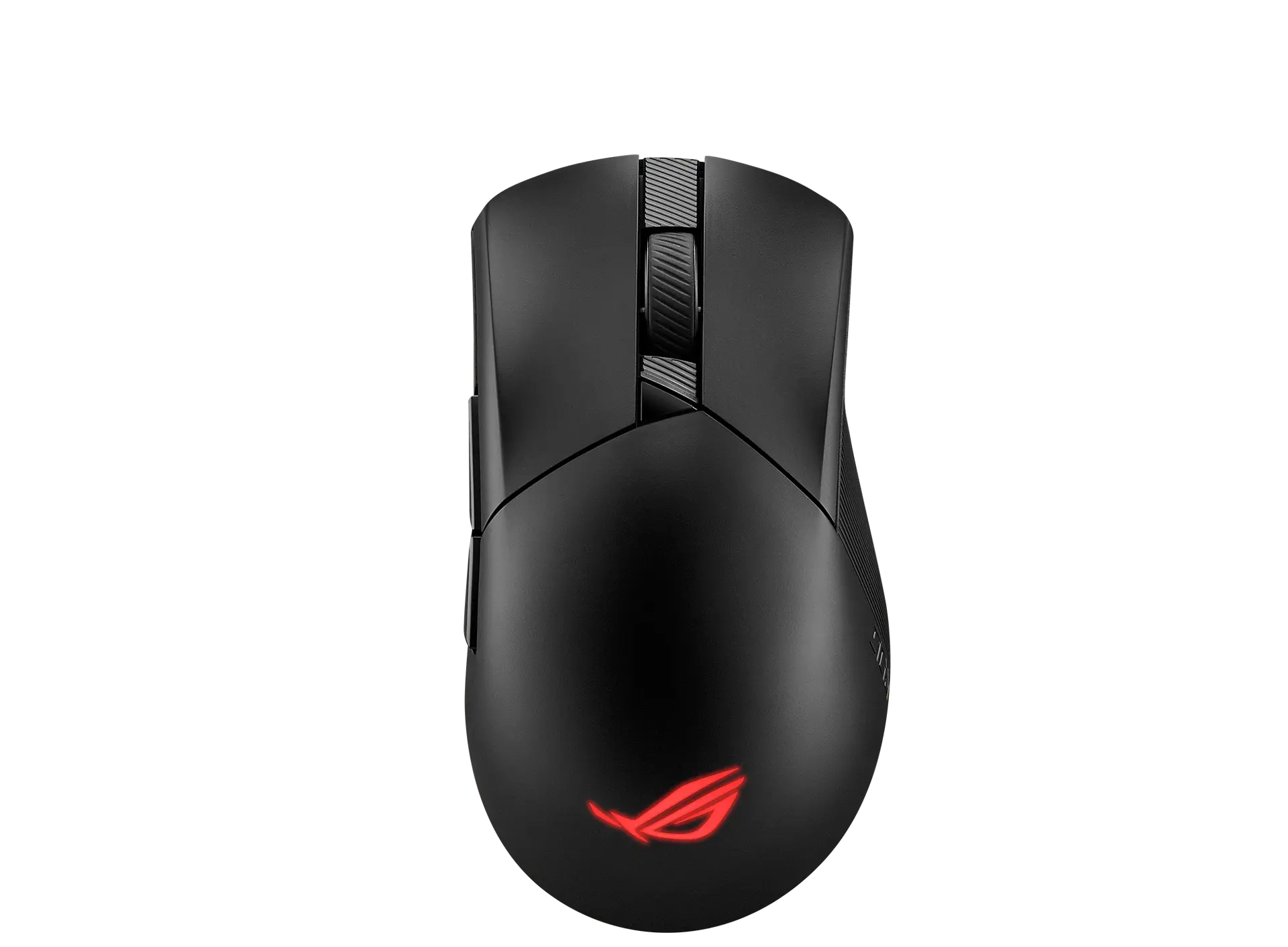
ASUS ROG Gladius III Wireless AimPoint mouse in black, top view showing the scroll wheel, left side buttons and red ROG logo

ASUS ROG Gladius III Wireless AimPoint

Weight
79 g
Controls
6 controls
Sensor model / type
ROG AimPoint optical sensor
Prices & product profile

Each record represents an explicitly checked model and configuration. Original import: 5 Sept 2026; this is not its verification date. This is not a list of current offers or a popularity ranking.