Skip to comparison
versus.deals
Menu
Browse versus.deals
MICE · YOUR NEXT FACE-OFF

Logitech MX Ergo S Advanced Wireless Trackball vs Logitech ERGO M575S Wireless Trackball

Real specs. Clear sources.Exact models · UK & US buying links

Compared products

YOUR FIRST CHOICE

Logitech MX Ergo S Advanced Wireless Trackball

Graphite · right-handed thumb trackball · 910-007260 · UK manufacturer configuration
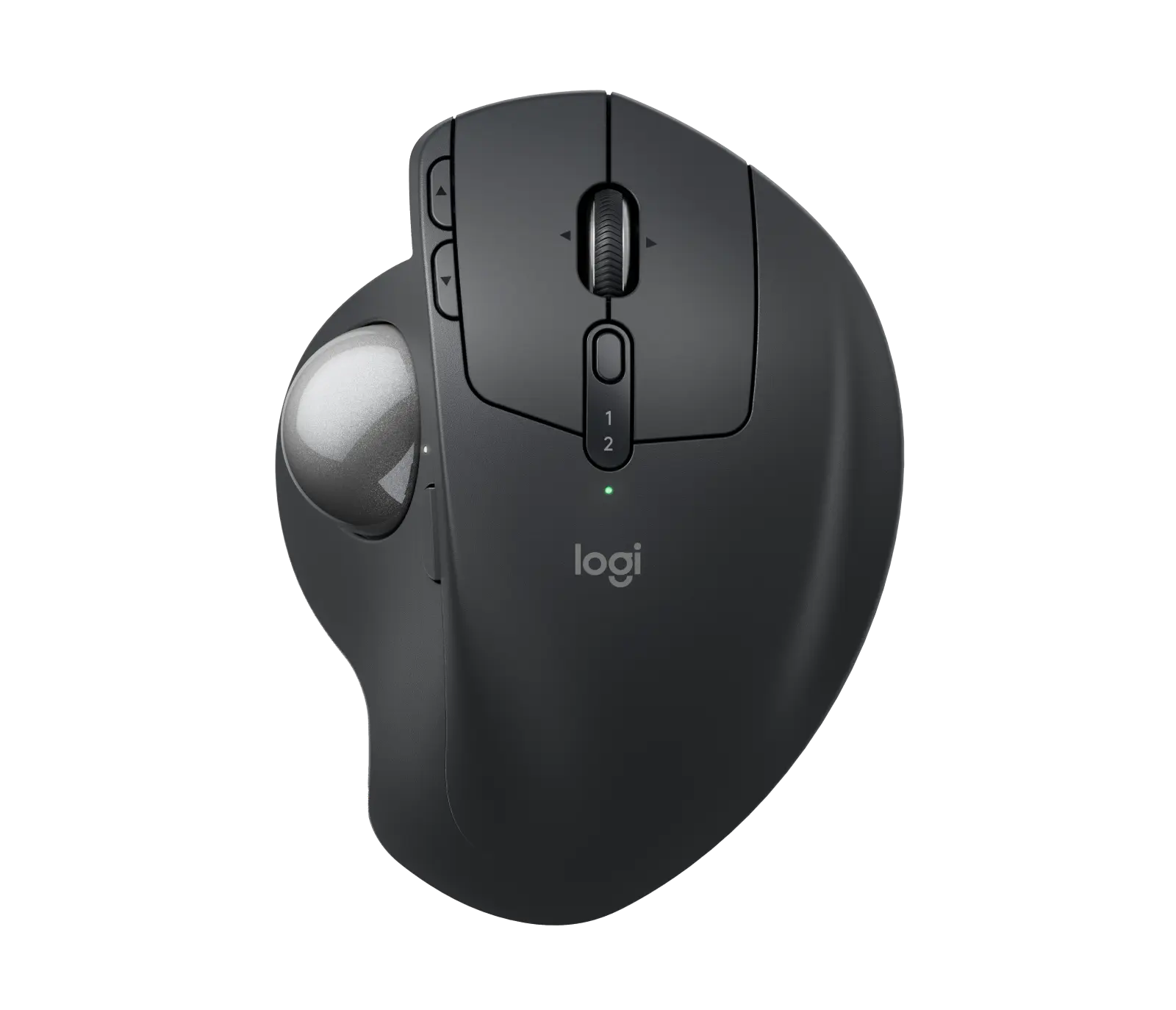
Logitech MX Ergo S wireless trackball in Graphite: official product image
Exact model & source notes

The MX Ergo S (UK part 910-007260, Graphite) is a right-handed thumb trackball from Logitech: the body stays put while your thumb moves the ball, the hinge tilts from 0 to 20 degrees, and it has quiet clicks, eight buttons including a precision-mode button, a Bolt receiver and Bluetooth.

Specifications checked 26 Sept 2026.

Amazon links open search results. Check the exact variant, current price and availability with the retailer.

Manufacturer specifications

WHAT DIFFERS
8Listed controls5
1 of 7 verified differences, in the order listed below. Not a rating.
See the 7 verified differences
THE CONTENDER

Logitech ERGO M575S Wireless Trackball

Graphite + Blue Ball · right-handed thumb trackball · 910-007029 · UK manufacturer configuration

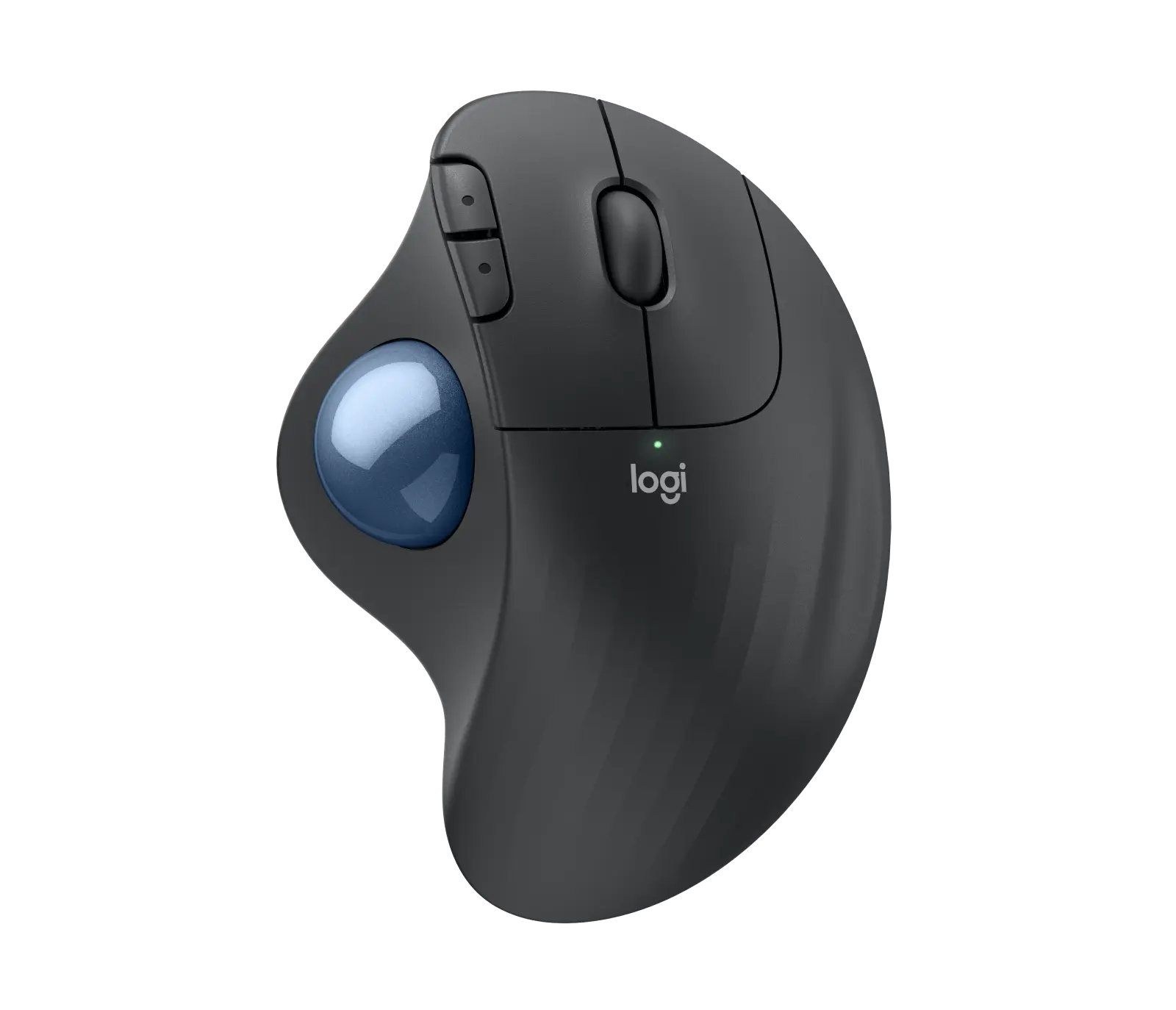
Logitech ERGO M575S wireless trackball in Graphite with blue ball: official product image
Exact model & source notes

The ERGO M575S (UK part910-007029, Graphite with blue ball) is a Logitech thumb trackball for right-handed users: five buttons, silent switches, a Bolt receiver plus Bluetooth and one user-replaceable AA battery. Logitech rates receiver use for up to18months; its Bluetooth figures conflict at18and20months.

Specifications checked 26 Sept 2026.

Amazon links open search results. Check the exact variant, current price and availability with the retailer.

Manufacturer specifications

MX Ergo S Advanced Wireless Trackball UK & US retailers

UK & US price history: no verified listing yet

ERGO M575S Wireless Trackball UK & US retailers

UK & US price history: no verified listing yet

Search links open retailer results, not a matched listing; eBay listings are checked daily. As an Amazon Associate I earn from qualifying purchases. As an eBay Partner, we may be compensated if you make a purchase.

THE DIFFERENCES, MADE VISIBLE

Visual facts

Differences first. Select a topic for its graphic, sources and conditions.

How to read this comparison
  • Manufacturer facts for the exact models shown. Not a quality rating or a test result.
  • “Different” means the known values differ, not that one is better.
  • Missing or conflicting evidence is marked and never counts as a difference. Source chips hold each fact’s sources and conditions.
SPECIFICATIONS SIDE BY SIDE7 topics
SELECTED TOPIC
01 / 07

Connections

Check the exact configuration and source conditions for your use.

Logitech MX Ergo S Advanced Wireless TrackballLogi Bolt USB-A receiver (included) and Bluetooth Low Energy (5.2); USB-C charging (cable not included)

Manufacturer specification

Logitech ERGO M575S Wireless TrackballLogi Bolt USB-A receiver (included) and Bluetooth Low Energy

Manufacturer specification · Not compatible with Unifying receivers.

Explore the full specifications

Choose the grip, then check the connection. Left-side thumb controls are not a mirrored left-handed layout. Check the receiver or USB connection, battery requirements and your preferred shape. DPI is tracking resolution, not an accuracy score; no gaming winner is inferred.

WHAT CHANGES BETWEEN THEM?

Key differences

Full specifications ↓

7 verified differences, most decision-relevant first. 6 are also drawn in Visual facts above. Missing information stays separate.

Connections

In Visual facts
Logitech MX Ergo S Advanced Wireless TrackballLogi Bolt USB-A receiver (included) and Bluetooth Low Energy (5.2); USB-C charging (cable not included)
Logitech ERGO M575S Wireless TrackballLogi Bolt USB-A receiver (included) and Bluetooth Low Energy
Sources
Logitech ERGO M575S Wireless Trackball

Manufacturer specification · Not compatible with Unifying receivers.

Logitech UK — ERGO M575S Wireless Trackball product page and technical specificationsLogitech Support — Specification - ERGO M575S

Check the exact configuration and source conditions for your use.

Listed controls

In Visual facts
Logitech MX Ergo S Advanced Wireless Trackball8
Logitech ERGO M575S Wireless Trackball5
Sources
Logitech MX Ergo S Advanced Wireless Trackball

Manufacturer specification · Left/right click, back/forward, scroll wheel with left/right tilt and middle click, Precision Mode and Easy-Switch; 6 are customisable.

Logitech UK — MX Ergo S product page and technical specificationsLogitech Support — Specification - MX Ergo S
Logitech ERGO M575S Wireless Trackball

Manufacturer specification · Left/right click, back/forward and scroll wheel with middle click; 3 customisable (back/forward, middle click) per the specification table. A Logitech FAQ answer says 5 customisable buttons.

Logitech UK — ERGO M575S Wireless Trackball product page and technical specificationsLogitech Support — Specification - ERGO M575S

Physical clicks, programmable wheel actions and optional side buttons can produce different counts. Read each configuration; a larger count does not establish better control or programmability.

Customisation software

In Visual facts
Logitech MX Ergo S Advanced Wireless TrackballLogi Options+ (Windows and macOS): 6 customisable buttons, time-saving shortcuts and Smart Actions; Logitech Flow for copy and paste across multiple computers
Logitech ERGO M575S Wireless TrackballLogi Options+ (Windows and macOS)
Sources
Logitech MX Ergo S Advanced Wireless Trackball

Manufacturer specification

Logitech UK — MX Ergo S product page and technical specifications
Logitech ERGO M575S Wireless Trackball

Manufacturer specification

Logitech UK — ERGO M575S Wireless Trackball product page and technical specifications

Stored profiles, sensitivity settings and software assignments are different capabilities. An unspecified profile count is not zero; check the software and firmware conditions.

Logitech MX Ergo S Advanced Wireless TrackballRechargeable 500 mAh lithium; up to 120 days per full charge; 24 hours from a 1-minute charge; not user-replaceable
Logitech ERGO M575S Wireless Trackball1 × AA (included, user-replaceable)
Sources
Logitech ERGO M575S Wireless Trackball

Receiver rating is up to18months. Bluetooth is18months in the support specification and20months in the product FAQ. · Manufacturer specification · One included user-replaceable AA battery. Connection-specific endurance is recorded separately; Bluetooth claims conflict.

Logitech UK — ERGO M575S Wireless Trackball product page and technical specificationsLogitech Support — Specification - ERGO M575S

Manufacturer claims for the stated mode and equipment. Read each test condition; this is not measured everyday battery life.

Listed package

In Visual facts
Logitech MX Ergo S Advanced Wireless TrackballTrackball; Logi Bolt receiver; documentation (no cable)
Logitech ERGO M575S Wireless TrackballTrackball; Logi Bolt receiver; 1 × AA battery; documentation
Sources
Logitech ERGO M575S Wireless Trackball

Manufacturer specification

Logitech UK — ERGO M575S Wireless Trackball product page and technical specifications

Check the exact configuration and source conditions for your use.

Button durability claims

In Visual facts
Logitech MX Ergo S Advanced Wireless TrackballLeft/right 3 million cycles; middle wheel 1 million
Logitech ERGO M575S Wireless Trackball3 million clicks (left/right)
Sources
Logitech MX Ergo S Advanced Wireless Trackball

Manufacturer specification

Logitech Support — Specification - MX Ergo S
Logitech ERGO M575S Wireless Trackball

Manufacturer specification

Logitech Support — Specification - ERGO M575S

Check the exact configuration and source conditions for your use.

Show 1 more verified difference

Dimensions

Logitech MX Ergo S Advanced Wireless Trackball132.5 × 99.8 × 51.4 mm (length × width × height)
Logitech ERGO M575S Wireless Trackball134 × 100 × 48 mm (length × width × height)
Sources
Logitech MX Ergo S Advanced Wireless Trackball

Manufacturer specification · Logitech labels these Height 132.5 mm, Width 99.8 mm, Depth 51.4 mm; the first is the front-to-back length in its top-view convention.

Logitech UK — MX Ergo S product page and technical specificationsLogitech Support — Specification - MX Ergo S
Logitech ERGO M575S Wireless Trackball

Manufacturer specification · Logitech labels these Height 134 mm, Width 100 mm, Depth 48 mm; the first is the front-to-back length in its top-view convention.

Logitech UK — ERGO M575S Wireless Trackball product page and technical specificationsLogitech Support — Specification - ERGO M575S

A size or weight trade-off; it does not establish the better product.

Small physical differences (2)

Body length

In Visual facts
Logitech MX Ergo S Advanced Wireless Trackball132.5 mm
Logitech ERGO M575S Wireless Trackball134 mm
Sources

Check the exact configuration and source conditions for your use.

Body width

Logitech MX Ergo S Advanced Wireless Trackball99.8 mm
Logitech ERGO M575S Wireless Trackball100 mm
Sources

A size or weight trade-off; it does not establish the better product.

Configuration & compatibility details (2)

Hand orientation

Logitech MX Ergo S Advanced Wireless TrackballRight-handed only (thumb trackball on the left side); sized for medium to large hands
Logitech ERGO M575S Wireless TrackballRight-handed only (thumb trackball on the left side)
Sources
Logitech MX Ergo S Advanced Wireless Trackball

Manufacturer specification · Logitech describes the sculpted design as 'a good fit for medium to large-sized hands'.

Logitech UK — MX Ergo S product page and technical specifications
Logitech ERGO M575S Wireless Trackball

Manufacturer specification

Logitech UK — ERGO M575S Wireless Trackball product page and technical specifications

Both sources describe right-hand controls. Their wording does not establish a different hand orientation or identical shape and comfort.

Supported operating systems

Logitech MX Ergo S Advanced Wireless TrackballBolt: Windows 10/11+, macOS 12+, Linux, ChromeOS; Bluetooth: also iPadOS 15+ and Android 12+
Logitech ERGO M575S Wireless TrackballWindows 10/11+, macOS 12+, Linux, ChromeOS; iPadOS 15+ and Android 12+ over Bluetooth
Sources
Logitech MX Ergo S Advanced Wireless Trackball

Manufacturer specification · Basic functions without drivers outside Windows and macOS.

Logitech UK — MX Ergo S product page and technical specificationsLogitech Support — Specification - MX Ergo S
Logitech ERGO M575S Wireless Trackball

Manufacturer specification · Current Logitech UK product page requirements (both the Bolt receiver and Bluetooth list Windows 10, 11 or later and macOS 12 or later). Basic functions without additional drivers outside Windows and macOS. The support specification's at-release list gives macOS 10.14 or later (and Windows 10 or later) for the USB receiver, and the same Bluetooth list as the product page.

Logitech UK — ERGO M575S Wireless Trackball product page and technical specificationsLogitech Support — Specification - ERGO M575S

These descriptions or measurements differ. Wording alone does not establish a different capability; check the exact configuration.

Missing or non-comparable evidence (17)

Switch type

Logitech MX Ergo S Advanced Wireless TrackballNot verified
Logitech ERGO M575S Wireless TrackballSilent
Sources
Logitech MX Ergo S Advanced Wireless Trackball

No source recorded for this side.

Logitech ERGO M575S Wireless Trackball

Manufacturer specification

Logitech Support — Specification - ERGO M575S

Evidence is missing or conflicting on at least one side. This is not a verified difference.

Sensor model / type

Logitech MX Ergo S Advanced Wireless TrackballLogitech Advanced Optical Tracking (thumb-operated trackball)
Logitech ERGO M575S Wireless TrackballNot verified
Sources
Logitech MX Ergo S Advanced Wireless Trackball

Manufacturer specification · The body stays still; the thumb moves the ball.

Logitech UK — MX Ergo S product page and technical specificationsLogitech Support — Specification - MX Ergo S
Logitech ERGO M575S Wireless Trackball

The individually reviewed exact source inventory does not identify a sensor model. The published method or description is retained separately. · Manufacturer specification

Logitech UK — ERGO M575S Wireless Trackball product page and technical specificationsLogitech Support — Specification - ERGO M575S

Evidence is missing or conflicting on at least one side. This is not a verified difference.

Maximum report rate

Logitech MX Ergo S Advanced Wireless TrackballNot verified
Logitech ERGO M575S Wireless TrackballNot verified
Sources
Logitech MX Ergo S Advanced Wireless Trackball

Logitech support lists 125 Hz (8 ms) over the receiver in HI mode and 88–133 Hz (7.5–11.25 ms) over Bluetooth; no single maximum is stated. · Manufacturer specification

Logitech Support — Specification - MX Ergo S
Logitech ERGO M575S Wireless Trackball

Logitech support lists 125 Hz (8 ms) over the receiver in LO mode and 88–133 Hz over Bluetooth; no single maximum is stated. · Manufacturer specification

Logitech Support — Specification - ERGO M575S

Evidence is missing or conflicting on at least one side. This is not a verified difference.

Claimed battery life with Bluetooth

Logitech MX Ergo S Advanced Wireless TrackballNot verified
Logitech ERGO M575S Wireless TrackballConflicting evidence
Sources
Logitech MX Ergo S Advanced Wireless Trackball

No source recorded for this side.

Logitech ERGO M575S Wireless Trackball

Logitech primary-source Bluetooth endurance claims remain18versus20months. · Manufacturer specification · The support specification says up to18months over Bluetooth; the product FAQ says up to20months over Bluetooth. No reconciliation or matched test protocol is supplied.

Logitech UK — ERGO M575S Wireless Trackball product page and technical specificationsLogitech Support — Specification - ERGO M575S

Evidence is missing or conflicting on at least one side. This is not a verified difference.

Claimed battery life with Bolt receiver

Logitech MX Ergo S Advanced Wireless TrackballNot verified
Logitech ERGO M575S Wireless Trackball18 months
Sources
Logitech MX Ergo S Advanced Wireless Trackball

No source recorded for this side.

Logitech ERGO M575S Wireless Trackball

Manufacturer specification · Up to18months with the Logi Bolt receiver. Actual usage/test protocol not fully stated.

Logitech UK — ERGO M575S Wireless Trackball product page and technical specificationsLogitech Support — Specification - ERGO M575S

Evidence is missing or conflicting on at least one side. This is not a verified difference.

Certifications

Logitech MX Ergo S Advanced Wireless TrackballCertified by ergonomists
Logitech ERGO M575S Wireless TrackballNot verified
Sources
Logitech MX Ergo S Advanced Wireless Trackball

Manufacturer specification · Logitech says MX Ergo S is certified by ergonomists, with a 20-degree tilt angle that encourages a better forearm posture and reduces muscle strain in the forearm by 27%. Logitech does not name the certifying ergonomists or the basis of the 27% figure on these pages.

Logitech UK — MX Ergo S product page and technical specificationsLogitech US — MX Ergo S product page and technical specifications
Logitech ERGO M575S Wireless Trackball

No source recorded for this side.

Evidence is missing or conflicting on at least one side. This is not a verified difference.

Materials

Logitech MX Ergo S Advanced Wireless TrackballMade with recycled plastic
Logitech ERGO M575S Wireless TrackballNot verified
Sources
Logitech MX Ergo S Advanced Wireless Trackball

Manufacturer specification · Logitech's UK product data give certified PCR plastic of 20% for the mouse in Graphite 910-007260, excluding packaging, printed wiring assembly, cables and receiver, and note that the percentage of recycled plastic may vary by colour; the US page gives the same 20% for its Graphite MX Ergo S. Logitech's support specification lists the materials used as plastic PCR ABS, PC, rubber and metal.

Logitech UK — MX Ergo S product page and technical specificationsLogitech US — MX Ergo S product page and technical specificationsLogitech Support — Specification - MX Ergo S
Logitech ERGO M575S Wireless Trackball

No source recorded for this side.

Evidence is missing or conflicting on at least one side. This is not a verified difference.

Multi-device pairing

Logitech MX Ergo S Advanced Wireless TrackballUp to 2 devices via Bluetooth or the included Logi Bolt receiver; switch with the Easy-Switch button
Logitech ERGO M575S Wireless TrackballNot verified
Sources
Logitech MX Ergo S Advanced Wireless Trackball

Manufacturer specification · Logitech Flow support via Logi Options+.

Logitech UK — MX Ergo S product page and technical specifications
Logitech ERGO M575S Wireless Trackball

No source recorded for this side.

Evidence is missing or conflicting on at least one side. This is not a verified difference.

Click noise

Logitech MX Ergo S Advanced Wireless TrackballQuiet clicks: 80% quieter clicks than MX Ergo
Logitech ERGO M575S Wireless TrackballNot verified
Sources
Logitech MX Ergo S Advanced Wireless Trackball

Manufacturer specification · Logitech comparison with MX Ergo; no decibel figure is published.

Logitech UK — MX Ergo S product page and technical specifications
Logitech ERGO M575S Wireless Trackball

No source recorded for this side.

Evidence is missing or conflicting on at least one side. This is not a verified difference.

Maximum sensitivity

Logitech MX Ergo S Advanced Wireless TrackballConflicting evidence
Logitech ERGO M575S Wireless Trackball2000 DPI
Sources
Logitech MX Ergo S Advanced Wireless Trackball

2,048 dpi on the product page; the support specification also lists 2,000 (software) and 4,000 (firmware). · Manufacturer specification

Logitech UK — MX Ergo S product page and technical specificationsLogitech Support — Specification - MX Ergo S

Evidence is missing or conflicting on at least one side. This is not a verified difference.

Minimum sensitivity

Logitech MX Ergo S Advanced Wireless TrackballConflicting evidence
Logitech ERGO M575S Wireless Trackball100 DPI
Sources
Logitech MX Ergo S Advanced Wireless Trackball

The product page lists 512–2,048 dpi; the support specification lists both '100-2000 (SW), 4000 (FW)' and '512 to 2048 DPI'. · Manufacturer specification

Logitech UK — MX Ergo S product page and technical specificationsLogitech Support — Specification - MX Ergo S
Logitech ERGO M575S Wireless Trackball

Manufacturer specification · Adjustable in Logi Options+; nominal 400 DPI.

Logitech UK — ERGO M575S Wireless Trackball product page and technical specificationsLogitech Support — Specification - ERGO M575S

Evidence is missing or conflicting on at least one side. This is not a verified difference.

Adjustable tilt

Logitech MX Ergo S Advanced Wireless TrackballHinge adjustable between 0 and 20 degrees
Logitech ERGO M575S Wireless TrackballNot verified
Sources
Logitech MX Ergo S Advanced Wireless Trackball

Manufacturer specification

Logitech UK — MX Ergo S product page and technical specifications
Logitech ERGO M575S Wireless Trackball

No source recorded for this side.

Evidence is missing or conflicting on at least one side. This is not a verified difference.

Tracking method

Logitech MX Ergo S Advanced Wireless TrackballNot verified
Logitech ERGO M575S Wireless TrackballOptical
Sources
Logitech MX Ergo S Advanced Wireless Trackball

No source recorded for this side.

Logitech ERGO M575S Wireless Trackball

Manufacturer specification · Original manufacturer description: Logitech Advanced Optical Tracking (thumb-operated trackball). This identifies optical tracking, not a named sensor model. Model-specific hardware, accuracy and performance are not inferred.

Logitech UK — ERGO M575S Wireless Trackball product page and technical specificationsLogitech Support — Specification - ERGO M575S

Evidence is missing or conflicting on at least one side. This is not a verified difference.

Limited hardware warranty

Logitech MX Ergo S Advanced Wireless TrackballConflicting evidence
Logitech ERGO M575S Wireless TrackballConflicting evidence
Sources
Logitech MX Ergo S Advanced Wireless Trackball

Logitech UK lists a 2-year limited hardware warranty; Logitech US lists 1 year. Regional terms differ. · Manufacturer specification

Logitech UK — MX Ergo S product page and technical specificationsLogitech US — MX Ergo S product page and technical specifications
Logitech ERGO M575S Wireless Trackball

Logitech UK lists a 2-year limited hardware warranty; Logitech US lists 1 year. Regional terms differ. · Manufacturer specification

Logitech UK — ERGO M575S Wireless Trackball product page and technical specificationsLogitech US — ERGO M575S Wireless Trackball product page and technical specifications

Evidence is missing or conflicting on at least one side. This is not a verified difference.

Weight without base plate

Logitech MX Ergo S Advanced Wireless Trackball164 g
Logitech ERGO M575S Wireless TrackballNot verified
Sources
Logitech MX Ergo S Advanced Wireless Trackball

Manufacturer specification · Without metal plate and receiver.

Logitech UK — MX Ergo S product page and technical specificationsLogitech Support — Specification - MX Ergo S
Logitech ERGO M575S Wireless Trackball

No source recorded for this side.

Evidence is missing or conflicting on at least one side. This is not a verified difference.

Weight

Logitech MX Ergo S Advanced Wireless Trackball259 g
Logitech ERGO M575S Wireless Trackball145 g
Sources
Logitech MX Ergo S Advanced Wireless Trackball

Manufacturer specification · With the magnetic metal base plate, without receiver. Without the plate: 164 g.

Logitech UK — MX Ergo S product page and technical specificationsLogitech Support — Specification - MX Ergo S
Logitech ERGO M575S Wireless Trackball

Manufacturer specification · Manufacturer-listed weight; battery inclusion not stated.

Logitech UK — ERGO M575S Wireless Trackball product page and technical specificationsLogitech Support — Specification - ERGO M575S

The manufacturer sources do not establish the same cable weighing basis. Both published masses remain visible with their conditions, but are not ranked.

1 shared field has the same recorded value.

WHAT EACH CHOICE ASKS OF YOU

What it brings and what to check

Logitech MX Ergo S Advanced Wireless Trackball

What it brings

  • Thumb control keeps hand movement to a minimum while the hand rests on the sculpted body, and the adjustable 0–20° hinge lets you set the tilt; Logitech sizes it for medium to large hands.
  • Eight buttons, including a tilting scroll wheel and a dedicated Precision Mode button to drop sensitivity on the fly; six are customisable in Logi Options+.
  • Logitech rates the 500 mAh battery for up to 120 days per charge, and it connects via the included Bolt receiver or Bluetooth 5.2.
  • Logitech says the S version has 80% quieter clicks than the MX Ergo, plus USB-C quick charging and Logi Bolt; it connects to up to 2 devices via Bluetooth or the included Logi Bolt receiver, switches between them with the Easy-Switch button and supports Logitech Flow.

What to check

Logitech ERGO M575S Wireless Trackball

What it brings

What to check

COMPARE THE DETAILS

Full specifications

How we verify
29 of 29 specifications Sources in each row
Source-backed specifications for Logitech MX Ergo S Advanced Wireless Trackball and Logitech ERGO M575S Wireless Trackball
SpecificationLogitech MX Ergo S Advanced Wireless TrackballLogitech ERGO M575S Wireless Trackball
WeightDifferent
Sources
Logitech MX Ergo S Advanced Wireless Trackball

Manufacturer specification · With the magnetic metal base plate, without receiver. Without the plate: 164 g.

Logitech UK — MX Ergo S product page and technical specificationsLogitech Support — Specification - MX Ergo S
Logitech ERGO M575S Wireless Trackball

Manufacturer specification · Manufacturer-listed weight; battery inclusion not stated.

Logitech UK — ERGO M575S Wireless Trackball product page and technical specificationsLogitech Support — Specification - ERGO M575S
259 g145 g
Weight without base plate
Sources
Logitech MX Ergo S Advanced Wireless Trackball

Manufacturer specification · Without metal plate and receiver.

Logitech UK — MX Ergo S product page and technical specificationsLogitech Support — Specification - MX Ergo S
Logitech ERGO M575S Wireless Trackball

No source recorded.

164 gNot provided
DimensionsDifferent
Sources
Logitech MX Ergo S Advanced Wireless Trackball

Manufacturer specification · Logitech labels these Height 132.5 mm, Width 99.8 mm, Depth 51.4 mm; the first is the front-to-back length in its top-view convention.

Logitech UK — MX Ergo S product page and technical specificationsLogitech Support — Specification - MX Ergo S
Logitech ERGO M575S Wireless Trackball

Manufacturer specification · Logitech labels these Height 134 mm, Width 100 mm, Depth 48 mm; the first is the front-to-back length in its top-view convention.

Logitech UK — ERGO M575S Wireless Trackball product page and technical specificationsLogitech Support — Specification - ERGO M575S
132.5 × 99.8 × 51.4 mm (length × width × height)134 × 100 × 48 mm (length × width × height)
132.5 mm134 mm
99.8 mm100 mm
Hand orientationDifferent
Sources
Logitech MX Ergo S Advanced Wireless Trackball

Manufacturer specification · Logitech describes the sculpted design as 'a good fit for medium to large-sized hands'.

Logitech UK — MX Ergo S product page and technical specifications
Logitech ERGO M575S Wireless Trackball

Manufacturer specification

Logitech UK — ERGO M575S Wireless Trackball product page and technical specifications
Right-handed only (thumb trackball on the left side); sized for medium to large handsRight-handed only (thumb trackball on the left side)
Sensor model / type
Sources
Logitech MX Ergo S Advanced Wireless Trackball

Manufacturer specification · The body stays still; the thumb moves the ball.

Logitech UK — MX Ergo S product page and technical specificationsLogitech Support — Specification - MX Ergo S
Logitech ERGO M575S Wireless Trackball

The individually reviewed exact source inventory does not identify a sensor model. The published method or description is retained separately. · Manufacturer specification

Logitech UK — ERGO M575S Wireless Trackball product page and technical specificationsLogitech Support — Specification - ERGO M575S
Logitech Advanced Optical Tracking (thumb-operated trackball)Not listed by the manufacturer
Minimum sensitivity
Sources
Logitech MX Ergo S Advanced Wireless Trackball

The product page lists 512–2,048 dpi; the support specification lists both '100-2000 (SW), 4000 (FW)' and '512 to 2048 DPI'. · Manufacturer specification

Logitech UK — MX Ergo S product page and technical specificationsLogitech Support — Specification - MX Ergo S
Logitech ERGO M575S Wireless Trackball

Manufacturer specification · Adjustable in Logi Options+; nominal 400 DPI.

Logitech UK — ERGO M575S Wireless Trackball product page and technical specificationsLogitech Support — Specification - ERGO M575S
Conflicting sources100 DPI
Maximum sensitivity
Sources
Logitech MX Ergo S Advanced Wireless Trackball

2,048 dpi on the product page; the support specification also lists 2,000 (software) and 4,000 (firmware). · Manufacturer specification

Logitech UK — MX Ergo S product page and technical specificationsLogitech Support — Specification - MX Ergo S
Conflicting sources2000 DPI
Tracking method
Sources
Logitech MX Ergo S Advanced Wireless Trackball

No source recorded.

Logitech ERGO M575S Wireless Trackball

Manufacturer specification · Original manufacturer description: Logitech Advanced Optical Tracking (thumb-operated trackball). This identifies optical tracking, not a named sensor model. Model-specific hardware, accuracy and performance are not inferred.

Logitech UK — ERGO M575S Wireless Trackball product page and technical specificationsLogitech Support — Specification - ERGO M575S
Not providedOptical
Listed controlsDifferent
Sources
Logitech MX Ergo S Advanced Wireless Trackball

Manufacturer specification · Left/right click, back/forward, scroll wheel with left/right tilt and middle click, Precision Mode and Easy-Switch; 6 are customisable.

Logitech UK — MX Ergo S product page and technical specificationsLogitech Support — Specification - MX Ergo S
Logitech ERGO M575S Wireless Trackball

Manufacturer specification · Left/right click, back/forward and scroll wheel with middle click; 3 customisable (back/forward, middle click) per the specification table. A Logitech FAQ answer says 5 customisable buttons.

Logitech UK — ERGO M575S Wireless Trackball product page and technical specificationsLogitech Support — Specification - ERGO M575S
85
Button durability claimsDifferent
Sources
Logitech MX Ergo S Advanced Wireless Trackball

Manufacturer specification

Logitech Support — Specification - MX Ergo S
Logitech ERGO M575S Wireless Trackball

Manufacturer specification

Logitech Support — Specification - ERGO M575S
Left/right 3 million cycles; middle wheel 1 million3 million clicks (left/right)
Switch type
Sources
Logitech MX Ergo S Advanced Wireless Trackball

No source recorded.

Logitech ERGO M575S Wireless Trackball

Manufacturer specification

Logitech Support — Specification - ERGO M575S
Not providedSilent
ConnectionsDifferent
Sources
Logitech ERGO M575S Wireless Trackball

Manufacturer specification · Not compatible with Unifying receivers.

Logitech UK — ERGO M575S Wireless Trackball product page and technical specificationsLogitech Support — Specification - ERGO M575S
Logi Bolt USB-A receiver (included) and Bluetooth Low Energy (5.2); USB-C charging (cable not included)Logi Bolt USB-A receiver (included) and Bluetooth Low Energy
BatteryDifferent
Sources
Logitech ERGO M575S Wireless Trackball

Receiver rating is up to18months. Bluetooth is18months in the support specification and20months in the product FAQ. · Manufacturer specification · One included user-replaceable AA battery. Connection-specific endurance is recorded separately; Bluetooth claims conflict.

Logitech UK — ERGO M575S Wireless Trackball product page and technical specificationsLogitech Support — Specification - ERGO M575S
Rechargeable 500 mAh lithium; up to 120 days per full charge; 24 hours from a 1-minute charge; not user-replaceable1 × AA (included, user-replaceable)
10 m10 m
Claimed battery life with Bolt receiver
Sources
Logitech MX Ergo S Advanced Wireless Trackball

No source recorded.

Logitech ERGO M575S Wireless Trackball

Manufacturer specification · Up to18months with the Logi Bolt receiver. Actual usage/test protocol not fully stated.

Logitech UK — ERGO M575S Wireless Trackball product page and technical specificationsLogitech Support — Specification - ERGO M575S
Not provided18 months
Customisation softwareDifferent
Sources
Logitech MX Ergo S Advanced Wireless Trackball

Manufacturer specification

Logitech UK — MX Ergo S product page and technical specifications
Logitech ERGO M575S Wireless Trackball

Manufacturer specification

Logitech UK — ERGO M575S Wireless Trackball product page and technical specifications
Logi Options+ (Windows and macOS): 6 customisable buttons, time-saving shortcuts and Smart Actions; Logitech Flow for copy and paste across multiple computersLogi Options+ (Windows and macOS)
Multi-device pairing
Sources
Logitech MX Ergo S Advanced Wireless Trackball

Manufacturer specification · Logitech Flow support via Logi Options+.

Logitech UK — MX Ergo S product page and technical specifications
Logitech ERGO M575S Wireless Trackball

No source recorded.

Up to 2 devices via Bluetooth or the included Logi Bolt receiver; switch with the Easy-Switch buttonNot provided
Click noise
Sources
Logitech MX Ergo S Advanced Wireless Trackball

Manufacturer specification · Logitech comparison with MX Ergo; no decibel figure is published.

Logitech UK — MX Ergo S product page and technical specifications
Logitech ERGO M575S Wireless Trackball

No source recorded.

Quiet clicks: 80% quieter clicks than MX ErgoNot provided
Adjustable tilt
Sources
Logitech MX Ergo S Advanced Wireless Trackball

Manufacturer specification

Logitech UK — MX Ergo S product page and technical specifications
Logitech ERGO M575S Wireless Trackball

No source recorded.

Hinge adjustable between 0 and 20 degreesNot provided
Certifications
Sources
Logitech MX Ergo S Advanced Wireless Trackball

Manufacturer specification · Logitech says MX Ergo S is certified by ergonomists, with a 20-degree tilt angle that encourages a better forearm posture and reduces muscle strain in the forearm by 27%. Logitech does not name the certifying ergonomists or the basis of the 27% figure on these pages.

Logitech UK — MX Ergo S product page and technical specificationsLogitech US — MX Ergo S product page and technical specifications
Logitech ERGO M575S Wireless Trackball

No source recorded.

Certified by ergonomistsNot provided
Grip surface
Sources
Logitech ERGO M575S Wireless Trackball

No source recorded.

Soft rubber grip on a sculpted bodyNot provided
Supported operating systemsDifferent
Sources
Logitech MX Ergo S Advanced Wireless Trackball

Manufacturer specification · Basic functions without drivers outside Windows and macOS.

Logitech UK — MX Ergo S product page and technical specificationsLogitech Support — Specification - MX Ergo S
Logitech ERGO M575S Wireless Trackball

Manufacturer specification · Current Logitech UK product page requirements (both the Bolt receiver and Bluetooth list Windows 10, 11 or later and macOS 12 or later). Basic functions without additional drivers outside Windows and macOS. The support specification's at-release list gives macOS 10.14 or later (and Windows 10 or later) for the USB receiver, and the same Bluetooth list as the product page.

Logitech UK — ERGO M575S Wireless Trackball product page and technical specificationsLogitech Support — Specification - ERGO M575S
Bolt: Windows 10/11+, macOS 12+, Linux, ChromeOS; Bluetooth: also iPadOS 15+ and Android 12+Windows 10/11+, macOS 12+, Linux, ChromeOS; iPadOS 15+ and Android 12+ over Bluetooth
Materials
Sources
Logitech MX Ergo S Advanced Wireless Trackball

Manufacturer specification · Logitech's UK product data give certified PCR plastic of 20% for the mouse in Graphite 910-007260, excluding packaging, printed wiring assembly, cables and receiver, and note that the percentage of recycled plastic may vary by colour; the US page gives the same 20% for its Graphite MX Ergo S. Logitech's support specification lists the materials used as plastic PCR ABS, PC, rubber and metal.

Logitech UK — MX Ergo S product page and technical specificationsLogitech US — MX Ergo S product page and technical specificationsLogitech Support — Specification - MX Ergo S
Logitech ERGO M575S Wireless Trackball

No source recorded.

Made with recycled plasticNot provided
Listed packageDifferent
Sources
Logitech ERGO M575S Wireless Trackball

Manufacturer specification

Logitech UK — ERGO M575S Wireless Trackball product page and technical specifications
Trackball; Logi Bolt receiver; documentation (no cable)Trackball; Logi Bolt receiver; 1 × AA battery; documentation
Show unverified (3)Not verified, not provided or conflicting for both products. Kept for completeness; never counted as a difference.
Specifications without verified values for either product
Maximum report rate
Sources
Logitech MX Ergo S Advanced Wireless Trackball

Logitech support lists 125 Hz (8 ms) over the receiver in HI mode and 88–133 Hz (7.5–11.25 ms) over Bluetooth; no single maximum is stated. · Manufacturer specification

Logitech Support — Specification - MX Ergo S
Logitech ERGO M575S Wireless Trackball

Logitech support lists 125 Hz (8 ms) over the receiver in LO mode and 88–133 Hz over Bluetooth; no single maximum is stated. · Manufacturer specification

Logitech Support — Specification - ERGO M575S
Not listed by the manufacturerNot listed by the manufacturer
Limited hardware warranty
Sources
Logitech MX Ergo S Advanced Wireless Trackball

Logitech UK lists a 2-year limited hardware warranty; Logitech US lists 1 year. Regional terms differ. · Manufacturer specification

Logitech UK — MX Ergo S product page and technical specificationsLogitech US — MX Ergo S product page and technical specifications
Logitech ERGO M575S Wireless Trackball

Logitech UK lists a 2-year limited hardware warranty; Logitech US lists 1 year. Regional terms differ. · Manufacturer specification

Logitech UK — ERGO M575S Wireless Trackball product page and technical specificationsLogitech US — ERGO M575S Wireless Trackball product page and technical specifications
Conflicting sourcesConflicting sources
Claimed battery life with Bluetooth
Sources
Logitech MX Ergo S Advanced Wireless Trackball

No source recorded.

Logitech ERGO M575S Wireless Trackball

Logitech primary-source Bluetooth endurance claims remain18versus20months. · Manufacturer specification · The support specification says up to18months over Bluetooth; the product FAQ says up to20months over Bluetooth. No reconciliation or matched test protocol is supplied.

Logitech UK — ERGO M575S Wireless Trackball product page and technical specificationsLogitech Support — Specification - ERGO M575S
Not providedConflicting sources
FIND YOUR CONTENDERS

More products

Closest mice to this pair by shared key specifications. Not a popularity ranking.

See all 62 mice

Each record represents an explicitly checked model and configuration. Original import: 5 Sept 2026; this is not its verification date. This is not a list of current offers or a popularity ranking.