Skip to comparison
versus.deals
Menu
Browse versus.deals
MICE · YOUR NEXT FACE-OFF

Logitech ERGO M575S Wireless Trackball vs Logitech MX Ergo S Advanced Wireless Trackball

Real specs. Clear sources.Exact models · UK & US buying links

Compared products

YOUR FIRST CHOICE

Logitech ERGO M575S Wireless Trackball

Graphite + Blue Ball · right-handed thumb trackball · 910-007029 · UK manufacturer configuration
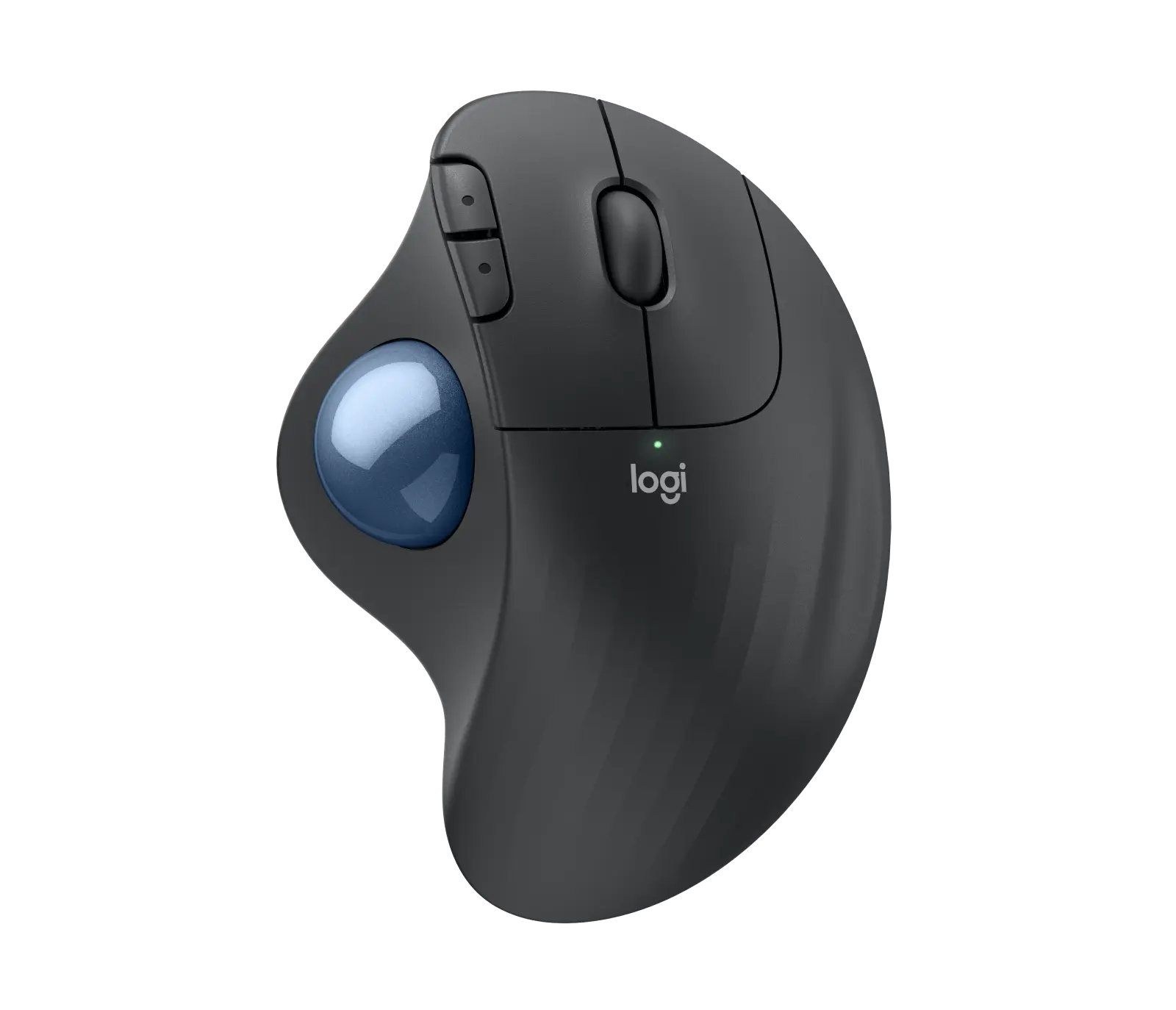
Logitech ERGO M575S wireless trackball in Graphite with blue ball: official product image
Exact model & source notes

The ERGO M575S (UK part910-007029, Graphite with blue ball) is a Logitech thumb trackball for right-handed users: five buttons, silent switches, a Bolt receiver plus Bluetooth and one user-replaceable AA battery. Logitech rates receiver use for up to18months; its Bluetooth figures conflict at18and20months.

Specifications checked 26 Sept 2026.

Amazon links open search results. Check the exact variant, current price and availability with the retailer.

Manufacturer specifications

WHAT DIFFERS
5Listed controls8
1 of 7 verified differences, in the order listed below. Not a rating.
See the 7 verified differences
THE CONTENDER

Logitech MX Ergo S Advanced Wireless Trackball

Graphite · right-handed thumb trackball · 910-007260 · UK manufacturer configuration

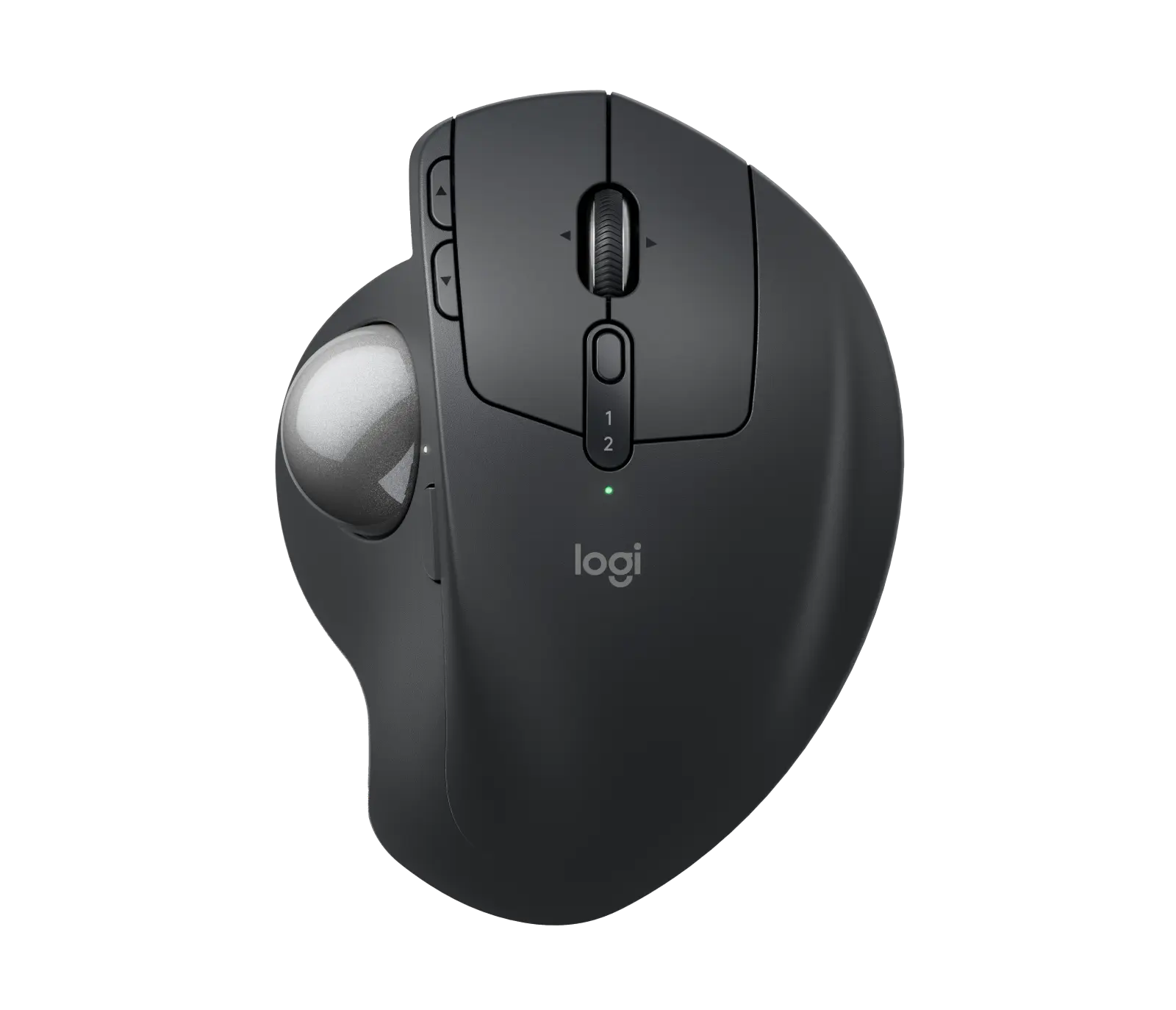
Logitech MX Ergo S wireless trackball in Graphite: official product image
Exact model & source notes

The MX Ergo S (UK part 910-007260, Graphite) is a right-handed thumb trackball from Logitech: the body stays put while your thumb moves the ball, the hinge tilts from 0 to 20 degrees, and it has quiet clicks, eight buttons including a precision-mode button, a Bolt receiver and Bluetooth.

Specifications checked 26 Sept 2026.

Amazon links open search results. Check the exact variant, current price and availability with the retailer.

Manufacturer specifications

ERGO M575S Wireless Trackball UK & US retailers

UK & US price history: no verified listing yet

MX Ergo S Advanced Wireless Trackball UK & US retailers

UK & US price history: no verified listing yet

Search links open retailer results, not a matched listing; eBay listings are checked daily. As an Amazon Associate I earn from qualifying purchases. As an eBay Partner, we may be compensated if you make a purchase.

THE DIFFERENCES, MADE VISIBLE

Visual facts

Differences first. Select a topic for its graphic, sources and conditions.

How to read this comparison
  • Manufacturer facts for the exact models shown. Not a quality rating or a test result.
  • “Different” means the known values differ, not that one is better.
  • Missing or conflicting evidence is marked and never counts as a difference. Source chips hold each fact’s sources and conditions.
SPECIFICATIONS SIDE BY SIDE7 topics
SELECTED TOPIC
01 / 07

Connections

Check the exact configuration and source conditions for your use.

Logitech ERGO M575S Wireless TrackballLogi Bolt USB-A receiver (included) and Bluetooth Low Energy

Manufacturer specification · Not compatible with Unifying receivers.

Logitech MX Ergo S Advanced Wireless TrackballLogi Bolt USB-A receiver (included) and Bluetooth Low Energy (5.2); USB-C charging (cable not included)

Manufacturer specification

Explore the full specifications

Choose the grip, then check the connection. Left-side thumb controls are not a mirrored left-handed layout. Check the receiver or USB connection, battery requirements and your preferred shape. DPI is tracking resolution, not an accuracy score; no gaming winner is inferred.

WHAT CHANGES BETWEEN THEM?

Key differences

Full specifications ↓

7 verified differences, most decision-relevant first. 6 are also drawn in Visual facts above. Missing information stays separate.

Connections

In Visual facts
Logitech ERGO M575S Wireless TrackballLogi Bolt USB-A receiver (included) and Bluetooth Low Energy
Logitech MX Ergo S Advanced Wireless TrackballLogi Bolt USB-A receiver (included) and Bluetooth Low Energy (5.2); USB-C charging (cable not included)
Sources
Logitech ERGO M575S Wireless Trackball

Manufacturer specification · Not compatible with Unifying receivers.

Logitech UK — ERGO M575S Wireless Trackball product page and technical specificationsLogitech Support — Specification - ERGO M575S

Check the exact configuration and source conditions for your use.

Listed controls

In Visual facts
Logitech ERGO M575S Wireless Trackball5
Logitech MX Ergo S Advanced Wireless Trackball8
Sources
Logitech ERGO M575S Wireless Trackball

Manufacturer specification · Left/right click, back/forward and scroll wheel with middle click; 3 customisable (back/forward, middle click) per the specification table. A Logitech FAQ answer says 5 customisable buttons.

Logitech UK — ERGO M575S Wireless Trackball product page and technical specificationsLogitech Support — Specification - ERGO M575S
Logitech MX Ergo S Advanced Wireless Trackball

Manufacturer specification · Left/right click, back/forward, scroll wheel with left/right tilt and middle click, Precision Mode and Easy-Switch; 6 are customisable.

Logitech UK — MX Ergo S product page and technical specificationsLogitech Support — Specification - MX Ergo S

Physical clicks, programmable wheel actions and optional side buttons can produce different counts. Read each configuration; a larger count does not establish better control or programmability.

Customisation software

In Visual facts
Logitech ERGO M575S Wireless TrackballLogi Options+ (Windows and macOS)
Logitech MX Ergo S Advanced Wireless TrackballLogi Options+ (Windows and macOS): 6 customisable buttons, time-saving shortcuts and Smart Actions; Logitech Flow for copy and paste across multiple computers
Sources
Logitech ERGO M575S Wireless Trackball

Manufacturer specification

Logitech UK — ERGO M575S Wireless Trackball product page and technical specifications
Logitech MX Ergo S Advanced Wireless Trackball

Manufacturer specification

Logitech UK — MX Ergo S product page and technical specifications

Stored profiles, sensitivity settings and software assignments are different capabilities. An unspecified profile count is not zero; check the software and firmware conditions.

Logitech ERGO M575S Wireless Trackball1 × AA (included, user-replaceable)
Logitech MX Ergo S Advanced Wireless TrackballRechargeable 500 mAh lithium; up to 120 days per full charge; 24 hours from a 1-minute charge; not user-replaceable
Sources
Logitech ERGO M575S Wireless Trackball

Receiver rating is up to18months. Bluetooth is18months in the support specification and20months in the product FAQ. · Manufacturer specification · One included user-replaceable AA battery. Connection-specific endurance is recorded separately; Bluetooth claims conflict.

Logitech UK — ERGO M575S Wireless Trackball product page and technical specificationsLogitech Support — Specification - ERGO M575S

Manufacturer claims for the stated mode and equipment. Read each test condition; this is not measured everyday battery life.

Listed package

In Visual facts
Logitech ERGO M575S Wireless TrackballTrackball; Logi Bolt receiver; 1 × AA battery; documentation
Logitech MX Ergo S Advanced Wireless TrackballTrackball; Logi Bolt receiver; documentation (no cable)
Sources
Logitech ERGO M575S Wireless Trackball

Manufacturer specification

Logitech UK — ERGO M575S Wireless Trackball product page and technical specifications

Check the exact configuration and source conditions for your use.

Primary button durability claim

In Visual facts
Logitech ERGO M575S Wireless Trackball3 million clicks (left/right)
Logitech MX Ergo S Advanced Wireless TrackballLeft/right 3 million cycles; middle wheel 1 million
Sources
Logitech ERGO M575S Wireless Trackball

Manufacturer specification

Logitech Support — Specification - ERGO M575S
Logitech MX Ergo S Advanced Wireless Trackball

Manufacturer specification

Logitech Support — Specification - MX Ergo S

Check the exact configuration and source conditions for your use.

Show 1 more verified difference

Dimensions

Logitech ERGO M575S Wireless Trackball134 × 100 × 48 mm (length × width × height)
Logitech MX Ergo S Advanced Wireless Trackball132.5 × 99.8 × 51.4 mm (length × width × height)
Sources
Logitech ERGO M575S Wireless Trackball

Manufacturer specification · Logitech labels these Height 134 mm, Width 100 mm, Depth 48 mm; the first is the front-to-back length in its top-view convention.

Logitech UK — ERGO M575S Wireless Trackball product page and technical specificationsLogitech Support — Specification - ERGO M575S
Logitech MX Ergo S Advanced Wireless Trackball

Manufacturer specification · Logitech labels these Height 132.5 mm, Width 99.8 mm, Depth 51.4 mm; the first is the front-to-back length in its top-view convention.

Logitech UK — MX Ergo S product page and technical specificationsLogitech Support — Specification - MX Ergo S

A size or weight trade-off; it does not establish the better product.

Small physical differences (2)

Body length

In Visual facts
Logitech ERGO M575S Wireless Trackball134 mm
Logitech MX Ergo S Advanced Wireless Trackball132.5 mm
Sources

Check the exact configuration and source conditions for your use.

Body width

Logitech ERGO M575S Wireless Trackball100 mm
Logitech MX Ergo S Advanced Wireless Trackball99.8 mm
Sources

A size or weight trade-off; it does not establish the better product.

Configuration & compatibility details (2)

Hand orientation

Logitech ERGO M575S Wireless TrackballRight-handed only (thumb trackball on the left side)
Logitech MX Ergo S Advanced Wireless TrackballRight-handed only (thumb trackball on the left side); sized for medium to large hands
Sources
Logitech ERGO M575S Wireless Trackball

Manufacturer specification

Logitech UK — ERGO M575S Wireless Trackball product page and technical specifications
Logitech MX Ergo S Advanced Wireless Trackball

Manufacturer specification · Logitech describes the sculpted design as 'a good fit for medium to large-sized hands'.

Logitech UK — MX Ergo S product page and technical specifications

Both sources describe right-hand controls. Their wording does not establish a different hand orientation or identical shape and comfort.

Supported operating systems

Logitech ERGO M575S Wireless TrackballWindows 10/11+, macOS 12+, Linux, ChromeOS; iPadOS 15+ and Android 12+ over Bluetooth
Logitech MX Ergo S Advanced Wireless TrackballBolt: Windows 10/11+, macOS 12+, Linux, ChromeOS; Bluetooth: also iPadOS 15+ and Android 12+
Sources
Logitech ERGO M575S Wireless Trackball

Manufacturer specification · Current Logitech UK product page requirements (both the Bolt receiver and Bluetooth list Windows 10, 11 or later and macOS 12 or later). Basic functions without additional drivers outside Windows and macOS. The support specification's at-release list gives macOS 10.14 or later (and Windows 10 or later) for the USB receiver, and the same Bluetooth list as the product page.

Logitech UK — ERGO M575S Wireless Trackball product page and technical specificationsLogitech Support — Specification - ERGO M575S
Logitech MX Ergo S Advanced Wireless Trackball

Manufacturer specification · Basic functions without drivers outside Windows and macOS.

Logitech UK — MX Ergo S product page and technical specificationsLogitech Support — Specification - MX Ergo S

These descriptions or measurements differ. Wording alone does not establish a different capability; check the exact configuration.

Missing or non-comparable evidence (17)

Switch type

Logitech ERGO M575S Wireless TrackballSilent
Logitech MX Ergo S Advanced Wireless TrackballNot verified
Sources
Logitech ERGO M575S Wireless Trackball

Manufacturer specification

Logitech Support — Specification - ERGO M575S
Logitech MX Ergo S Advanced Wireless Trackball

No source recorded for this side.

Evidence is missing or conflicting on at least one side. This is not a verified difference.

Sensor model

Logitech ERGO M575S Wireless TrackballNot verified
Logitech MX Ergo S Advanced Wireless TrackballLogitech Advanced Optical Tracking (thumb-operated trackball)
Sources
Logitech ERGO M575S Wireless Trackball

The individually reviewed exact source inventory does not identify a sensor model. The published method or description is retained separately. · Manufacturer specification

Logitech UK — ERGO M575S Wireless Trackball product page and technical specificationsLogitech Support — Specification - ERGO M575S
Logitech MX Ergo S Advanced Wireless Trackball

Manufacturer specification · The body stays still; the thumb moves the ball.

Logitech UK — MX Ergo S product page and technical specificationsLogitech Support — Specification - MX Ergo S

Evidence is missing or conflicting on at least one side. This is not a verified difference.

Maximum report rate

Logitech ERGO M575S Wireless TrackballNot verified
Logitech MX Ergo S Advanced Wireless TrackballNot verified
Sources
Logitech ERGO M575S Wireless Trackball

Logitech support lists 125 Hz (8 ms) over the receiver in LO mode and 88–133 Hz over Bluetooth; no single maximum is stated. · Manufacturer specification

Logitech Support — Specification - ERGO M575S
Logitech MX Ergo S Advanced Wireless Trackball

Logitech support lists 125 Hz (8 ms) over the receiver in HI mode and 88–133 Hz (7.5–11.25 ms) over Bluetooth; no single maximum is stated. · Manufacturer specification

Logitech Support — Specification - MX Ergo S

Evidence is missing or conflicting on at least one side. This is not a verified difference.

Claimed battery life with Bluetooth

Logitech ERGO M575S Wireless TrackballConflicting evidence
Logitech MX Ergo S Advanced Wireless TrackballNot verified
Sources
Logitech ERGO M575S Wireless Trackball

Logitech primary-source Bluetooth endurance claims remain18versus20months. · Manufacturer specification · The support specification says up to18months over Bluetooth; the product FAQ says up to20months over Bluetooth. No reconciliation or matched test protocol is supplied.

Logitech UK — ERGO M575S Wireless Trackball product page and technical specificationsLogitech Support — Specification - ERGO M575S
Logitech MX Ergo S Advanced Wireless Trackball

No source recorded for this side.

Evidence is missing or conflicting on at least one side. This is not a verified difference.

Claimed battery life with Bolt receiver

Logitech ERGO M575S Wireless Trackball18 months
Logitech MX Ergo S Advanced Wireless TrackballNot verified
Sources
Logitech ERGO M575S Wireless Trackball

Manufacturer specification · Up to18months with the Logi Bolt receiver. Actual usage/test protocol not fully stated.

Logitech UK — ERGO M575S Wireless Trackball product page and technical specificationsLogitech Support — Specification - ERGO M575S
Logitech MX Ergo S Advanced Wireless Trackball

No source recorded for this side.

Evidence is missing or conflicting on at least one side. This is not a verified difference.

Certifications

Logitech ERGO M575S Wireless TrackballNot verified
Logitech MX Ergo S Advanced Wireless TrackballCertified by ergonomists
Sources
Logitech ERGO M575S Wireless Trackball

No source recorded for this side.

Logitech MX Ergo S Advanced Wireless Trackball

Manufacturer specification · Logitech says MX Ergo S is certified by ergonomists, with a 20-degree tilt angle that encourages a better forearm posture and reduces muscle strain in the forearm by 27%. Logitech does not name the certifying ergonomists or the basis of the 27% figure on these pages.

Logitech UK — MX Ergo S product page and technical specificationsLogitech US — MX Ergo S product page and technical specifications

Evidence is missing or conflicting on at least one side. This is not a verified difference.

Materials

Logitech ERGO M575S Wireless TrackballNot verified
Logitech MX Ergo S Advanced Wireless TrackballMade with recycled plastic
Sources
Logitech ERGO M575S Wireless Trackball

No source recorded for this side.

Logitech MX Ergo S Advanced Wireless Trackball

Manufacturer specification · Logitech's UK product data give certified PCR plastic of 20% for the mouse in Graphite 910-007260, excluding packaging, printed wiring assembly, cables and receiver, and note that the percentage of recycled plastic may vary by colour; the US page gives the same 20% for its Graphite MX Ergo S. Logitech's support specification lists the materials used as plastic PCR ABS, PC, rubber and metal.

Logitech UK — MX Ergo S product page and technical specificationsLogitech US — MX Ergo S product page and technical specificationsLogitech Support — Specification - MX Ergo S

Evidence is missing or conflicting on at least one side. This is not a verified difference.

Multi-device pairing

Logitech ERGO M575S Wireless TrackballNot verified
Logitech MX Ergo S Advanced Wireless TrackballUp to 2 devices via Bluetooth or the included Logi Bolt receiver; switch with the Easy-Switch button
Sources
Logitech ERGO M575S Wireless Trackball

No source recorded for this side.

Logitech MX Ergo S Advanced Wireless Trackball

Manufacturer specification · Logitech Flow support via Logi Options+.

Logitech UK — MX Ergo S product page and technical specifications

Evidence is missing or conflicting on at least one side. This is not a verified difference.

Click noise

Logitech ERGO M575S Wireless TrackballNot verified
Logitech MX Ergo S Advanced Wireless TrackballQuiet clicks: 80% quieter clicks than MX Ergo
Sources
Logitech ERGO M575S Wireless Trackball

No source recorded for this side.

Logitech MX Ergo S Advanced Wireless Trackball

Manufacturer specification · Logitech comparison with MX Ergo; no decibel figure is published.

Logitech UK — MX Ergo S product page and technical specifications

Evidence is missing or conflicting on at least one side. This is not a verified difference.

Maximum sensitivity

Logitech ERGO M575S Wireless Trackball2000 DPI
Logitech MX Ergo S Advanced Wireless TrackballConflicting evidence
Sources
Logitech MX Ergo S Advanced Wireless Trackball

2,048 dpi on the product page; the support specification also lists 2,000 (software) and 4,000 (firmware). · Manufacturer specification

Logitech UK — MX Ergo S product page and technical specificationsLogitech Support — Specification - MX Ergo S

Evidence is missing or conflicting on at least one side. This is not a verified difference.

Minimum sensitivity

Logitech ERGO M575S Wireless Trackball100 DPI
Logitech MX Ergo S Advanced Wireless TrackballConflicting evidence
Sources
Logitech ERGO M575S Wireless Trackball

Manufacturer specification · Adjustable in Logi Options+; nominal 400 DPI.

Logitech UK — ERGO M575S Wireless Trackball product page and technical specificationsLogitech Support — Specification - ERGO M575S
Logitech MX Ergo S Advanced Wireless Trackball

The product page lists 512–2,048 dpi; the support specification lists both '100-2000 (SW), 4000 (FW)' and '512 to 2048 DPI'. · Manufacturer specification

Logitech UK — MX Ergo S product page and technical specificationsLogitech Support — Specification - MX Ergo S

Evidence is missing or conflicting on at least one side. This is not a verified difference.

Adjustable tilt

Logitech ERGO M575S Wireless TrackballNot verified
Logitech MX Ergo S Advanced Wireless TrackballHinge adjustable between 0 and 20 degrees
Sources
Logitech ERGO M575S Wireless Trackball

No source recorded for this side.

Logitech MX Ergo S Advanced Wireless Trackball

Manufacturer specification

Logitech UK — MX Ergo S product page and technical specifications

Evidence is missing or conflicting on at least one side. This is not a verified difference.

Tracking method

Logitech ERGO M575S Wireless TrackballOptical
Logitech MX Ergo S Advanced Wireless TrackballNot verified
Sources
Logitech ERGO M575S Wireless Trackball

Manufacturer specification · Original manufacturer description: Logitech Advanced Optical Tracking (thumb-operated trackball). This identifies optical tracking, not a named sensor model. Model-specific hardware, accuracy and performance are not inferred.

Logitech UK — ERGO M575S Wireless Trackball product page and technical specificationsLogitech Support — Specification - ERGO M575S
Logitech MX Ergo S Advanced Wireless Trackball

No source recorded for this side.

Evidence is missing or conflicting on at least one side. This is not a verified difference.

Limited hardware warranty

Logitech ERGO M575S Wireless TrackballConflicting evidence
Logitech MX Ergo S Advanced Wireless TrackballConflicting evidence
Sources
Logitech ERGO M575S Wireless Trackball

Logitech UK lists a 2-year limited hardware warranty; Logitech US lists 1 year. Regional terms differ. · Manufacturer specification

Logitech UK — ERGO M575S Wireless Trackball product page and technical specificationsLogitech US — ERGO M575S Wireless Trackball product page and technical specifications
Logitech MX Ergo S Advanced Wireless Trackball

Logitech UK lists a 2-year limited hardware warranty; Logitech US lists 1 year. Regional terms differ. · Manufacturer specification

Logitech UK — MX Ergo S product page and technical specificationsLogitech US — MX Ergo S product page and technical specifications

Evidence is missing or conflicting on at least one side. This is not a verified difference.

Weight without base plate

Logitech ERGO M575S Wireless TrackballNot verified
Logitech MX Ergo S Advanced Wireless Trackball164 g
Sources
Logitech ERGO M575S Wireless Trackball

No source recorded for this side.

Logitech MX Ergo S Advanced Wireless Trackball

Manufacturer specification · Without metal plate and receiver.

Logitech UK — MX Ergo S product page and technical specificationsLogitech Support — Specification - MX Ergo S

Evidence is missing or conflicting on at least one side. This is not a verified difference.

Weight

Logitech ERGO M575S Wireless Trackball145 g
Logitech MX Ergo S Advanced Wireless Trackball259 g
Sources
Logitech ERGO M575S Wireless Trackball

Manufacturer specification · Manufacturer-listed weight; battery inclusion not stated.

Logitech UK — ERGO M575S Wireless Trackball product page and technical specificationsLogitech Support — Specification - ERGO M575S
Logitech MX Ergo S Advanced Wireless Trackball

Manufacturer specification · With the magnetic metal base plate, without receiver. Without the plate: 164 g.

Logitech UK — MX Ergo S product page and technical specificationsLogitech Support — Specification - MX Ergo S

The manufacturer sources do not establish the same cable weighing basis. Both published masses remain visible with their conditions, but are not ranked.

1 shared field has the same recorded value.

WHAT EACH CHOICE ASKS OF YOU

What it brings and what to check

Logitech ERGO M575S Wireless Trackball

What it brings

What to check

Logitech MX Ergo S Advanced Wireless Trackball

What it brings

  • Thumb control keeps hand movement to a minimum while the hand rests on the sculpted body, and the adjustable 0–20° hinge lets you set the tilt; Logitech sizes it for medium to large hands.
  • Eight buttons, including a tilting scroll wheel and a dedicated Precision Mode button to drop sensitivity on the fly; six are customisable in Logi Options+.
  • Logitech rates the 500 mAh battery for up to 120 days per charge, and it connects via the included Bolt receiver or Bluetooth 5.2.
  • Logitech says the S version has 80% quieter clicks than the MX Ergo, plus USB-C quick charging and Logi Bolt; it connects to up to 2 devices via Bluetooth or the included Logi Bolt receiver, switches between them with the Easy-Switch button and supports Logitech Flow.

What to check

COMPARE THE DETAILS

Full specifications

How we verify
29 of 29 specifications Sources in each row
Source-backed specifications for Logitech ERGO M575S Wireless Trackball and Logitech MX Ergo S Advanced Wireless Trackball
SpecificationLogitech ERGO M575S Wireless TrackballLogitech MX Ergo S Advanced Wireless Trackball
WeightDifferent
Sources
Logitech ERGO M575S Wireless Trackball

Manufacturer specification · Manufacturer-listed weight; battery inclusion not stated.

Logitech UK — ERGO M575S Wireless Trackball product page and technical specificationsLogitech Support — Specification - ERGO M575S
Logitech MX Ergo S Advanced Wireless Trackball

Manufacturer specification · With the magnetic metal base plate, without receiver. Without the plate: 164 g.

Logitech UK — MX Ergo S product page and technical specificationsLogitech Support — Specification - MX Ergo S
145 g259 g
DimensionsDifferent
Sources
Logitech ERGO M575S Wireless Trackball

Manufacturer specification · Logitech labels these Height 134 mm, Width 100 mm, Depth 48 mm; the first is the front-to-back length in its top-view convention.

Logitech UK — ERGO M575S Wireless Trackball product page and technical specificationsLogitech Support — Specification - ERGO M575S
Logitech MX Ergo S Advanced Wireless Trackball

Manufacturer specification · Logitech labels these Height 132.5 mm, Width 99.8 mm, Depth 51.4 mm; the first is the front-to-back length in its top-view convention.

Logitech UK — MX Ergo S product page and technical specificationsLogitech Support — Specification - MX Ergo S
134 × 100 × 48 mm (length × width × height)132.5 × 99.8 × 51.4 mm (length × width × height)
134 mm132.5 mm
100 mm99.8 mm
Hand orientationDifferent
Sources
Logitech ERGO M575S Wireless Trackball

Manufacturer specification

Logitech UK — ERGO M575S Wireless Trackball product page and technical specifications
Logitech MX Ergo S Advanced Wireless Trackball

Manufacturer specification · Logitech describes the sculpted design as 'a good fit for medium to large-sized hands'.

Logitech UK — MX Ergo S product page and technical specifications
Right-handed only (thumb trackball on the left side)Right-handed only (thumb trackball on the left side); sized for medium to large hands
Weight without base plate
Sources
Logitech ERGO M575S Wireless Trackball

No source recorded.

Logitech MX Ergo S Advanced Wireless Trackball

Manufacturer specification · Without metal plate and receiver.

Logitech UK — MX Ergo S product page and technical specificationsLogitech Support — Specification - MX Ergo S
Not provided164 g
Tracking method
Sources
Logitech ERGO M575S Wireless Trackball

Manufacturer specification · Original manufacturer description: Logitech Advanced Optical Tracking (thumb-operated trackball). This identifies optical tracking, not a named sensor model. Model-specific hardware, accuracy and performance are not inferred.

Logitech UK — ERGO M575S Wireless Trackball product page and technical specificationsLogitech Support — Specification - ERGO M575S
Logitech MX Ergo S Advanced Wireless Trackball

No source recorded.

OpticalNot provided
Minimum sensitivity
Sources
Logitech ERGO M575S Wireless Trackball

Manufacturer specification · Adjustable in Logi Options+; nominal 400 DPI.

Logitech UK — ERGO M575S Wireless Trackball product page and technical specificationsLogitech Support — Specification - ERGO M575S
Logitech MX Ergo S Advanced Wireless Trackball

The product page lists 512–2,048 dpi; the support specification lists both '100-2000 (SW), 4000 (FW)' and '512 to 2048 DPI'. · Manufacturer specification

Logitech UK — MX Ergo S product page and technical specificationsLogitech Support — Specification - MX Ergo S
100 DPIConflicting sources
Maximum sensitivity
Sources
Logitech MX Ergo S Advanced Wireless Trackball

2,048 dpi on the product page; the support specification also lists 2,000 (software) and 4,000 (firmware). · Manufacturer specification

Logitech UK — MX Ergo S product page and technical specificationsLogitech Support — Specification - MX Ergo S
2000 DPIConflicting sources
Sensor model
Sources
Logitech ERGO M575S Wireless Trackball

The individually reviewed exact source inventory does not identify a sensor model. The published method or description is retained separately. · Manufacturer specification

Logitech UK — ERGO M575S Wireless Trackball product page and technical specificationsLogitech Support — Specification - ERGO M575S
Logitech MX Ergo S Advanced Wireless Trackball

Manufacturer specification · The body stays still; the thumb moves the ball.

Logitech UK — MX Ergo S product page and technical specificationsLogitech Support — Specification - MX Ergo S
Not listed by the manufacturerLogitech Advanced Optical Tracking (thumb-operated trackball)
Listed controlsDifferent
Sources
Logitech ERGO M575S Wireless Trackball

Manufacturer specification · Left/right click, back/forward and scroll wheel with middle click; 3 customisable (back/forward, middle click) per the specification table. A Logitech FAQ answer says 5 customisable buttons.

Logitech UK — ERGO M575S Wireless Trackball product page and technical specificationsLogitech Support — Specification - ERGO M575S
Logitech MX Ergo S Advanced Wireless Trackball

Manufacturer specification · Left/right click, back/forward, scroll wheel with left/right tilt and middle click, Precision Mode and Easy-Switch; 6 are customisable.

Logitech UK — MX Ergo S product page and technical specificationsLogitech Support — Specification - MX Ergo S
58
Switch type
Sources
Logitech ERGO M575S Wireless Trackball

Manufacturer specification

Logitech Support — Specification - ERGO M575S
Logitech MX Ergo S Advanced Wireless Trackball

No source recorded.

SilentNot provided
Primary button durability claimDifferent
Sources
Logitech ERGO M575S Wireless Trackball

Manufacturer specification

Logitech Support — Specification - ERGO M575S
Logitech MX Ergo S Advanced Wireless Trackball

Manufacturer specification

Logitech Support — Specification - MX Ergo S
3 million clicks (left/right)Left/right 3 million cycles; middle wheel 1 million
ConnectionsDifferent
Sources
Logitech ERGO M575S Wireless Trackball

Manufacturer specification · Not compatible with Unifying receivers.

Logitech UK — ERGO M575S Wireless Trackball product page and technical specificationsLogitech Support — Specification - ERGO M575S
Logi Bolt USB-A receiver (included) and Bluetooth Low EnergyLogi Bolt USB-A receiver (included) and Bluetooth Low Energy (5.2); USB-C charging (cable not included)
BatteryDifferent
Sources
Logitech ERGO M575S Wireless Trackball

Receiver rating is up to18months. Bluetooth is18months in the support specification and20months in the product FAQ. · Manufacturer specification · One included user-replaceable AA battery. Connection-specific endurance is recorded separately; Bluetooth claims conflict.

Logitech UK — ERGO M575S Wireless Trackball product page and technical specificationsLogitech Support — Specification - ERGO M575S
1 × AA (included, user-replaceable)Rechargeable 500 mAh lithium; up to 120 days per full charge; 24 hours from a 1-minute charge; not user-replaceable
10 m10 m
Claimed battery life with Bolt receiver
Sources
Logitech ERGO M575S Wireless Trackball

Manufacturer specification · Up to18months with the Logi Bolt receiver. Actual usage/test protocol not fully stated.

Logitech UK — ERGO M575S Wireless Trackball product page and technical specificationsLogitech Support — Specification - ERGO M575S
Logitech MX Ergo S Advanced Wireless Trackball

No source recorded.

18 monthsNot provided
Customisation softwareDifferent
Sources
Logitech ERGO M575S Wireless Trackball

Manufacturer specification

Logitech UK — ERGO M575S Wireless Trackball product page and technical specifications
Logitech MX Ergo S Advanced Wireless Trackball

Manufacturer specification

Logitech UK — MX Ergo S product page and technical specifications
Logi Options+ (Windows and macOS)Logi Options+ (Windows and macOS): 6 customisable buttons, time-saving shortcuts and Smart Actions; Logitech Flow for copy and paste across multiple computers
Supported operating systemsDifferent
Sources
Logitech ERGO M575S Wireless Trackball

Manufacturer specification · Current Logitech UK product page requirements (both the Bolt receiver and Bluetooth list Windows 10, 11 or later and macOS 12 or later). Basic functions without additional drivers outside Windows and macOS. The support specification's at-release list gives macOS 10.14 or later (and Windows 10 or later) for the USB receiver, and the same Bluetooth list as the product page.

Logitech UK — ERGO M575S Wireless Trackball product page and technical specificationsLogitech Support — Specification - ERGO M575S
Logitech MX Ergo S Advanced Wireless Trackball

Manufacturer specification · Basic functions without drivers outside Windows and macOS.

Logitech UK — MX Ergo S product page and technical specificationsLogitech Support — Specification - MX Ergo S
Windows 10/11+, macOS 12+, Linux, ChromeOS; iPadOS 15+ and Android 12+ over BluetoothBolt: Windows 10/11+, macOS 12+, Linux, ChromeOS; Bluetooth: also iPadOS 15+ and Android 12+
Listed packageDifferent
Sources
Logitech ERGO M575S Wireless Trackball

Manufacturer specification

Logitech UK — ERGO M575S Wireless Trackball product page and technical specifications
Trackball; Logi Bolt receiver; 1 × AA battery; documentationTrackball; Logi Bolt receiver; documentation (no cable)
Multi-device pairing
Sources
Logitech ERGO M575S Wireless Trackball

No source recorded.

Logitech MX Ergo S Advanced Wireless Trackball

Manufacturer specification · Logitech Flow support via Logi Options+.

Logitech UK — MX Ergo S product page and technical specifications
Not providedUp to 2 devices via Bluetooth or the included Logi Bolt receiver; switch with the Easy-Switch button
Click noise
Sources
Logitech ERGO M575S Wireless Trackball

No source recorded.

Logitech MX Ergo S Advanced Wireless Trackball

Manufacturer specification · Logitech comparison with MX Ergo; no decibel figure is published.

Logitech UK — MX Ergo S product page and technical specifications
Not providedQuiet clicks: 80% quieter clicks than MX Ergo
Adjustable tilt
Sources
Logitech ERGO M575S Wireless Trackball

No source recorded.

Logitech MX Ergo S Advanced Wireless Trackball

Manufacturer specification

Logitech UK — MX Ergo S product page and technical specifications
Not providedHinge adjustable between 0 and 20 degrees
Certifications
Sources
Logitech ERGO M575S Wireless Trackball

No source recorded.

Logitech MX Ergo S Advanced Wireless Trackball

Manufacturer specification · Logitech says MX Ergo S is certified by ergonomists, with a 20-degree tilt angle that encourages a better forearm posture and reduces muscle strain in the forearm by 27%. Logitech does not name the certifying ergonomists or the basis of the 27% figure on these pages.

Logitech UK — MX Ergo S product page and technical specificationsLogitech US — MX Ergo S product page and technical specifications
Not providedCertified by ergonomists
Grip surface
Sources
Logitech ERGO M575S Wireless Trackball

No source recorded.

Not providedSoft rubber grip on a sculpted body
Materials
Sources
Logitech ERGO M575S Wireless Trackball

No source recorded.

Logitech MX Ergo S Advanced Wireless Trackball

Manufacturer specification · Logitech's UK product data give certified PCR plastic of 20% for the mouse in Graphite 910-007260, excluding packaging, printed wiring assembly, cables and receiver, and note that the percentage of recycled plastic may vary by colour; the US page gives the same 20% for its Graphite MX Ergo S. Logitech's support specification lists the materials used as plastic PCR ABS, PC, rubber and metal.

Logitech UK — MX Ergo S product page and technical specificationsLogitech US — MX Ergo S product page and technical specificationsLogitech Support — Specification - MX Ergo S
Not providedMade with recycled plastic
Show unverified (3)Not verified, not provided or conflicting for both products. Kept for completeness; never counted as a difference.
Specifications without verified values for either product
Maximum report rate
Sources
Logitech ERGO M575S Wireless Trackball

Logitech support lists 125 Hz (8 ms) over the receiver in LO mode and 88–133 Hz over Bluetooth; no single maximum is stated. · Manufacturer specification

Logitech Support — Specification - ERGO M575S
Logitech MX Ergo S Advanced Wireless Trackball

Logitech support lists 125 Hz (8 ms) over the receiver in HI mode and 88–133 Hz (7.5–11.25 ms) over Bluetooth; no single maximum is stated. · Manufacturer specification

Logitech Support — Specification - MX Ergo S
Not listed by the manufacturerNot listed by the manufacturer
Limited hardware warranty
Sources
Logitech ERGO M575S Wireless Trackball

Logitech UK lists a 2-year limited hardware warranty; Logitech US lists 1 year. Regional terms differ. · Manufacturer specification

Logitech UK — ERGO M575S Wireless Trackball product page and technical specificationsLogitech US — ERGO M575S Wireless Trackball product page and technical specifications
Logitech MX Ergo S Advanced Wireless Trackball

Logitech UK lists a 2-year limited hardware warranty; Logitech US lists 1 year. Regional terms differ. · Manufacturer specification

Logitech UK — MX Ergo S product page and technical specificationsLogitech US — MX Ergo S product page and technical specifications
Conflicting sourcesConflicting sources
Claimed battery life with Bluetooth
Sources
Logitech ERGO M575S Wireless Trackball

Logitech primary-source Bluetooth endurance claims remain18versus20months. · Manufacturer specification · The support specification says up to18months over Bluetooth; the product FAQ says up to20months over Bluetooth. No reconciliation or matched test protocol is supplied.

Logitech UK — ERGO M575S Wireless Trackball product page and technical specificationsLogitech Support — Specification - ERGO M575S
Logitech MX Ergo S Advanced Wireless Trackball

No source recorded.

Conflicting sourcesNot provided
FIND YOUR CONTENDERS

More products

Closest mice to this pair by shared key specifications. Not a popularity ranking.

See all 62 mice

Each record represents an explicitly checked model and configuration. Original import: 5 Sept 2026; this is not its verification date. This is not a list of current offers or a popularity ranking.