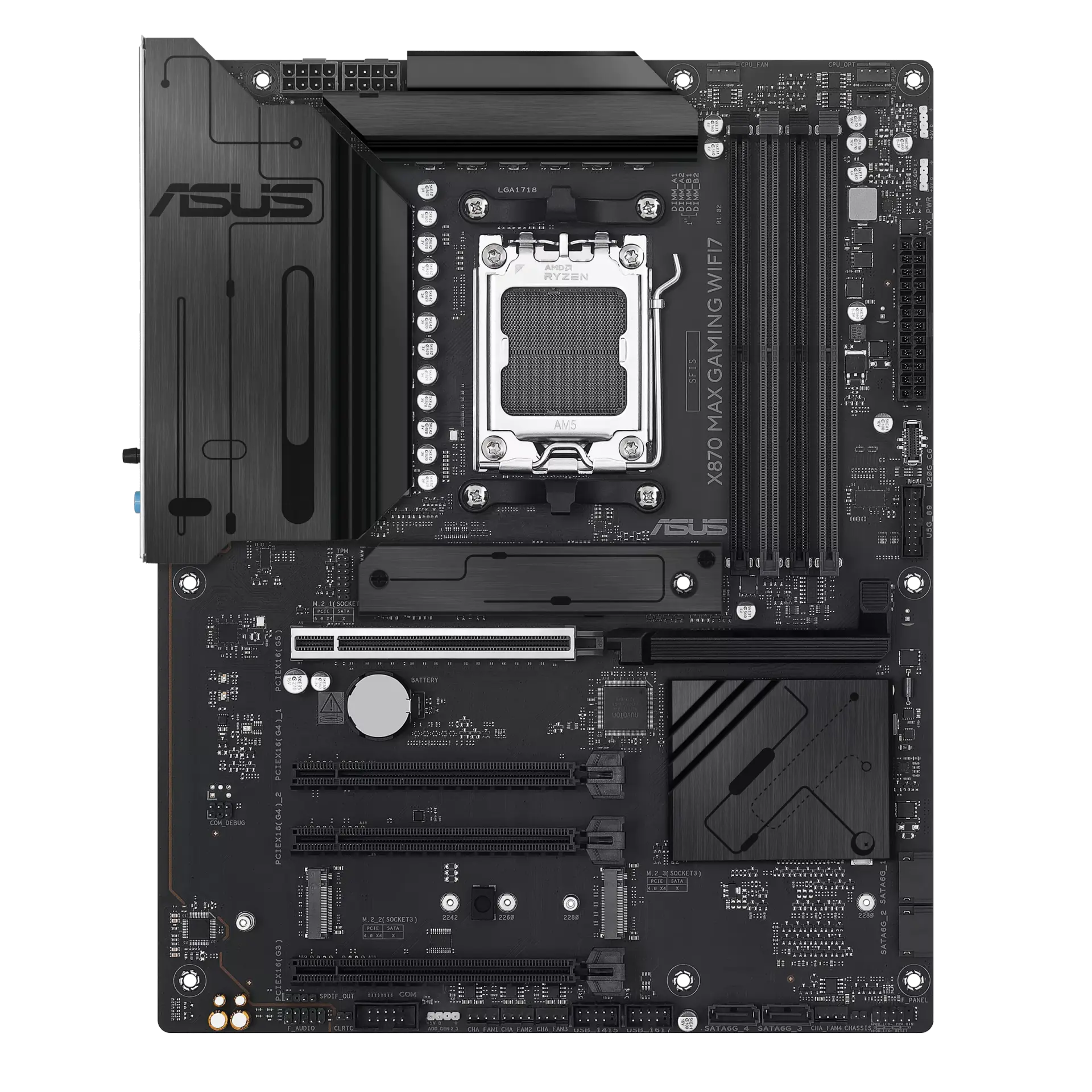
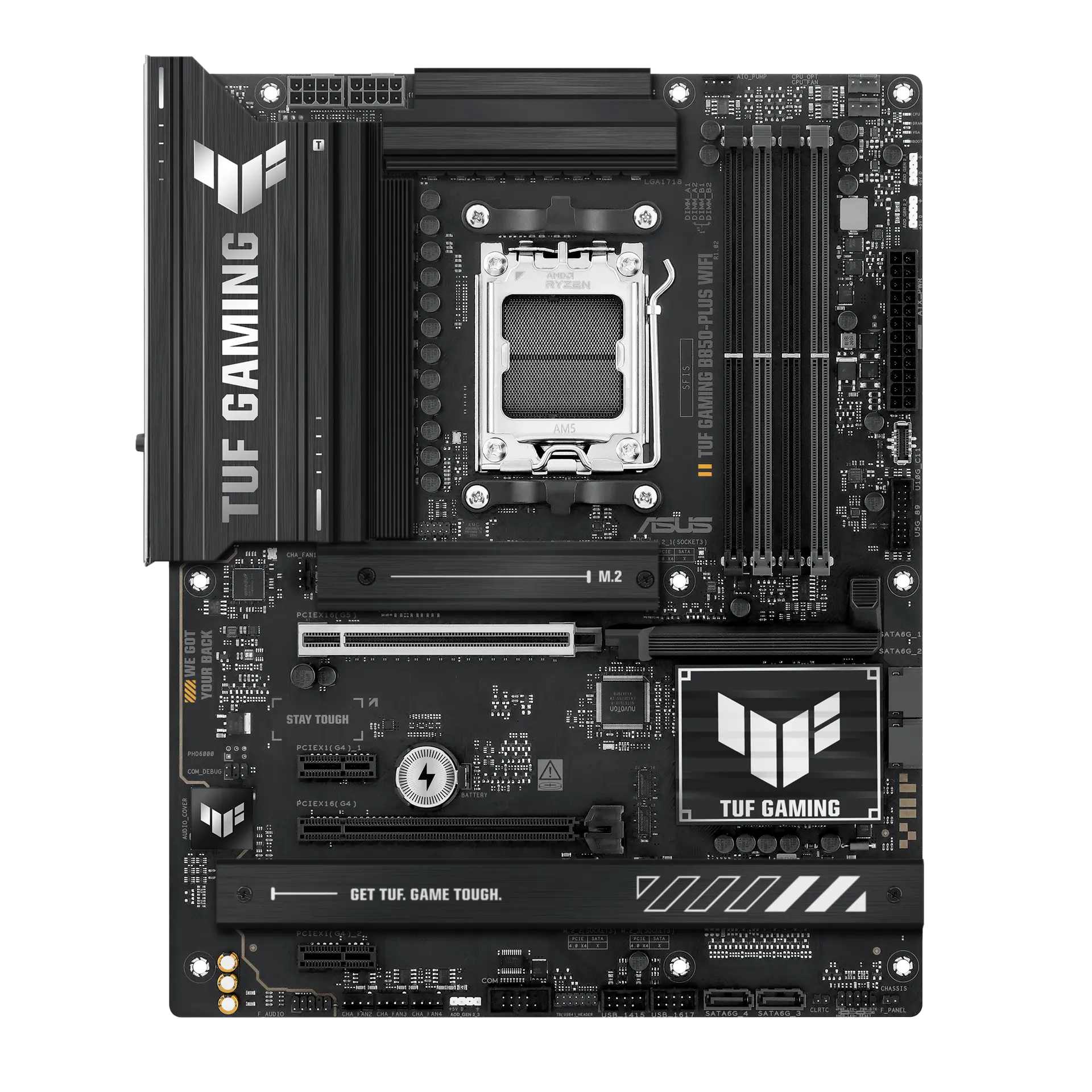
An ATX AM5 motherboard with AMD X870: four DDR5 slots rated up to DDR5-8000+ (OC), a PCIe 5.0 x16 slot plus three x1-mode slots, three M.2 slots (one PCIe 5.0 x4), two rear USB4 40 Gb/s ports, Realtek 2.5 Gb Ethernet and Wi-Fi 7.
Specifications checked 27 Sept 2026.
Amazon links open search results. Check the exact variant, current price and availability with the retailer.
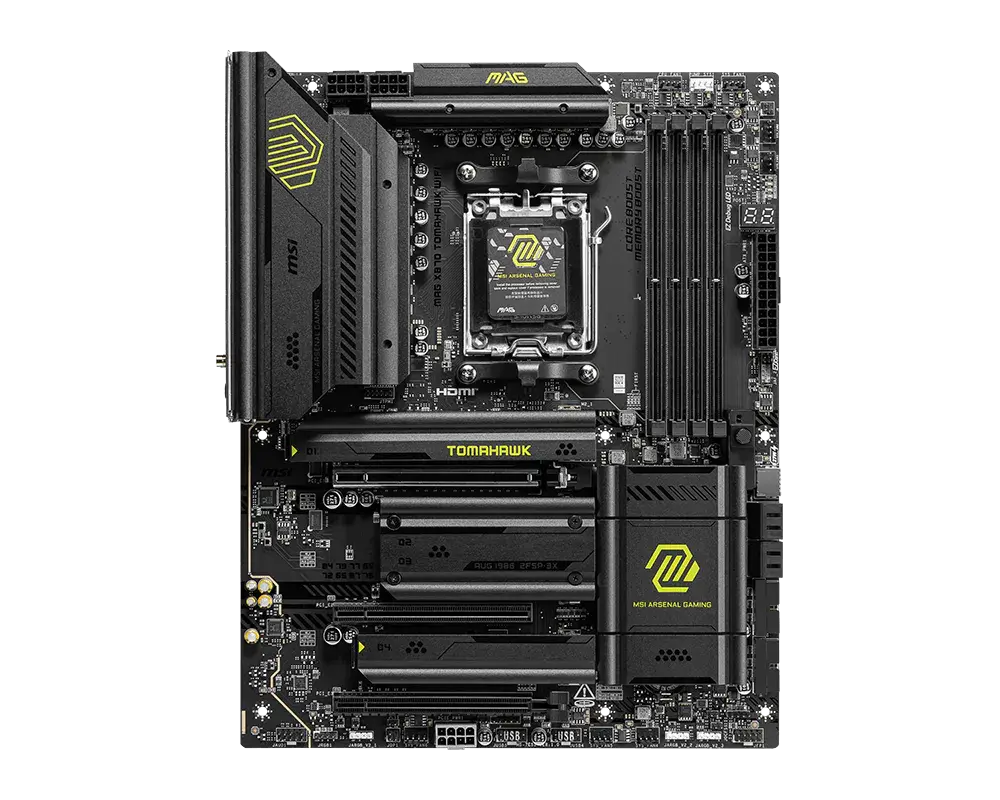
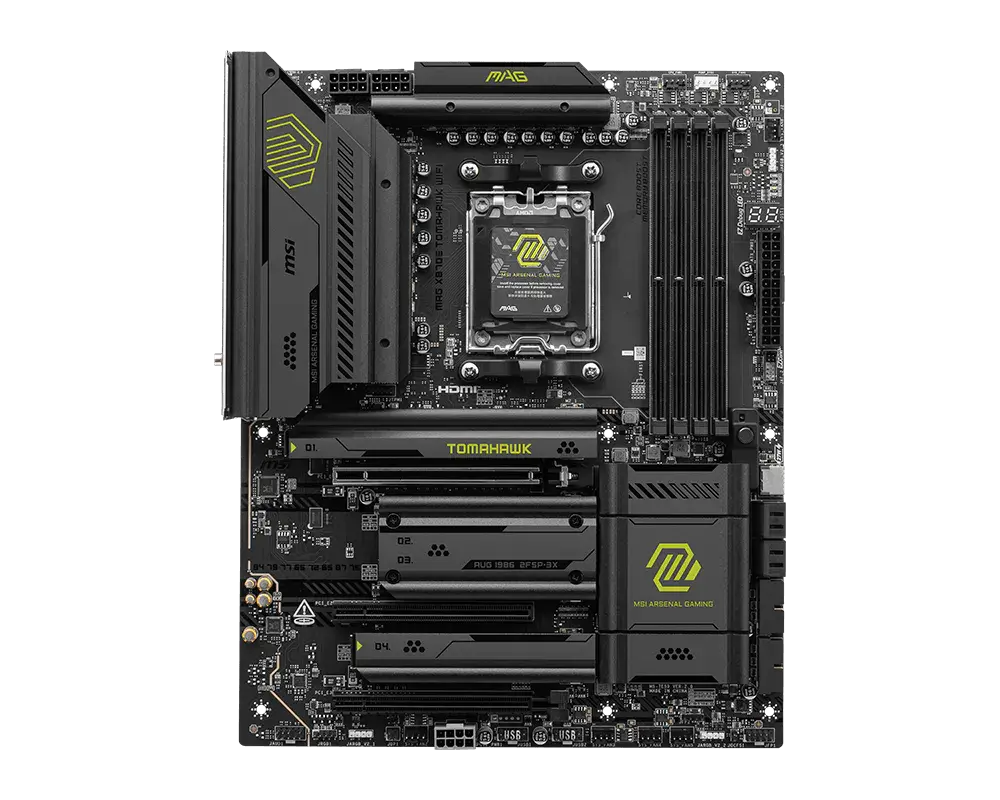
An ATX AM5 motherboard with AMD X870: four DDR5 slots rated up to DDR5-8400+ (OC), a PCIe 5.0 x16 graphics slot, four M.2 slots (two PCIe 5.0 x4), two rear USB4 40 Gb/s ports, Realtek 5 Gb Ethernet and Wi-Fi 7.
Specifications checked 7 Sept 2026.
Amazon links open search results. Check the exact variant, current price and availability with the retailer.
Search links open retailer results, not a matched listing; eBay listings are checked daily. As an Amazon Associate I earn from qualifying purchases. As an eBay Partner, we may be compensated if you make a purchase.
THE DIFFERENCES, MADE VISIBLE
Visual facts
Differences first. Select a topic for its graphic, sources and conditions.
How to read this comparison
Manufacturer facts for the exact models shown. Not a quality rating or a test result.
“Different” means the known values differ, not that one is better.
Missing or conflicting evidence is marked and never counts as a difference. Source chips hold each fact’s sources and conditions.
SPECIFICATIONS SIDE BY SIDE8 topics
SELECTED TOPIC
01 / 08
Memory type, slots and limit
Check the exact configuration and source conditions for your use.
ASUS X870 MAX GAMING WIFI74 DDR5 DIMM slots; dual channel; up to 256 GB; up to DDR5-8000+ (OC); AMD EXPO; ECC and non-ECC unbuffered
ASUS lists up to 8000+ MT/s (OC) with Ryzen 9000, 8000 and 7000 processors and AEMP. · Manufacturer specification · Supported capacity, module population and profile speeds depend on the exact CPU, installed BIOS and validated memory kit. Profile support does not guarantee an overclock.
MSI MAG X870 TOMAHAWK WIFI4 DDR5 DIMM slots; dual channel; up to 256 GB; up to DDR5-8400+ (OC); AMD EXPO; non-ECC unbuffered; CUDIMM support
The overclocked speed is MSI's 1DPC 1R maximum with Ryzen 9000; MSI lists 1DPC 2R, 2DPC 1R and 2DPC 2R up to 6400+ MT/s. JEDEC speeds are 4800–5600 MT/s. CUDIMMs run in clock-driver bypass mode only. · Manufacturer specification · Manufacturer capacity ceiling for this exact board, not included memory or a performance measurement. CPU, BIOS, DIMM population and the validated-module list determine support. DDR5 slots require DDR5 modules; DDR4 and DDR5 are not interchangeable. CUDIMM support is bypass mode only; compatibility depends on CPU and BIOS, and some combinations may not boot. Check the exact memory support list.
Plan the complete platform. Check the exact CPU-support list, required BIOS and memory validation before buying. PCIe generations and lane allocations can change with the processor. A socket match or slot count is not a guarantee that every component works together at its highest advertised setting.
ASUS X870 MAX GAMING WIFI74 DDR5 DIMM slots; dual channel; up to 256 GB; up to DDR5-8000+ (OC); AMD EXPO; ECC and non-ECC unbuffered
MSI MAG X870 TOMAHAWK WIFI4 DDR5 DIMM slots; dual channel; up to 256 GB; up to DDR5-8400+ (OC); AMD EXPO; non-ECC unbuffered; CUDIMM support
Sources
ASUS X870 MAX GAMING WIFI7
ASUS lists up to 8000+ MT/s (OC) with Ryzen 9000, 8000 and 7000 processors and AEMP. · Manufacturer specification · Supported capacity, module population and profile speeds depend on the exact CPU, installed BIOS and validated memory kit. Profile support does not guarantee an overclock.
The overclocked speed is MSI's 1DPC 1R maximum with Ryzen 9000; MSI lists 1DPC 2R, 2DPC 1R and 2DPC 2R up to 6400+ MT/s. JEDEC speeds are 4800–5600 MT/s. CUDIMMs run in clock-driver bypass mode only. · Manufacturer specification · Manufacturer capacity ceiling for this exact board, not included memory or a performance measurement. CPU, BIOS, DIMM population and the validated-module list determine support. DDR5 slots require DDR5 modules; DDR4 and DDR5 are not interchangeable. CUDIMM support is bypass mode only; compatibility depends on CPU and BIOS, and some combinations may not boot. Check the exact memory support list.
M.2_1 (2280, PCIe 5.0 x4) and M.2_2 (2242/2260/2280, PCIe 4.0 x4) are listed under the Ryzen processor; M.2_3 (2280, PCIe 4.0 x4) under the X870 chipset. · Manufacturer specification · M.2_2 is disabled whenever either USB4 port is running (adjustable in BIOS). SATA6G_3/4 are disabled when the PCIe 3.0 slot is running. With Ryzen 8000, M.2_1 runs PCIe 4.0 x4 and M.2_2 PCIe 4.0 x4/x2.
M2_1 and M2_2 connect to the CPU (PCIe 5.0 x4); M2_3 (PCIe 4.0 x2) and M2_4 (PCIe 4.0 x4) connect to the chipset. M2_1 accepts drives up to 22110; the others up to 2280. · Manufacturer specification · Ryzen 8000 reduces CPU M.2 links to PCIe 4.0; M2_2 is unavailable with Ryzen 8500/8300. M2_2 and the rear USB4 controller share CPU PCIe 5.0 x4 lanes. With M2_2 populated, each runs at x2; selecting M2_2 x4 in BIOS disables rear USB4. The USB4 controller itself supports at most PCIe 4.0 x4. PCI_E3 runs at x2 when M2_3 is used; selecting PCI_E3 x4 in BIOS disables M2_3.
Manufacturer specification · By default M.2_2 is disabled whenever either USB4 port is running (adjustable in BIOS), so all three M.2 slots and USB4 are not available together at defaults.
Manufacturer specification · Onboard M.2 storage positions only. Ryzen 8000 reduces CPU M.2 links to PCIe 4.0; M2_2 is unavailable with Ryzen 8500/8300. M2_2 and the rear USB4 controller share CPU PCIe 5.0 x4 lanes. With M2_2 populated, each runs at x2; selecting M2_2 x4 in BIOS disables rear USB4. The USB4 controller itself supports at most PCIe 4.0 x4. PCI_E3 runs at x2 when M2_3 is used; selecting PCI_E3 x4 in BIOS disables M2_3.
The PCIe 5.0 x16 slot is listed under the Ryzen processor; the three x1-mode slots under the X870 chipset. · Manufacturer specification · With Ryzen 8000 the first slot runs PCIe 4.0 x8/x4. Running the PCIe 3.0 slot disables SATA6G_3/4. See ASUS's PCIe bifurcation table.
All three slots are x16 length. PCI_E1 (PCIe 5.0 x16) uses CPU lanes; PCI_E2 (PCIe 3.0 x1) and PCI_E3 (PCIe 4.0 x4) use chipset lanes. · Manufacturer specification · All three connectors have x16 physical length. E1 uses CPU lanes: Ryzen 7000/9000 x16 Gen5; 8700/8600/8400 x8 Gen4; 8500/8300 x4 Gen4. E2/E3 use chipset lanes. M2_3 population reduces E3 to x2; forcing E3 x4 disables M2_3.
Manufacturer specification · Wireless bands and channel widths depend on local rules, the operating system and the installed module. Full Wi-Fi 7 features require Windows 11 24H2 or later; ASUS states Windows 10 supports only Wi-Fi 6. Bluetooth versions may vary by module.
MSI names the Ethernet controller Realtek 8126-CG for this board. · Manufacturer specification · Wi-Fi 7 requires supported Windows 11, drivers and access point; MSI specifies Windows 11 24H2 for full Wi-Fi 7 operation. 6 GHz availability depends on country rules. Bluetooth version depends on module vendor and drivers; no measured throughput is claimed.
Manufacturer specification · ASUS says 7.1 output needs a chassis HD audio front-panel module. A codec description is not an independent sound-quality measurement.
Manufacturer specification · Manufacturer-listed onboard audio hardware, not a measured sound-quality result. Where alternatives are listed, no particular unseen controller revision is promised.
Manufacturer specification · Requires processor integrated graphics. HDMI maximum 8K 60 Hz; USB4 display maximum 4K 60 Hz. CPU and connected equipment affect support; discrete GPU outputs are separate. M2_2 shares lanes with rear USB4. Populating it splits the link; selecting its x4 BIOS mode disables rear USB4. Controller maximum is PCIe 4.0 x4.
Evidence is missing or conflicting on at least one side. This is not a verified difference.
Rear Clear CMOS button
ASUS X870 MAX GAMING WIFI7Not verified
MSI MAG X870 TOMAHAWK WIFIYes
Sources
ASUS X870 MAX GAMING WIFI7
ASUS's complete back-panel list has no Clear CMOS button; it lists an internal Clear CMOS header instead. Omission is recorded as unconfirmed rather than a sourced absence. · Manufacturer specification
Evidence is missing or conflicting on at least one side. This is not a verified difference.
Wired Ethernet
ASUS X870 MAX GAMING WIFI7Realtek 2.5 Gb Ethernet
MSI MAG X870 TOMAHAWK WIFINot verified
Sources
ASUS X870 MAX GAMING WIFI7
Manufacturer specification · Link-rate capability; real throughput depends on the connected network, cabling and workload. ASUS also lists ASUS LANGuard.
Evidence is missing or conflicting on at least one side. This is not a verified difference.
Expansion/storage lane sharing
ASUS X870 MAX GAMING WIFI7M.2_2 is disabled when either USB4 port is running; SATA6G_3 and SATA6G_4 are disabled when PCIEX16(G3) is running (both adjustable in BIOS)
MSI MAG X870 TOMAHAWK WIFINot verified
Sources
ASUS X870 MAX GAMING WIFI7
Manufacturer specification · Read the simultaneous-use restrictions rather than assuming USB4, every M.2 slot and all SATA ports work together at defaults.
Evidence is missing or conflicting on at least one side. This is not a verified difference.
Listed memory overclocking profiles
ASUS X870 MAX GAMING WIFI7Ryzen 9000, 8000, 7000: up to 8000+ MT/s (OC)
MSI MAG X870 TOMAHAWK WIFINot verified
Sources
ASUS X870 MAX GAMING WIFI7
Manufacturer specification · These are manufacturer-listed overclocking configurations, not guaranteed stock transfer rates or tested performance. CPU family and DIMM layout remain material.
Evidence is missing or conflicting on at least one side. This is not a verified difference.
NVMe RAID modes
ASUS X870 MAX GAMING WIFI7Not verified
MSI MAG X870 TOMAHAWK WIFI0 / 1 / 5 / 10
Sources
ASUS X870 MAX GAMING WIFI7
ASUS lists AMD RAIDXpert2 levels per CPU family (Ryzen 9000: 0/1/5/10; 8000: 0/1; 7000: 0/1/10) without stating which apply to NVMe versus SATA devices. · Manufacturer specification
Evidence is missing or conflicting on at least one side. This is not a verified difference.
Rear connections
ASUS X870 MAX GAMING WIFI72 × USB4 40 Gb/s (Type-C); 1 × USB 10 Gb/s (Type-A); 3 × USB 5 Gb/s (Type-A); 4 × USB 2.0 (Type-A); 1 × HDMI; Wi-Fi module; 1 × Realtek 2.5 Gb Ethernet; 3 × audio jacks; BIOS FlashBack button
MSI MAG X870 TOMAHAWK WIFINot verified
Sources
ASUS X870 MAX GAMING WIFI7
Manufacturer specification · Connector count and listed modes describe the rear panel. There is no rear DisplayPort; the USB4 ports provide Type-C display output.
Evidence is missing or conflicting on at least one side. This is not a verified difference.
Specification market
ASUS X870 MAX GAMING WIFI7ASUS UK documentation
MSI MAG X870 TOMAHAWK WIFINot verified
Sources
ASUS X870 MAX GAMING WIFI7
Manufacturer specification · UK and US buying links are searches, not proof of stock, identical regional wireless modules, bundles or warranty. Confirm the exact model and part identifier with the retailer.
Evidence is missing or conflicting on at least one side. This is not a verified difference.
SATA RAID modes
ASUS X870 MAX GAMING WIFI7Not verified
MSI MAG X870 TOMAHAWK WIFINot verified
Sources
ASUS X870 MAX GAMING WIFI7
ASUS lists AMD RAIDXpert2 levels per CPU family (Ryzen 9000: 0/1/5/10; 8000: 0/1; 7000: 0/1/10) without stating which apply to SATA versus NVMe devices. · Manufacturer specification
MSI lists RAID modes for M.2 NVMe drives only; SATA RAID support is not stated. · Manufacturer specification · Check the manual or BIOS documentation before relying on SATA arrays.
Evidence is missing or conflicting on at least one side. This is not a verified difference.
Tool-less M.2 heatsink handling
ASUS X870 MAX GAMING WIFI7Not verified
MSI MAG X870 TOMAHAWK WIFIYes
Sources
ASUS X870 MAX GAMING WIFI7
No source recorded for this side.
MSI MAG X870 TOMAHAWK WIFI
Manufacturer specification · MSI describes tool-less SSD and Shield Frozr installation/removal under EZ M.2 Shield Frozr II. An installation convenience, not a cooling measurement; it may not suit every SSD heatsink.
Evidence is missing or conflicting on at least one side. This is not a verified difference.
Included Wi-Fi
ASUS X870 MAX GAMING WIFI7Yes
MSI MAG X870 TOMAHAWK WIFINot verified
Sources
ASUS X870 MAX GAMING WIFI7
Manufacturer specification · 2x2 Wi-Fi 7 with up to 160 MHz channels (up to 2.9 Gbps). Full Wi-Fi 7 features need Windows 11 24H2 or later; Windows 10 supports only Wi-Fi 6.
A single 2.5 Gb Ethernet port, Wi-Fi 7 limited to 160 MHz, no rear DisplayPort and an unnamed Realtek audio codec; ASUS's back-panel list includes no Clear CMOS button (an internal Clear CMOS header is listed).
M2_2 shares lanes with the rear USB4 ports (both drop to x2 when it is used) and is unavailable with Ryzen 8500/8300; a drive in M2_3 drops PCI_E3 to x2.
Manufacturer specification · Check ASUS's exact CPU support list and its required BIOS. Family support does not confirm the firmware installed on a retail board.
Manufacturer specification · Check MSI's exact CPU support list and its required BIOS. Family support does not confirm the firmware installed on a retail board.
ASUS lists up to 8000+ MT/s (OC) with Ryzen 9000, 8000 and 7000 processors and AEMP. · Manufacturer specification · Supported capacity, module population and profile speeds depend on the exact CPU, installed BIOS and validated memory kit. Profile support does not guarantee an overclock.
The overclocked speed is MSI's 1DPC 1R maximum with Ryzen 9000; MSI lists 1DPC 2R, 2DPC 1R and 2DPC 2R up to 6400+ MT/s. JEDEC speeds are 4800–5600 MT/s. CUDIMMs run in clock-driver bypass mode only. · Manufacturer specification · Manufacturer capacity ceiling for this exact board, not included memory or a performance measurement. CPU, BIOS, DIMM population and the validated-module list determine support. DDR5 slots require DDR5 modules; DDR4 and DDR5 are not interchangeable. CUDIMM support is bypass mode only; compatibility depends on CPU and BIOS, and some combinations may not boot. Check the exact memory support list.
Manufacturer specification · Manufacturer capacity ceiling for this exact board, not included memory or a performance measurement. CPU, BIOS, DIMM population and the validated-module list determine support. DDR5 slots require DDR5 modules; DDR4 and DDR5 are not interchangeable. CUDIMM support is bypass mode only; compatibility depends on CPU and BIOS, and some combinations may not boot. Check the exact memory support list.
Manufacturer specification · Physical DDR5 module positions, not included modules. Consult the board manual for population order and compatible capacities.
Manufacturer specification · These are manufacturer-listed overclocking configurations, not guaranteed stock transfer rates or tested performance. CPU family and DIMM layout remain material.
M.2_1 (2280, PCIe 5.0 x4) and M.2_2 (2242/2260/2280, PCIe 4.0 x4) are listed under the Ryzen processor; M.2_3 (2280, PCIe 4.0 x4) under the X870 chipset. · Manufacturer specification · M.2_2 is disabled whenever either USB4 port is running (adjustable in BIOS). SATA6G_3/4 are disabled when the PCIe 3.0 slot is running. With Ryzen 8000, M.2_1 runs PCIe 4.0 x4 and M.2_2 PCIe 4.0 x4/x2.
M2_1 and M2_2 connect to the CPU (PCIe 5.0 x4); M2_3 (PCIe 4.0 x2) and M2_4 (PCIe 4.0 x4) connect to the chipset. M2_1 accepts drives up to 22110; the others up to 2280. · Manufacturer specification · Ryzen 8000 reduces CPU M.2 links to PCIe 4.0; M2_2 is unavailable with Ryzen 8500/8300. M2_2 and the rear USB4 controller share CPU PCIe 5.0 x4 lanes. With M2_2 populated, each runs at x2; selecting M2_2 x4 in BIOS disables rear USB4. The USB4 controller itself supports at most PCIe 4.0 x4. PCI_E3 runs at x2 when M2_3 is used; selecting PCI_E3 x4 in BIOS disables M2_3.
Manufacturer specification · By default M.2_2 is disabled whenever either USB4 port is running (adjustable in BIOS), so all three M.2 slots and USB4 are not available together at defaults.
Manufacturer specification · Onboard M.2 storage positions only. Ryzen 8000 reduces CPU M.2 links to PCIe 4.0; M2_2 is unavailable with Ryzen 8500/8300. M2_2 and the rear USB4 controller share CPU PCIe 5.0 x4 lanes. With M2_2 populated, each runs at x2; selecting M2_2 x4 in BIOS disables rear USB4. The USB4 controller itself supports at most PCIe 4.0 x4. PCI_E3 runs at x2 when M2_3 is used; selecting PCI_E3 x4 in BIOS disables M2_3.
Manufacturer specification · SATA 6 Gb/s connectors, not supplied drives or power cables. Ryzen 8000 reduces CPU M.2 links to PCIe 4.0; M2_2 is unavailable with Ryzen 8500/8300. M2_2 and the rear USB4 controller share CPU PCIe 5.0 x4 lanes. With M2_2 populated, each runs at x2; selecting M2_2 x4 in BIOS disables rear USB4. The USB4 controller itself supports at most PCIe 4.0 x4. PCI_E3 runs at x2 when M2_3 is used; selecting PCI_E3 x4 in BIOS disables M2_3.
ASUS lists AMD RAIDXpert2 levels per CPU family (Ryzen 9000: 0/1/5/10; 8000: 0/1; 7000: 0/1/10) without stating which apply to NVMe versus SATA devices. · Manufacturer specification
Manufacturer specification · MSI describes tool-less SSD and Shield Frozr installation/removal under EZ M.2 Shield Frozr II. An installation convenience, not a cooling measurement; it may not suit every SSD heatsink.
Expansion slots and electrical linksDifferentSources
ASUS X870 MAX GAMING WIFI7
The PCIe 5.0 x16 slot is listed under the Ryzen processor; the three x1-mode slots under the X870 chipset. · Manufacturer specification · With Ryzen 8000 the first slot runs PCIe 4.0 x8/x4. Running the PCIe 3.0 slot disables SATA6G_3/4. See ASUS's PCIe bifurcation table.
All three slots are x16 length. PCI_E1 (PCIe 5.0 x16) uses CPU lanes; PCI_E2 (PCIe 3.0 x1) and PCI_E3 (PCIe 4.0 x4) use chipset lanes. · Manufacturer specification · All three connectors have x16 physical length. E1 uses CPU lanes: Ryzen 7000/9000 x16 Gen5; 8700/8600/8400 x8 Gen4; 8500/8300 x4 Gen4. E2/E3 use chipset lanes. M2_3 population reduces E3 to x2; forcing E3 x4 disables M2_3.
Manufacturer specification · Read the simultaneous-use restrictions rather than assuming USB4, every M.2 slot and all SATA ports work together at defaults.
Manufacturer specification · MSI EZ PCIe Release operates the graphics-card slot latch. This is an installation control, not a PCIe bandwidth or gaming-performance measurement.
Manufacturer specification · Connector count and listed modes describe the rear panel. There is no rear DisplayPort; the USB4 ports provide Type-C display output.
Manufacturer specification · Requires processor integrated graphics. HDMI maximum 8K 60 Hz; USB4 display maximum 4K 60 Hz. CPU and connected equipment affect support; discrete GPU outputs are separate. M2_2 shares lanes with rear USB4. Populating it splits the link; selecting its x4 BIOS mode disables rear USB4. Controller maximum is PCIe 4.0 x4.
HDMI 2.1 FRL; two USB-C DisplayPort 1.4 HBR3 outputs
Audio hardwareDifferentSources
ASUS X870 MAX GAMING WIFI7
Manufacturer specification · ASUS says 7.1 output needs a chassis HD audio front-panel module. A codec description is not an independent sound-quality measurement.
Manufacturer specification · Manufacturer-listed onboard audio hardware, not a measured sound-quality result. Where alternatives are listed, no particular unseen controller revision is promised.
Manufacturer specification · M2_2 shares lanes with rear USB4. Populating it splits the link; selecting its x4 BIOS mode disables rear USB4. Controller maximum is PCIe 4.0 x4.
Manufacturer specification · M2_2 shares lanes with rear USB4. Populating it splits the link; selecting its x4 BIOS mode disables rear USB4. Controller maximum is PCIe 4.0 x4.
Manufacturer specification · Nominal port signalling rate, not measured throughput. M2_2 shares lanes with rear USB4. Populating it splits the link; selecting its x4 BIOS mode disables rear USB4. Controller maximum is PCIe 4.0 x4.
Manufacturer specification · Wireless bands and channel widths depend on local rules, the operating system and the installed module. Full Wi-Fi 7 features require Windows 11 24H2 or later; ASUS states Windows 10 supports only Wi-Fi 6. Bluetooth versions may vary by module.
MSI names the Ethernet controller Realtek 8126-CG for this board. · Manufacturer specification · Wi-Fi 7 requires supported Windows 11, drivers and access point; MSI specifies Windows 11 24H2 for full Wi-Fi 7 operation. 6 GHz availability depends on country rules. Bluetooth version depends on module vendor and drivers; no measured throughput is claimed.
Realtek 8126 5 Gb Ethernet; Wi-Fi 7; Bluetooth 5.4
Wired EthernetSources
ASUS X870 MAX GAMING WIFI7
Manufacturer specification · Link-rate capability; real throughput depends on the connected network, cabling and workload. ASUS also lists ASUS LANGuard.
Manufacturer specification · 2x2 Wi-Fi 7 with up to 160 MHz channels (up to 2.9 Gbps). Full Wi-Fi 7 features need Windows 11 24H2 or later; Windows 10 supports only Wi-Fi 6.
1 × 24-pin Main Power connector 2 × 8-pin +12V CPU Power connectors
Not provided
Rear Clear CMOS buttonSources
ASUS X870 MAX GAMING WIFI7
ASUS's complete back-panel list has no Clear CMOS button; it lists an internal Clear CMOS header instead. Omission is recorded as unconfirmed rather than a sourced absence. · Manufacturer specification
Manufacturer specification · UK and US buying links are searches, not proof of stock, identical regional wireless modules, bundles or warranty. Confirm the exact model and part identifier with the retailer.
Show unverified (1)Not verified, not provided or conflicting for both products. Kept for completeness; never counted as a difference.
Specifications without verified values for either product
SATA RAID modesSources
ASUS X870 MAX GAMING WIFI7
ASUS lists AMD RAIDXpert2 levels per CPU family (Ryzen 9000: 0/1/5/10; 8000: 0/1; 7000: 0/1/10) without stating which apply to SATA versus NVMe devices. · Manufacturer specification
MSI lists RAID modes for M.2 NVMe drives only; SATA RAID support is not stated. · Manufacturer specification · Check the manual or BIOS documentation before relying on SATA arrays.
Each record represents an explicitly checked model and configuration. Original import: 5 Sept 2026; this is not its verification date. This is not a list of current offers or a popularity ranking.