Skip to comparison
versus.deals
Menu
Browse versus.deals
MONITORS · YOUR NEXT FACE-OFF

ASUS ROG Swift OLED PG32UCDM vs Philips Evnia 27M2N8500

Real specs. Clear sources.Exact models · UK & US buying links

Compared products

YOUR FIRST CHOICE

ASUS ROG Swift OLED PG32UCDM

UK specification
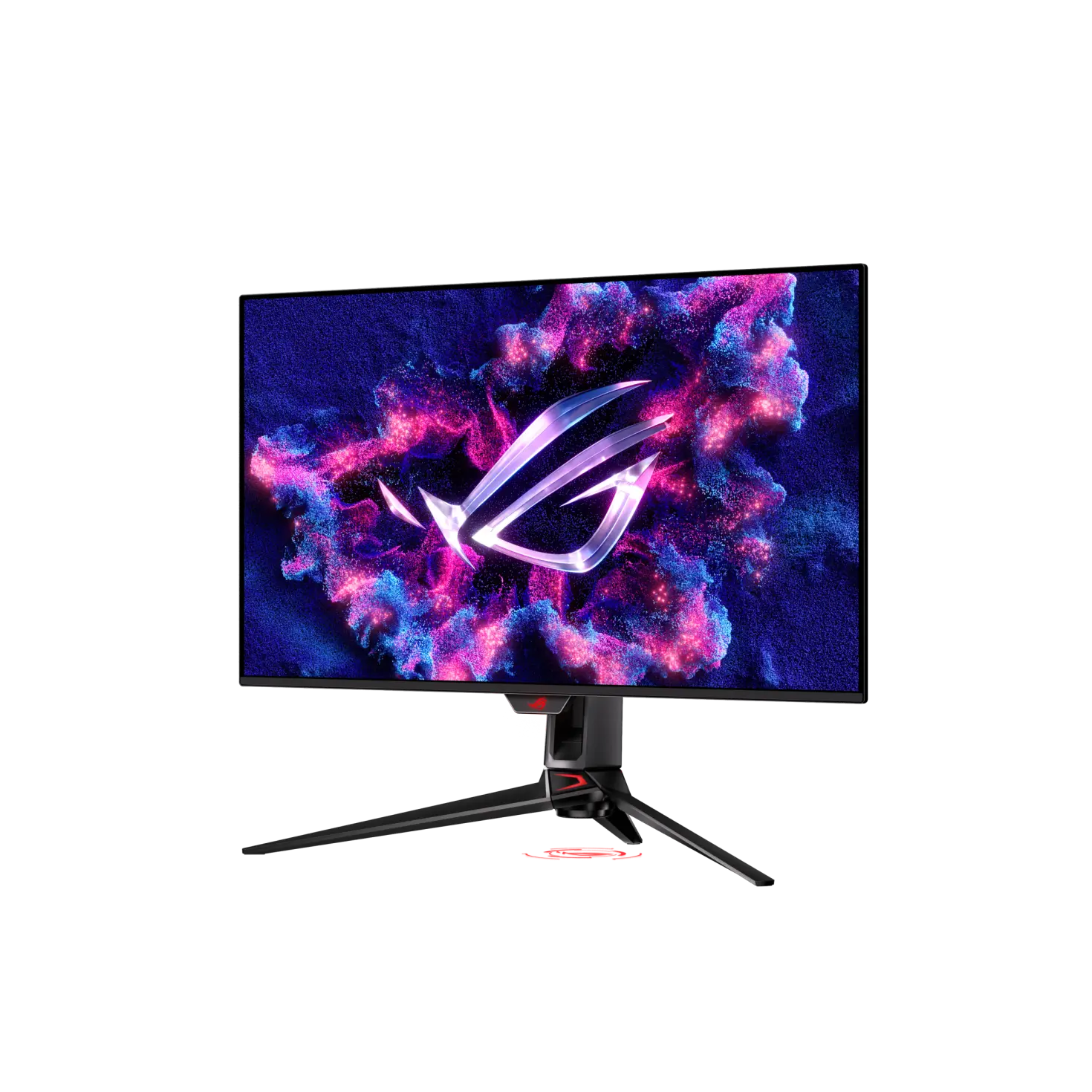
ASUS ROG Swift OLED PG32UCDM monitor at a front-left angle on its tripod-style stand, with ROG screen artwork.
Exact model & source notes

A 31.5-inch 3840 × 2160 QD-OLED gaming monitor rated at 240 Hz on HDMI 2.1, DisplayPort 1.4 (DSC) and USB-C (the user guide gives up to 3840 × 2160 at 144 Hz on USB-C with DSC on when its Type-C bandwidth is set to USB 3.2), with DisplayHDR 400 True Black, Dolby Vision, USB-C power delivery of 65 W by default or 90 W when enabled in the on-screen menu, a KVM switch and a 3-year warranty that includes burn-in.

Specifications checked 26 Sept 2026.

Amazon links open search results. Check the exact variant, current price and availability with the retailer.

Manufacturer specifications

WHICH SUITS YOU?

Choose the ASUS ROG Swift OLED PG32UCDM for

  • Higher stated native resolution: 3840 × 2160 vs 2560 × 1440
  • Larger stated screen diagonal: 31.5 in vs 26.5 in
  • USB-C connection: Yes vs No

Choose the Philips Evnia 27M2N8500 for

  • Higher stated refresh rate: 360 Hz vs 240 Hz
  • Smaller stated screen diagonal: 26.5 in vs 31.5 in
  • Built-in speakers: Yes vs No
Built from verified specifications that differ. Not a rating or a recommendation.
See the 29 verified differences
THE CONTENDER

Philips Evnia 27M2N8500

UK/EU model 27M2N8500/00

Philips Evnia 27M2N8500 white QD-OLED monitor from the front on its white V-shaped stand, with a racing-game scene on screen.
Exact model & source notes

A 26.5-inch 2560 × 1440 QD-OLED gaming monitor rated up to 360 Hz on both HDMI 2.1 and DisplayPort, with DisplayHDR True Black 400, FreeSync Premium Pro, certified G-SYNC Compatible support over DisplayPort and a 0.03 ms grey-to-grey claim. It includes 3-sided, AI-enhanced Ambiglow lighting, two 5 W speakers, a two-port USB-A hub and a height, tilt and swivel stand.

Specifications checked 26 Sept 2026.

Amazon links open search results. Check the exact variant, current price and availability with the retailer.

Manufacturer specifications

ASUS ROG Swift OLED PG32UCDM UK & US retailers

UK & US price history: no verified listing yet

Philips Evnia 27M2N8500 UK & US retailers

UK & US price history: no verified listing yet

Search links open retailer results, not a matched listing; eBay listings are checked daily. As an Amazon Associate I earn from qualifying purchases. As an eBay Partner, we may be compensated if you make a purchase.

THE DIFFERENCES, MADE VISIBLE

Visual facts

Differences first. Select a topic for its graphic, sources and conditions.

How to read this comparison
  • Manufacturer facts for the exact models shown. Not a quality rating or a test result.
  • “Different” means the known values differ, not that one is better.
  • Missing or conflicting evidence is marked and never counts as a difference. Source chips hold each fact’s sources and conditions.
SPECIFICATIONS SIDE BY SIDE7 topics
SELECTED TOPIC
01 / 07

Native resolution

Check the exact configuration and source conditions for your use.

ASUS ROG Swift OLED PG32UCDM3840 × 2160

Manufacturer specification

Philips Evnia 27M2N85002560 × 1440

Manufacturer specification

Explore the full specifications

Match the monitor to the connection. Refresh limits depend on the input, cable and source device. Confirm the exact regional ports, stand adjustment and mount. Manufacturer response-time methods such as MPRT and GtG are different; neither the image nor these figures establish an independent motion or colour-quality test.

WHAT CHANGES BETWEEN THEM?

Key differences

Full specifications ↓

29 verified differences, most decision-relevant first. 7 are also drawn in Visual facts above. Missing information stays separate.

Refresh rate

In Visual facts
ASUS ROG Swift OLED PG32UCDM240 Hz
Philips Evnia 27M2N8500360 Hz
Sources
ASUS ROG Swift OLED PG32UCDM

Manufacturer specification · ASUS lists up to 240 Hz on HDMI, DisplayPort and USB-C. The user guide says that with the USB-C port’s Type-C Bandwidth set to USB 3.2, USB-C is up to 3840 × 2160 at 144 Hz when DSC support is on.

ASUS ROG UK — ROG Swift OLED PG32UCDM technical specificationsASUS — PG32UCDM Series OLED monitor user guide (English, PDF)
Philips Evnia 27M2N8500

Manufacturer specification · Philips lists 360 Hz on both HDMI and DisplayPort.

Philips UK — Evnia 27M2N8500/00 specification data (Philips product-catalogue feed behind the UK product page’s Technical specifications)

Check the exact configuration and source conditions for your use.

Screen diagonal

In Visual facts
ASUS ROG Swift OLED PG32UCDM31.5 in
Philips Evnia 27M2N850026.5 in
Sources
ASUS ROG Swift OLED PG32UCDM

Manufacturer specification

ASUS ROG UK — ROG Swift OLED PG32UCDM technical specifications
Philips Evnia 27M2N8500

Manufacturer specification · Philips lists a 26.5-inch (67.3 cm) panel, marketed in the 27-inch class.

Philips UK — Evnia 27M2N8500/00 specification data (Philips product-catalogue feed behind the UK product page’s Technical specifications)

Check the exact configuration and source conditions for your use.

Inputs and versions

In Visual facts
ASUS ROG Swift OLED PG32UCDM1 × USB-C (DisplayPort Alt Mode, USB upstream; 65 W power delivery by default, 90 W when enabled in the on-screen menu); 1 × DisplayPort 1.4 (DSC); 2 × HDMI 2.1 (FRL); 1 × USB 3.2 Gen 1 Type-B upstream; 3 × USB 3.2 Gen 1 Type-A downstream; earphone jack; optical S/PDIF output
Philips Evnia 27M2N85002 × HDMI 2.1; 1 × DisplayPort 1.4; USB-B upstream; 2 × USB-A 5 Gbps downstream; headphone out
Sources
ASUS ROG Swift OLED PG32UCDM

Manufacturer specification · The user guide says the earphone jack is only available when an HDMI, DisplayPort or USB-C cable is connected.

ASUS ROG UK — ROG Swift OLED PG32UCDM technical specificationsASUS ROG UK — ROG Swift OLED PG32UCDM product page and galleryASUS — PG32UCDM Series OLED monitor user guide (English, PDF)

Check the exact configuration and source conditions for your use.

USB-C connection

In Visual facts
ASUS ROG Swift OLED PG32UCDMYes
Philips Evnia 27M2N8500No
Sources
ASUS ROG Swift OLED PG32UCDM

Manufacturer specification

ASUS ROG UK — ROG Swift OLED PG32UCDM technical specifications
Philips Evnia 27M2N8500

Manufacturer specification · The complete input list and USB hub entry name HDMI, DisplayPort, USB-B and USB-A only.

Philips UK — Evnia 27M2N8500/00 specification data (Philips product-catalogue feed behind the UK product page’s Technical specifications)

Check the exact configuration and source conditions for your use.

HDR support

In Visual facts
ASUS ROG Swift OLED PG32UCDMHDR10; Dolby Vision; VESA DisplayHDR 400 True Black
Philips Evnia 27M2N8500VESA DisplayHDR True Black 400
Sources
ASUS ROG Swift OLED PG32UCDM

Manufacturer specification · The user guide says Dolby Vision requires monitor firmware MCM105/305 or higher; the product page links a Dolby Vision firmware update.

ASUS ROG UK — ROG Swift OLED PG32UCDM technical specificationsASUS ROG UK — ROG Swift OLED PG32UCDM product page and galleryASUS — PG32UCDM Series OLED monitor user guide (English, PDF)
Philips Evnia 27M2N8500

Manufacturer specification · Philips lists HDR modes: HDR Game, HDR Movie, HDR Photo and VESA DisplayHDR certified level.

Philips UK — Evnia 27M2N8500/00 specification data (Philips product-catalogue feed behind the UK product page’s Technical specifications)Philips UK — Evnia QD-OLED gaming monitor 27M2N8500/00 product page

Check the exact configuration and source conditions for your use.

Show 23 more verified differences

Built-in speakers

In Visual facts
ASUS ROG Swift OLED PG32UCDMNo
Philips Evnia 27M2N8500Yes
Sources
ASUS ROG Swift OLED PG32UCDM

Manufacturer specification

ASUS ROG UK — ROG Swift OLED PG32UCDM technical specifications

Check the actual speakers and audio connectors. Speaker wattage is not measured loudness or sound quality, and a line input is not a headphone output.

Declared variable-refresh range

ASUS ROG Swift OLED PG32UCDM48–240 Hz
Philips Evnia 27M2N850048–360 Hz
Sources
ASUS ROG Swift OLED PG32UCDM

Manufacturer specification · The user guide says Variable Refresh Rate can only be activated within 48–240 Hz. The technical table’s wider HDMI 24–240 Hz figure is an input signal-frequency range, recorded separately.

ASUS ROG UK — ROG Swift OLED PG32UCDM technical specificationsASUS — PG32UCDM Series OLED monitor user guide (English, PDF)

Check the exact configuration and source conditions for your use.

Listed accessories

ASUS ROG Swift OLED PG32UCDMDisplayPort cable; HDMI Ultra High Speed cable; power adapter; power cord; quick start guide; ROG pouch; ROG sticker; USB 3.2 cable; USB-C cable; VESA mount kit; warranty card
Philips Evnia 27M2N8500Monitor with stand; DP cable; HDMI cable; USB upstream (B-A) cable; power cable; user documentation
Sources
ASUS ROG Swift OLED PG32UCDM

Manufacturer specification · ASUS says accessories vary by region; the US page lists a shorter accessory set. The user guide lists quick start guide, warranty card, power adapter, power cord, ROG welcome card with envelope, ROG wall mount kit, ROG sticker and ROG pouch, with HDMI, DisplayPort, USB Type-A to Type-B and USB Type-C cables marked optional. The same guide says the ROG wall mount kit attaches to the back of the monitor after the arm/base is detached, and that the VESA wall mount kit (100 x 100 mm) is purchased separately; the UK table's 'VESA mount kit' entry is read with that note.

ASUS ROG UK — ROG Swift OLED PG32UCDM technical specificationsASUS — PG32UCDM Series OLED monitor user guide (English, PDF)

Check the exact configuration and source conditions for your use.

Colour-accuracy claim

ASUS ROG Swift OLED PG32UCDMΔE < 2
Philips Evnia 27M2N8500Delta E <2 (sRGB)
Sources
ASUS ROG Swift OLED PG32UCDM

Manufacturer specification · Manufacturer claim; test conditions not stated.

ASUS ROG UK — ROG Swift OLED PG32UCDM technical specifications
Philips Evnia 27M2N8500

Manufacturer specification · Listed in the UK and US specification feeds. A manufacturer claim in the sRGB colour space, not an independent measurement; Philips does not mention a per-unit calibration report on these pages.

Philips UK — Evnia 27M2N8500/00 specification data (Philips product-catalogue feed behind the UK product page’s Technical specifications)Philips USA — Evnia 27M2N8500/27 specification data

Check the exact configuration and source conditions for your use.

Declared colour-gamut figures

ASUS ROG Swift OLED PG32UCDMDCI-P3 99%
Philips Evnia 27M2N8500DCI-P3 98.5%; sRGB 147.5%; NTSC 120%; Adobe RGB 118% (typical)
Sources
ASUS ROG Swift OLED PG32UCDM

Manufacturer specification · ASUS does not state the CIE basis.

ASUS ROG UK — ROG Swift OLED PG32UCDM technical specifications
Philips Evnia 27M2N8500

Manufacturer specification · Philips typical figures. The product-page footnote states the basis: DCI-P3 is coverage based on CIE 1976; sRGB is area based on CIE 1931; NTSC and Adobe RGB are area based on CIE 1976. Area figures above 100% describe relative gamut size, not coverage.

Philips UK — Evnia 27M2N8500/00 specification data (Philips product-catalogue feed behind the UK product page’s Technical specifications)Philips UK — Evnia QD-OLED gaming monitor 27M2N8500/00 product page

Check the exact configuration and source conditions for your use.

Cooling

ASUS ROG Swift OLED PG32UCDMCustom passive heatsink with top vents in the back cover; graphene film behind the QD-OLED panel
Philips Evnia 27M2N8500Integrated graphene cooling shield
Sources
ASUS ROG Swift OLED PG32UCDM

Manufacturer specification · ASUS says the heatsink, airflow design and graphene film improve heat management to reduce the risk of burn-in. ASUS describes the heatsink as passive but does not separately state that the monitor has no fan.

ASUS ROG UK — ROG Swift OLED PG32UCDM product page and gallery
Philips Evnia 27M2N8500

Manufacturer specification · Philips says the graphene shield disperses heat generated by the panel’s blue light to protect QD-OLED colours from fading over time. A manufacturer claim, not a burn-in guarantee.

Philips UK — Evnia QD-OLED gaming monitor 27M2N8500/00 product page

Check the exact configuration and source conditions for your use.

Declared power limits

ASUS ROG Swift OLED PG32UCDMOn: <42 W; power saving: <0.5 W; off: <0.3 W
Philips Evnia 27M2N8500Standby 0.5 W (typ.); off 0.3 W (typ.)
Sources
ASUS ROG Swift OLED PG32UCDM

Manufacturer specification · Upper bounds; not typical running-power measurements. The user guide writes the on-mode figure as “< 42 W (Typ.)”, measured at a screen brightness of 200 nits without audio, USB or card-reader connections.

ASUS ROG UK — ROG Swift OLED PG32UCDM technical specificationsASUS — PG32UCDM Series OLED monitor user guide (English, PDF)

Check the exact configuration and source conditions for your use.

On-screen gaming tools

ASUS ROG Swift OLED PG32UCDMGamePlus (FPS Counter, Crosshair with Dynamic Crosshair, Sniper, Sniper Night Vision, Timer, Stopwatch, Display Alignment); Shadow Boost and Dynamic Shadow Boost; GameFast Input; Trace Free; Aspect Control (27-inch and 24.5-inch simulation); Uniform Brightness; Auto Low Latency Mode; DisplayWidget Center software
Philips Evnia 27M2N8500Smart Crosshair; Smart Sniper; Shadow Boost; Stark Shadow Boost; Low Input Lag; SmartImage game
Sources
ASUS ROG Swift OLED PG32UCDM

Manufacturer specification · Named ASUS functions from the UK technical table, product page and user guide. The guide says Aspect Control disables variable refresh rate, PIP/PBP and ELMB, and that Uniform Brightness keeps the maximum screen brightness from changing with the displayed image size. DisplayWidget Center is desktop software for changing monitor and OLED settings with a mouse.

ASUS ROG UK — ROG Swift OLED PG32UCDM technical specificationsASUS ROG UK — ROG Swift OLED PG32UCDM product page and galleryASUS — PG32UCDM Series OLED monitor user guide (English, PDF)
Philips Evnia 27M2N8500

Manufacturer specification · Named Philips game functions from the UK and US specification feeds. Philips says Smart Crosshair changes the crosshair to the complementary colour of the background. No input-lag figure is published.

Philips UK — Evnia 27M2N8500/00 specification data (Philips product-catalogue feed behind the UK product page’s Technical specifications)Philips UK — Evnia QD-OLED gaming monitor 27M2N8500/00 product pagePhilips USA — Evnia 27M2N8500/27 specification data

Check the exact configuration and source conditions for your use.

HDCP

ASUS ROG Swift OLED PG32UCDMHDCP 2.2
Philips Evnia 27M2N8500HDCP 1.4, 2.2 and 2.3 (HDMI / DisplayPort)
Sources
ASUS ROG Swift OLED PG32UCDM

Manufacturer specification

ASUS ROG UK — ROG Swift OLED PG32UCDM technical specifications
Philips Evnia 27M2N8500

Manufacturer specification · UK feed; the US feed lists HDCP 1.4 and 2.2 only.

Philips UK — Evnia 27M2N8500/00 specification data (Philips product-catalogue feed behind the UK product page’s Technical specifications)

Check the exact configuration and source conditions for your use.

OLED care features

ASUS ROG Swift OLED PG32UCDMASUS OLED Care (pixel cleaning, screen saver, screen move, logo brightness adjustment); proximity sensor
Philips Evnia 27M2N8500Pixel orbiting (reserved border pixels: 2576 × 1456 total, 2560 × 1440 active)
Sources
ASUS ROG Swift OLED PG32UCDM

Manufacturer specification · OLED Care functions named on the UK product page and in the user guide. The user guide says the proximity sensor turns the monitor off when no presence is detected within a selectable 50–110 cm range over the preset time.

ASUS ROG UK — ROG Swift OLED PG32UCDM technical specificationsASUS ROG UK — ROG Swift OLED PG32UCDM product page and galleryASUS — PG32UCDM Series OLED monitor user guide (English, PDF)
Philips Evnia 27M2N8500

Manufacturer specification · Product-page footnote: extra pixels on each side are reserved for pixel orbiting. These Philips pages do not itemise other OLED care functions; not a burn-in guarantee.

Philips UK — Evnia QD-OLED gaming monitor 27M2N8500/00 product page

Check the exact configuration and source conditions for your use.

GameVisual picture modes

ASUS ROG Swift OLED PG32UCDMScenery; Racing; Cinema; RTS/RPG; FPS; sRGB Cal; MOBA; Night Vision; User
Philips Evnia 27M2N8500FPS; Racing; RTS (with SmartFrame); Gamer 1; Gamer 2
Sources
ASUS ROG Swift OLED PG32UCDM

Manufacturer specification · The product page describes seven GameVisual presets (Racing, MOBA, Cinema, RTS/RPG, FPS, sRGB, Scenery); the user guide lists nine, adding Night Vision and User Mode and naming the sRGB preset “sRGB Cal”. The guide says GameVisual is unavailable while HDR content is displayed.

ASUS ROG UK — ROG Swift OLED PG32UCDM technical specificationsASUS ROG UK — ROG Swift OLED PG32UCDM product page and galleryASUS — PG32UCDM Series OLED monitor user guide (English, PDF)
Philips Evnia 27M2N8500

Manufacturer specification · Modes described on the product page for the SmartImage game OSD; Gamer 1 and Gamer 2 store personalised settings. The specification feeds do not list the modes.

Philips UK — Evnia 27M2N8500/00 specification data (Philips product-catalogue feed behind the UK product page’s Technical specifications)Philips UK — Evnia QD-OLED gaming monitor 27M2N8500/00 product page

Check the exact configuration and source conditions for your use.

Power arrangement

ASUS ROG Swift OLED PG32UCDMExternal power adapter; AC input 100–240 V, 50/60 Hz
Philips Evnia 27M2N8500Internal; 100–240 VAC, 50–60 Hz
Sources
ASUS ROG Swift OLED PG32UCDM

Manufacturer specification

ASUS ROG UK — ROG Swift OLED PG32UCDM technical specifications

Check the exact configuration and source conditions for your use.

Regional configuration

ASUS ROG Swift OLED PG32UCDMPart numbers as observed on 26 September 2026: the ROG UK specification page’s data lists part 90LM09T0-B01370 and its Buy Now configuration link is 90LM09T0-B013A1; the ROG US specification page’s schema.org sku is 90LM09T0-B013B0, its configuration link is 90LM09T0-B013B2 and its page data lists part 90LM09T0-B01310. ASUS does not say which code applies to which market or configuration, so no single UK part number is asserted. The US table gives the same size, resolution, input, refresh-range, power, stand, dimension and weight figures and the same 3-year burn-in warranty. It omits rows present in the UK table (DCI-P3; panel type; display surface; contrast; response time; colour accuracy; display colours; HDR10; maximum refresh rate; ASUS OLED Care; GameFast Input; KVM switch; colour calibration e-report; the Audio section; 1/4-inch tripod socket; proximity sensor; backlight type; colour-temperature selection; 6-axis colour and gamma adjustment; PIP/PBP; and the TÜV Low Blue Light (Hardware Solution) and AMD FreeSync Premium Pro certificates) and lists a shorter accessory set without the HDMI, USB 3.2 and USB-C cables or VESA mount kit. These are omissions, not contrary values.
Philips Evnia 27M2N8500UK/EU SKU 27M2N8500/00; US SKU 27M2N8500/27. The US specification feed lists the same panel, 360 Hz, ports, brightness, dimensions and weights, but swivel ±30° (UK: ±20°) and HDCP 1.4/2.2 without the HDCP 2.3 listed in the UK feed; it has no “What’s in the box” section.
Sources

Lighting effect

ASUS ROG Swift OLED PG32UCDMAura RGB (Off, Rainbow, Color Cycle, Static, Breathing, Strobing) and Aura Sync; projected ROG logo at the base; LIGHT IN MOTION stand-light brightness (Off to Level 3)
Philips Evnia 27M2N8500AI-enhanced Ambiglow (3-sided); Windows Dynamic Lighting
Sources
ASUS ROG Swift OLED PG32UCDM

Manufacturer specification · The UK technical table lists Aura Sync and the UK product page a projected ROG logo at the base of the monitor. The user guide’s Lighting Effect menu lists Aura RGB effects (R/G/B/C/M/Y colour choice for Static, Breathing and Strobing), Aura Sync (which disables the Aura RGB setting) and LIGHT IN MOTION, which sets the brightness of the light on the stand from Off to Level 3. The guide says Aura lighting is controlled by Armoury Crate software, and activating it needs Aura Sync turned on and a USB Type-B or Type-C connection to the computer.

ASUS ROG UK — ROG Swift OLED PG32UCDM technical specificationsASUS ROG UK — ROG Swift OLED PG32UCDM product page and galleryASUS — PG32UCDM Series OLED monitor user guide (English, PDF)
Philips Evnia 27M2N8500

Manufacturer specification · Philips says the AI-enhanced processor adapts the colour and brightness of the emitted light to the on-screen image. Windows Dynamic Lighting lets Windows 11 synchronise and manage RGB lighting across monitors and peripherals from one menu. Philips does not name the three sides.

Philips UK — Evnia 27M2N8500/00 specification data (Philips product-catalogue feed behind the UK product page’s Technical specifications)Philips UK — Evnia QD-OLED gaming monitor 27M2N8500/00 product pagePhilips USA — Evnia 27M2N8500/27 specification data

Check the exact configuration and source conditions for your use.

Depth with stand

ASUS ROG Swift OLED PG32UCDM274 mm
Philips Evnia 27M2N8500274.5 mm
Sources
ASUS ROG Swift OLED PG32UCDM

Manufacturer specification · Front-to-back depth with the supplied stand; allow cable clearance.

ASUS ROG UK — ROG Swift OLED PG32UCDM technical specifications
Philips Evnia 27M2N8500

Manufacturer specification · Front-to-back depth with stand; allow cable clearance.

Philips UK — Evnia 27M2N8500/00 specification data (Philips product-catalogue feed behind the UK product page’s Technical specifications)

A size or weight trade-off; it does not establish the better product.

USB data connections

ASUS ROG Swift OLED PG32UCDMUSB 3.2 Gen 1: 3 × Type-A downstream; 1 × Type-B upstream; the USB-C port (DP Alt Mode) also accepts a USB upstream connection
Philips Evnia 27M2N8500USB-B upstream × 1; USB-A downstream × 2 (one BC 1.2 fast charge); USB 3.2 Gen 1 / 5 Gbps
Sources
ASUS ROG Swift OLED PG32UCDM

Manufacturer specification · The UK technical table lists the hub as 3 × USB 3.2 Gen 1 Type-A. The user guide lists 1 × USB Type-C, 1 × USB 3.2 Gen 1 Type-B and 3 × USB 3.2 Gen 1 Type-A, says the Type-B port connects a USB upstream cable that enables the monitor’s USB ports, and says the USB-C port is also for a USB upstream cable (a USB-C-to-Type-A cable enables only the Type-A downstream ports). Its KVM setting switches the USB downstream ports between the USB-C and Type-B upstream ports, and its Type-C Bandwidth setting selects USB 2.0 or USB 3.2 for USB-C.

ASUS ROG UK — ROG Swift OLED PG32UCDM technical specificationsASUS — PG32UCDM Series OLED monitor user guide (English, PDF)

Check the exact configuration and source conditions for your use.

Active display area

ASUS ROG Swift OLED PG32UCDM699.48 × 394.73 mm (horizontal × vertical)
Philips Evnia 27M2N8500590.42 × 333.72 mm (horizontal × vertical)
Sources
ASUS ROG Swift OLED PG32UCDM

Manufacturer specification

ASUS ROG UK — ROG Swift OLED PG32UCDM technical specifications

Check the exact configuration and source conditions for your use.

Dimensions with stand

ASUS ROG Swift OLED PG32UCDM718 × 579 × 274 mm (width × height × depth, with stand)
Philips Evnia 27M2N8500609.3 × 513.7 × 274.5 mm (width × height × depth, with stand at maximum height)
Sources
ASUS ROG Swift OLED PG32UCDM

Manufacturer specification · Converted from ASUS’s centimetre figures; ASUS labels dimensions as estimates that vary by region. The user guide gives this as the highest stand position and 718 × 499 × 274 mm at the lowest.

ASUS ROG UK — ROG Swift OLED PG32UCDM technical specificationsASUS — PG32UCDM Series OLED monitor user guide (English, PDF)
Philips Evnia 27M2N8500

Manufacturer specification · Philips’ W × H × D at maximum stand height.

Philips UK — Evnia 27M2N8500/00 specification data (Philips product-catalogue feed behind the UK product page’s Technical specifications)

A size or weight trade-off; it does not establish the better product.

Dimensions without stand

ASUS ROG Swift OLED PG32UCDM718 × 430 × 74 mm (width × height × depth)
Philips Evnia 27M2N8500609.3 × 357.7 × 61 mm (width × height × depth)
Sources
ASUS ROG Swift OLED PG32UCDM

Manufacturer specification

ASUS ROG UK — ROG Swift OLED PG32UCDM technical specifications

A size or weight trade-off; it does not establish the better product.

Weight with stand

ASUS ROG Swift OLED PG32UCDM8.8 kg
Philips Evnia 27M2N85007.35 kg
Sources
ASUS ROG Swift OLED PG32UCDM

Manufacturer specification · ASUS “Net Weight”, listed separately from “Net Weight without Stand”; estimate that may vary by region.

ASUS ROG UK — ROG Swift OLED PG32UCDM technical specifications

A size or weight trade-off; it does not establish the better product.

Missing or non-comparable evidence (23)

USB-C charging

ASUS ROG Swift OLED PG32UCDM90 W
Philips Evnia 27M2N8500Not verified
Sources
ASUS ROG Swift OLED PG32UCDM

Manufacturer specification · Maximum. ASUS says power delivery defaults to 65 W and 90 W must be enabled in the on-screen menu. The user guide’s USB-C Charging setting offers 65 W or 90 W, and selecting 90 W limits the maximum brightness setting to 65. The guide lists output profiles of 5 V/3 A, 9 V/3 A, 12 V/3 A, 15 V/3 A and 20 V/3.25 A for 65 W, and 5 V/3 A, 9 V/3 A, 12 V/3 A, 15 V/3 A and 20 V/4.5 A for 90 W.

ASUS ROG UK — ROG Swift OLED PG32UCDM technical specificationsASUS ROG UK — ROG Swift OLED PG32UCDM product page and galleryASUS — PG32UCDM Series OLED monitor user guide (English, PDF)
Philips Evnia 27M2N8500

No source recorded for this side.

Evidence is missing or conflicting on at least one side. This is not a verified difference.

Named adaptive-sync technology

ASUS ROG Swift OLED PG32UCDMAMD FreeSync Premium Pro; NVIDIA G-SYNC Compatible
Philips Evnia 27M2N8500AMD FreeSync Premium Pro; NVIDIA G-SYNC Compatible (certified)
Sources
ASUS ROG Swift OLED PG32UCDM

Manufacturer specification

ASUS ROG UK — ROG Swift OLED PG32UCDM technical specifications
Philips Evnia 27M2N8500

Manufacturer specification · The specification feeds list AMD FreeSync Premium Pro and “G-SYNC: Yes”; the product page states the display is certified as NVIDIA G-SYNC Compatible and its footnote gives DisplayPort as the only G-SYNC support interface (a G-SYNC-capable graphics card and current driver are required).

Philips UK — Evnia 27M2N8500/00 specification data (Philips product-catalogue feed behind the UK product page’s Technical specifications)Philips UK — Evnia QD-OLED gaming monitor 27M2N8500/00 product pagePhilips USA — Evnia 27M2N8500/27 specification data

One source states less detail or a rounded figure. This is not a verified difference; check the exact configuration.

Motion-blur reduction mode

ASUS ROG Swift OLED PG32UCDMYes
Philips Evnia 27M2N8500Not verified
Sources
ASUS ROG Swift OLED PG32UCDM

Manufacturer specification · ASUS Extreme Low Motion Blur (ELMB). The user guide says it is available only at a 120 Hz refresh rate, disables variable refresh rate and limits the maximum brightness setting to 70.

ASUS ROG UK — ROG Swift OLED PG32UCDM technical specificationsASUS — PG32UCDM Series OLED monitor user guide (English, PDF)
Philips Evnia 27M2N8500

No source recorded for this side.

Evidence is missing or conflicting on at least one side. This is not a verified difference.

Stand adjustment

ASUS ROG Swift OLED PG32UCDMConflicting evidence
Philips Evnia 27M2N8500Height 130 mm; tilt −5° to +20°; swivel ±20° (UK feed)
Sources
ASUS ROG Swift OLED PG32UCDM

Tilt −5° to +20° and swivel ±15° agree across the UK and US technical tables, the user guide and the UK product page, and the user guide lists pivot as “No”. Height travel conflicts: the tables and user guide give 80 mm, while the product-page stand graphic gives 0–110 mm. · Manufacturer specification

ASUS ROG UK — ROG Swift OLED PG32UCDM technical specificationsASUS ROG UK — ROG Swift OLED PG32UCDM product page and galleryASUS ROG USA — ROG Swift OLED PG32UCDM technical specificationsASUS — PG32UCDM Series OLED monitor user guide (English, PDF)
Philips Evnia 27M2N8500

Manufacturer specification · The US feed lists swivel ±30°; see regional configuration.

Philips UK — Evnia 27M2N8500/00 specification data (Philips product-catalogue feed behind the UK product page’s Technical specifications)

Evidence is missing or conflicting on at least one side. This is not a verified difference.

VESA mounting pattern

ASUS ROG Swift OLED PG32UCDM100 × 100 mm
Philips Evnia 27M2N8500100 × 100 mm (VESA bracket listed)
Sources
ASUS ROG Swift OLED PG32UCDM

Manufacturer specification

ASUS ROG UK — ROG Swift OLED PG32UCDM technical specifications

One source states less detail or a rounded figure. This is not a verified difference; check the exact configuration.

Built-in KVM

ASUS ROG Swift OLED PG32UCDMYes
Philips Evnia 27M2N8500Not verified
Sources
ASUS ROG Swift OLED PG32UCDM

Manufacturer specification · The user guide’s KVM setting switches the USB downstream ports between the USB-C and USB Type-B upstream ports, with an Auto KVM Detection option (firmware MCM103/303 or higher). Keyboard Hotkey 1 (Ctrl+Alt+Q) switches KVM and PIP when a keyboard is connected to a downstream port and the upstream port is connected; the guide adds that Keyboard Hotkey 1 is only available when the KVM and/or PIP function is activated.

ASUS ROG UK — ROG Swift OLED PG32UCDM technical specificationsASUS — PG32UCDM Series OLED monitor user guide (English, PDF)
Philips Evnia 27M2N8500

No source recorded for this side.

Evidence is missing or conflicting on at least one side. This is not a verified difference.

HDMI CEC

ASUS ROG Swift OLED PG32UCDMYes
Philips Evnia 27M2N8500Not verified
Sources
ASUS ROG Swift OLED PG32UCDM

Manufacturer specification · User-guide setting for power on/off control of consoles and set-top boxes; off by default and requires monitor firmware MCM103/303 or higher.

ASUS — PG32UCDM Series OLED monitor user guide (English, PDF)
Philips Evnia 27M2N8500

No source recorded for this side.

Evidence is missing or conflicting on at least one side. This is not a verified difference.

Cable management

ASUS ROG Swift OLED PG32UCDMCable management slot
Philips Evnia 27M2N8500Not verified
Sources
ASUS ROG Swift OLED PG32UCDM

Manufacturer specification · The user guide’s Cable management section says the cables can be organised with the cable management slot; ASUS gives no further detail.

ASUS — PG32UCDM Series OLED monitor user guide (English, PDF)
Philips Evnia 27M2N8500

No source recorded for this side.

Evidence is missing or conflicting on at least one side. This is not a verified difference.

Clear MR tier

ASUS ROG Swift OLED PG32UCDMNot verified
Philips Evnia 27M2N850013,000
Sources
ASUS ROG Swift OLED PG32UCDM

No source recorded for this side.

Philips Evnia 27M2N8500

Manufacturer specification · Listed in the UK feed as “13,000” and the US feed as “13000”. These Philips sources do not define the rating or its test method.

Philips UK — Evnia 27M2N8500/00 specification data (Philips product-catalogue feed behind the UK product page’s Technical specifications)Philips USA — Evnia 27M2N8500/27 specification data

Evidence is missing or conflicting on at least one side. This is not a verified difference.

Colour controls

ASUS ROG Swift OLED PG32UCDM6-axis colour adjustment (R, G, B, C, M, Y); gamma 1.8/2.0/2.2/2.4/2.6; 8 colour-temperature modes
Philips Evnia 27M2N8500Not verified
Sources
ASUS ROG Swift OLED PG32UCDM

Manufacturer specification

ASUS ROG UK — ROG Swift OLED PG32UCDM technical specifications
Philips Evnia 27M2N8500

No source recorded for this side.

Evidence is missing or conflicting on at least one side. This is not a verified difference.

Colour depth

ASUS ROG Swift OLED PG32UCDM10-bit (1,073.7 million colours)
Philips Evnia 27M2N850010-bit
Sources
ASUS ROG Swift OLED PG32UCDM

Manufacturer specification · ASUS’s UK product page advertises “True 10-bit”; the technical table and user guide list 1073.7M colours (10 bit). Manufacturer claim, not a measured result.

ASUS ROG UK — ROG Swift OLED PG32UCDM technical specificationsASUS ROG UK — ROG Swift OLED PG32UCDM product page and galleryASUS — PG32UCDM Series OLED monitor user guide (English, PDF)

One source states less detail or a rounded figure. This is not a verified difference; check the exact configuration.

Factory calibration report

ASUS ROG Swift OLED PG32UCDMYes
Philips Evnia 27M2N8500Not verified
Sources
ASUS ROG Swift OLED PG32UCDM

Manufacturer specification · Colour calibration e-report viewed via DisplayWidget Center; the user guide’s on-screen menu also includes a Color Calibration Report view.

ASUS ROG UK — ROG Swift OLED PG32UCDM technical specificationsASUS — PG32UCDM Series OLED monitor user guide (English, PDF)
Philips Evnia 27M2N8500

No source recorded for this side.

Evidence is missing or conflicting on at least one side. This is not a verified difference.

HDR picture modes

ASUS ROG Swift OLED PG32UCDMGaming HDR; Cinema HDR; Console HDR; DisplayHDR 400 True Black; Dolby Vision Bright, Dark and Gaming
Philips Evnia 27M2N8500Not verified
Sources
ASUS ROG Swift OLED PG32UCDM

Manufacturer specification · User-guide HDR Setting and DolbyVision Setting options. Gaming HDR and Cinema HDR include a Dynamic Brightness Boost that cannot be disabled; Console HDR has an optional Dynamic Brightness Boost; the Dolby Vision modes are available only with Dolby Vision content.

ASUS — PG32UCDM Series OLED monitor user guide (English, PDF)
Philips Evnia 27M2N8500

No source recorded for this side.

Evidence is missing or conflicting on at least one side. This is not a verified difference.

Declared vertical input signal ranges

ASUS ROG Swift OLED PG32UCDMHDMI 24–240 Hz; DisplayPort / USB-C 48–240 Hz
Philips Evnia 27M2N8500Not verified
Sources
ASUS ROG Swift OLED PG32UCDM

Manufacturer specification · Vertical figures from ASUS’s Digital Signal Frequency row; these are input signal ranges, not the variable-refresh window.

ASUS ROG UK — ROG Swift OLED PG32UCDM technical specifications
Philips Evnia 27M2N8500

No source recorded for this side.

Evidence is missing or conflicting on at least one side. This is not a verified difference.

Manufacturer warranty

ASUS ROG Swift OLED PG32UCDMNot verified
Philips Evnia 27M2N8500Not verified
Sources
ASUS ROG Swift OLED PG32UCDM

No source recorded for this side.

Philips Evnia 27M2N8500

Not established from an accepted Philips source. The UK product page links a model-specific document, “QD OLED Warranty_27M2N8500.pdf”, but it is hosted on tpvpxm.saas.contentserv.com, which is not an accepted Philips origin, so it was not captured or used; the warranty term and any OLED burn-in coverage are therefore unknown here. The page header’s “2 year warranty” is a site-wide Philips-store banner, not a model-specific term, and is not used. The UK and US specification feeds state no warranty. · Manufacturer specification

Philips UK — Evnia 27M2N8500/00 specification data (Philips product-catalogue feed behind the UK product page’s Technical specifications)Philips UK — Evnia QD-OLED gaming monitor 27M2N8500/00 product pagePhilips USA — Evnia 27M2N8500/27 specification data

Evidence is missing or conflicting on at least one side. This is not a verified difference.

Desktop monitor software

ASUS ROG Swift OLED PG32UCDMNot verified
Philips Evnia 27M2N8500Evnia Precision Centre
Sources
ASUS ROG Swift OLED PG32UCDM

No source recorded for this side.

Philips Evnia 27M2N8500

Manufacturer specification · Philips describes Evnia Precision Center as software for optimising and personalising the monitor’s settings.

Philips UK — Evnia QD-OLED gaming monitor 27M2N8500/00 product page

Evidence is missing or conflicting on at least one side. This is not a verified difference.

Typical operating power consumption

ASUS ROG Swift OLED PG32UCDMNot verified
Philips Evnia 27M2N850083.7 W
Sources
ASUS ROG Swift OLED PG32UCDM

ASUS publishes only an upper bound (<42 W); the user guide labels it “< 42 W (Typ.)” at a screen brightness of 200 nits without audio, USB or card-reader connections. No typical operating figure without the inequality is stated. · Manufacturer specification

ASUS ROG UK — ROG Swift OLED PG32UCDM technical specificationsASUS — PG32UCDM Series OLED monitor user guide (English, PDF)

Evidence is missing or conflicting on at least one side. This is not a verified difference.

Stand height travel

ASUS ROG Swift OLED PG32UCDMConflicting evidence
Philips Evnia 27M2N8500130 mm
Sources
ASUS ROG Swift OLED PG32UCDM

ASUS sources disagree: the UK and US technical tables (“Height Adjustment : 0~80mm”) and the user guide (“Height Adjustment 80 mm”; with-stand heights of 579 mm highest and 499 mm lowest) give 80 mm, while the UK product-page ergonomic stand graphic gives “0-110MM HEIGHT ADJUSTMENT”. Adjustment travel, not overall assembled height. · Manufacturer specification

ASUS ROG UK — ROG Swift OLED PG32UCDM technical specificationsASUS ROG UK — ROG Swift OLED PG32UCDM product page and galleryASUS ROG USA — ROG Swift OLED PG32UCDM technical specificationsASUS — PG32UCDM Series OLED monitor user guide (English, PDF)
Philips Evnia 27M2N8500

Manufacturer specification · The UK feed gives “130” without a unit; the US feed gives the same value with a millimetre unit.

Philips UK — Evnia 27M2N8500/00 specification data (Philips product-catalogue feed behind the UK product page’s Technical specifications)Philips USA — Evnia 27M2N8500/27 specification data

Evidence is missing or conflicting on at least one side. This is not a verified difference.

1/4-inch tripod socket

ASUS ROG Swift OLED PG32UCDMYes
Philips Evnia 27M2N8500Not verified
Sources
ASUS ROG Swift OLED PG32UCDM

Manufacturer specification

ASUS ROG UK — ROG Swift OLED PG32UCDM technical specifications
Philips Evnia 27M2N8500

No source recorded for this side.

Evidence is missing or conflicting on at least one side. This is not a verified difference.

Maximum USB-C refresh

ASUS ROG Swift OLED PG32UCDM240 Hz
Philips Evnia 27M2N8500Not verified
Sources
ASUS ROG Swift OLED PG32UCDM

Manufacturer specification · 240 Hz is the technical-table maximum (DisplayPort / USB-C 48–240 Hz vertical range). The user guide’s Type-C Bandwidth setting selects USB 2.0 or USB 3.2 for the USB-C port and says USB 3.2 is up to 3840 × 2160 at 144 Hz when DSC support is on; the guide gives no separate USB-C figure for the USB 2.0 setting.

ASUS ROG UK — ROG Swift OLED PG32UCDM technical specificationsASUS — PG32UCDM Series OLED monitor user guide (English, PDF)
Philips Evnia 27M2N8500

No source recorded for this side.

Evidence is missing or conflicting on at least one side. This is not a verified difference.

Manufacturer warranty

ASUS ROG Swift OLED PG32UCDM3 years (including panel burn-in)
Philips Evnia 27M2N8500Not verified
Sources
ASUS ROG Swift OLED PG32UCDM

Manufacturer specification · As stated on the ROG UK page; regional terms apply.

ASUS ROG UK — ROG Swift OLED PG32UCDM technical specifications
Philips Evnia 27M2N8500

No source recorded for this side.

Evidence is missing or conflicting on at least one side. This is not a verified difference.

22 shared fields have the same recorded value.

WHAT EACH CHOICE ASKS OF YOU

What it brings and what to check

ASUS ROG Swift OLED PG32UCDM

What it brings

  • Two HDMI 2.1 (FRL) inputs list up to 240 Hz, and the USB-C input carries video with 65 W power delivery by default or 90 W when enabled in the on-screen menu, alongside a KVM switch that moves the three USB 3.2 Gen 1 Type-A ports between the USB-C and USB Type-B upstream connections, and an optical S/PDIF output.
  • ASUS lists 99% DCI-P3, 10-bit colour, ΔE < 2, 6-axis colour adjustment and a 1,000 cd/m² HDR peak (DisplayHDR 400 True Black).
  • The UK warranty is 3 years including panel burn-in, and ASUS lists OLED Care, a proximity sensor, a custom passive heatsink and a graphene film for heat management.

What to check

Philips Evnia 27M2N8500

What it brings

  • Philips lists 360 Hz at 2560 × 1440 over both HDMI 2.1 and DisplayPort 1.4, although its product page gives DisplayPort as the only G-SYNC support interface.
  • The QD-OLED panel carries DisplayHDR True Black 400, a 1000-nit 3% APL HDR figure and 98.5% DCI-P3 (typical).
  • Two 5 W speakers, a headphone output, a USB-A hub and PIP/PBP for two devices are built in, and the stand gives 130 mm of height adjustment.

What to check

COMPARE THE DETAILS

Full specifications

How we verify
75 of 75 specifications Sources in each row
Source-backed specifications for ASUS ROG Swift OLED PG32UCDM and Philips Evnia 27M2N8500
SpecificationASUS ROG Swift OLED PG32UCDMPhilips Evnia 27M2N8500
Screen diagonalDifferent
Sources
ASUS ROG Swift OLED PG32UCDM

Manufacturer specification

ASUS ROG UK — ROG Swift OLED PG32UCDM technical specifications
Philips Evnia 27M2N8500

Manufacturer specification · Philips lists a 26.5-inch (67.3 cm) panel, marketed in the 27-inch class.

Philips UK — Evnia 27M2N8500/00 specification data (Philips product-catalogue feed behind the UK product page’s Technical specifications)
31.5 in26.5 in
3840 × 21602560 × 1440
Panel technology
Sources
ASUS ROG Swift OLED PG32UCDM

Manufacturer specification

ASUS ROG UK — ROG Swift OLED PG32UCDM technical specifications
Philips Evnia 27M2N8500

Manufacturer specification · Philips notes an RGB Q-Stripe sub-pixel format.

Philips UK — Evnia 27M2N8500/00 specification data (Philips product-catalogue feed behind the UK product page’s Technical specifications)
QD-OLEDQD-OLED
16:916:9
Active display areaDifferent
Sources
699.48 × 394.73 mm (horizontal × vertical)590.42 × 333.72 mm (horizontal × vertical)
Anti-reflectionAnti-reflection, 2H
0.182 mm0.2292 mm
Declared HDR peak brightness
Sources
ASUS ROG Swift OLED PG32UCDM

Manufacturer specification · Peak HDR figure; ASUS gives no window size. The model carries VESA DisplayHDR 400 True Black.

ASUS ROG UK — ROG Swift OLED PG32UCDM technical specifications
Philips Evnia 27M2N8500

Manufacturer specification · Philips “HDR E/P” figure at 3% APL; 450 nits at 10% APL.

Philips UK — Evnia 27M2N8500/00 specification data (Philips product-catalogue feed behind the UK product page’s Technical specifications)
1000 cd/m²1000 cd/m²
Declared (non-peak) brightness
Sources
ASUS ROG Swift OLED PG32UCDM

Manufacturer specification · User-guide specification figure, listed alongside the 1,000 cd/m² peak; ASUS does not state its measurement basis. The UK and US technical tables list only the HDR peak.

ASUS — PG32UCDM Series OLED monitor user guide (English, PDF)
250 cd/m²250 cd/m²
1,500,000:11,500,000:1
1.07 billion (10-bit)1.07 billion (10-bit)
Declared colour-gamut figuresDifferent
Sources
ASUS ROG Swift OLED PG32UCDM

Manufacturer specification · ASUS does not state the CIE basis.

ASUS ROG UK — ROG Swift OLED PG32UCDM technical specifications
Philips Evnia 27M2N8500

Manufacturer specification · Philips typical figures. The product-page footnote states the basis: DCI-P3 is coverage based on CIE 1976; sRGB is area based on CIE 1931; NTSC and Adobe RGB are area based on CIE 1976. Area figures above 100% describe relative gamut size, not coverage.

Philips UK — Evnia 27M2N8500/00 specification data (Philips product-catalogue feed behind the UK product page’s Technical specifications)Philips UK — Evnia QD-OLED gaming monitor 27M2N8500/00 product page
DCI-P3 99%DCI-P3 98.5%; sRGB 147.5%; NTSC 120%; Adobe RGB 118% (typical)
HDR supportDifferent
Sources
ASUS ROG Swift OLED PG32UCDM

Manufacturer specification · The user guide says Dolby Vision requires monitor firmware MCM105/305 or higher; the product page links a Dolby Vision firmware update.

ASUS ROG UK — ROG Swift OLED PG32UCDM technical specificationsASUS ROG UK — ROG Swift OLED PG32UCDM product page and galleryASUS — PG32UCDM Series OLED monitor user guide (English, PDF)
Philips Evnia 27M2N8500

Manufacturer specification · Philips lists HDR modes: HDR Game, HDR Movie, HDR Photo and VESA DisplayHDR certified level.

Philips UK — Evnia 27M2N8500/00 specification data (Philips product-catalogue feed behind the UK product page’s Technical specifications)Philips UK — Evnia QD-OLED gaming monitor 27M2N8500/00 product page
HDR10; Dolby Vision; VESA DisplayHDR 400 True BlackVESA DisplayHDR True Black 400
HDR picture modes
Sources
ASUS ROG Swift OLED PG32UCDM

Manufacturer specification · User-guide HDR Setting and DolbyVision Setting options. Gaming HDR and Cinema HDR include a Dynamic Brightness Boost that cannot be disabled; Console HDR has an optional Dynamic Brightness Boost; the Dolby Vision modes are available only with Dolby Vision content.

ASUS — PG32UCDM Series OLED monitor user guide (English, PDF)
Philips Evnia 27M2N8500

No source recorded.

Gaming HDR; Cinema HDR; Console HDR; DisplayHDR 400 True Black; Dolby Vision Bright, Dark and GamingNot provided
Declared viewing angles
Sources
ASUS ROG Swift OLED PG32UCDM

Manufacturer specification · At contrast ratio ≥ 10:1.

ASUS ROG UK — ROG Swift OLED PG32UCDM technical specifications
178° horizontal / 178° vertical178° horizontal / 178° vertical
Colour depth
Sources
ASUS ROG Swift OLED PG32UCDM

Manufacturer specification · ASUS’s UK product page advertises “True 10-bit”; the technical table and user guide list 1073.7M colours (10 bit). Manufacturer claim, not a measured result.

ASUS ROG UK — ROG Swift OLED PG32UCDM technical specificationsASUS ROG UK — ROG Swift OLED PG32UCDM product page and galleryASUS — PG32UCDM Series OLED monitor user guide (English, PDF)
10-bit (1,073.7 million colours)10-bit
Colour-accuracy claimDifferent
Sources
ASUS ROG Swift OLED PG32UCDM

Manufacturer specification · Manufacturer claim; test conditions not stated.

ASUS ROG UK — ROG Swift OLED PG32UCDM technical specifications
Philips Evnia 27M2N8500

Manufacturer specification · Listed in the UK and US specification feeds. A manufacturer claim in the sRGB colour space, not an independent measurement; Philips does not mention a per-unit calibration report on these pages.

Philips UK — Evnia 27M2N8500/00 specification data (Philips product-catalogue feed behind the UK product page’s Technical specifications)Philips USA — Evnia 27M2N8500/27 specification data
ΔE < 2Delta E <2 (sRGB)
Factory calibration report
Sources
ASUS ROG Swift OLED PG32UCDM

Manufacturer specification · Colour calibration e-report viewed via DisplayWidget Center; the user guide’s on-screen menu also includes a Color Calibration Report view.

ASUS ROG UK — ROG Swift OLED PG32UCDM technical specificationsASUS — PG32UCDM Series OLED monitor user guide (English, PDF)
Philips Evnia 27M2N8500

No source recorded.

YesNot provided
GameVisual picture modesDifferent
Sources
ASUS ROG Swift OLED PG32UCDM

Manufacturer specification · The product page describes seven GameVisual presets (Racing, MOBA, Cinema, RTS/RPG, FPS, sRGB, Scenery); the user guide lists nine, adding Night Vision and User Mode and naming the sRGB preset “sRGB Cal”. The guide says GameVisual is unavailable while HDR content is displayed.

ASUS ROG UK — ROG Swift OLED PG32UCDM technical specificationsASUS ROG UK — ROG Swift OLED PG32UCDM product page and galleryASUS — PG32UCDM Series OLED monitor user guide (English, PDF)
Philips Evnia 27M2N8500

Manufacturer specification · Modes described on the product page for the SmartImage game OSD; Gamer 1 and Gamer 2 store personalised settings. The specification feeds do not list the modes.

Philips UK — Evnia 27M2N8500/00 specification data (Philips product-catalogue feed behind the UK product page’s Technical specifications)Philips UK — Evnia QD-OLED gaming monitor 27M2N8500/00 product page
Scenery; Racing; Cinema; RTS/RPG; FPS; sRGB Cal; MOBA; Night Vision; UserFPS; Racing; RTS (with SmartFrame); Gamer 1; Gamer 2
Colour controls
Sources
ASUS ROG Swift OLED PG32UCDM

Manufacturer specification

ASUS ROG UK — ROG Swift OLED PG32UCDM technical specifications
Philips Evnia 27M2N8500

No source recorded.

6-axis colour adjustment (R, G, B, C, M, Y); gamma 1.8/2.0/2.2/2.4/2.6; 8 colour-temperature modesNot provided
Refresh rateDifferent
Sources
ASUS ROG Swift OLED PG32UCDM

Manufacturer specification · ASUS lists up to 240 Hz on HDMI, DisplayPort and USB-C. The user guide says that with the USB-C port’s Type-C Bandwidth set to USB 3.2, USB-C is up to 3840 × 2160 at 144 Hz when DSC support is on.

ASUS ROG UK — ROG Swift OLED PG32UCDM technical specificationsASUS — PG32UCDM Series OLED monitor user guide (English, PDF)
Philips Evnia 27M2N8500

Manufacturer specification · Philips lists 360 Hz on both HDMI and DisplayPort.

Philips UK — Evnia 27M2N8500/00 specification data (Philips product-catalogue feed behind the UK product page’s Technical specifications)
240 Hz360 Hz
Response method and claim
Sources
ASUS ROG Swift OLED PG32UCDM

Manufacturer specification

ASUS ROG UK — ROG Swift OLED PG32UCDM technical specifications
Philips Evnia 27M2N8500

Manufacturer specification · Philips typical grey-to-grey claim. The product-page footnote says the value is equal to SmartResponse and the measurement pattern is one horizontal line. Not an independent measurement.

Philips UK — Evnia 27M2N8500/00 specification data (Philips product-catalogue feed behind the UK product page’s Technical specifications)Philips UK — Evnia QD-OLED gaming monitor 27M2N8500/00 product page
0.03 ms GtG0.03 ms GtG
Declared grey-to-grey response
Sources
ASUS ROG Swift OLED PG32UCDM

Manufacturer specification · Manufacturer claim; not a measured response or input-lag result.

ASUS ROG UK — ROG Swift OLED PG32UCDM technical specifications
Philips Evnia 27M2N8500

Manufacturer specification · Philips typical grey-to-grey claim. The product-page footnote says the value is equal to SmartResponse and the measurement pattern is one horizontal line. Not an independent measurement.

Philips UK — Evnia 27M2N8500/00 specification data (Philips product-catalogue feed behind the UK product page’s Technical specifications)Philips UK — Evnia QD-OLED gaming monitor 27M2N8500/00 product page
0.03 ms0.03 ms
YesYes
Named adaptive-sync technology
Sources
ASUS ROG Swift OLED PG32UCDM

Manufacturer specification

ASUS ROG UK — ROG Swift OLED PG32UCDM technical specifications
Philips Evnia 27M2N8500

Manufacturer specification · The specification feeds list AMD FreeSync Premium Pro and “G-SYNC: Yes”; the product page states the display is certified as NVIDIA G-SYNC Compatible and its footnote gives DisplayPort as the only G-SYNC support interface (a G-SYNC-capable graphics card and current driver are required).

Philips UK — Evnia 27M2N8500/00 specification data (Philips product-catalogue feed behind the UK product page’s Technical specifications)Philips UK — Evnia QD-OLED gaming monitor 27M2N8500/00 product pagePhilips USA — Evnia 27M2N8500/27 specification data
AMD FreeSync Premium Pro; NVIDIA G-SYNC CompatibleAMD FreeSync Premium Pro; NVIDIA G-SYNC Compatible (certified)
Declared variable-refresh rangeDifferent
Sources
ASUS ROG Swift OLED PG32UCDM

Manufacturer specification · The user guide says Variable Refresh Rate can only be activated within 48–240 Hz. The technical table’s wider HDMI 24–240 Hz figure is an input signal-frequency range, recorded separately.

ASUS ROG UK — ROG Swift OLED PG32UCDM technical specificationsASUS — PG32UCDM Series OLED monitor user guide (English, PDF)
48–240 Hz48–360 Hz
Maximum HDMI refreshDifferent
Sources
240 Hz360 Hz
Maximum USB-C refresh
Sources
ASUS ROG Swift OLED PG32UCDM

Manufacturer specification · 240 Hz is the technical-table maximum (DisplayPort / USB-C 48–240 Hz vertical range). The user guide’s Type-C Bandwidth setting selects USB 2.0 or USB 3.2 for the USB-C port and says USB 3.2 is up to 3840 × 2160 at 144 Hz when DSC support is on; the guide gives no separate USB-C figure for the USB 2.0 setting.

ASUS ROG UK — ROG Swift OLED PG32UCDM technical specificationsASUS — PG32UCDM Series OLED monitor user guide (English, PDF)
Philips Evnia 27M2N8500

No source recorded.

240 HzNot provided
Motion-blur reduction mode
Sources
ASUS ROG Swift OLED PG32UCDM

Manufacturer specification · ASUS Extreme Low Motion Blur (ELMB). The user guide says it is available only at a 120 Hz refresh rate, disables variable refresh rate and limits the maximum brightness setting to 70.

ASUS ROG UK — ROG Swift OLED PG32UCDM technical specificationsASUS — PG32UCDM Series OLED monitor user guide (English, PDF)
Philips Evnia 27M2N8500

No source recorded.

YesNot provided
Inputs and versionsDifferent
Sources
1 × USB-C (DisplayPort Alt Mode, USB upstream; 65 W power delivery by default, 90 W when enabled in the on-screen menu); 1 × DisplayPort 1.4 (DSC); 2 × HDMI 2.1 (FRL); 1 × USB 3.2 Gen 1 Type-B upstream; 3 × USB 3.2 Gen 1 Type-A downstream; earphone jack; optical S/PDIF output2 × HDMI 2.1; 1 × DisplayPort 1.4; USB-B upstream; 2 × USB-A 5 Gbps downstream; headphone out
Picture-in-picture / picture-by-picture
Sources
ASUS ROG Swift OLED PG32UCDM

Manufacturer specification · The user guide says PIP/PBP runs at 60 Hz, cannot be used with HDR, and disables variable refresh rate, Aspect Control, ELMB and DSC; PIP size is Small, Middle or Large.

ASUS ROG UK — ROG Swift OLED PG32UCDM technical specificationsASUS — PG32UCDM Series OLED monitor user guide (English, PDF)
Philips Evnia 27M2N8500

Manufacturer specification · Philips MultiView: PIP/PBP mode for 2 devices. Philips does not state supported input combinations, refresh limits or HDR interaction on these pages.

Philips UK — Evnia 27M2N8500/00 specification data (Philips product-catalogue feed behind the UK product page’s Technical specifications)Philips USA — Evnia 27M2N8500/27 specification data
YesYes
NoYes
YesYes
USB-C connectionDifferent
Sources
ASUS ROG Swift OLED PG32UCDM

Manufacturer specification

ASUS ROG UK — ROG Swift OLED PG32UCDM technical specifications
Philips Evnia 27M2N8500

Manufacturer specification · The complete input list and USB hub entry name HDMI, DisplayPort, USB-B and USB-A only.

Philips UK — Evnia 27M2N8500/00 specification data (Philips product-catalogue feed behind the UK product page’s Technical specifications)
YesNo
USB-C charging
Sources
ASUS ROG Swift OLED PG32UCDM

Manufacturer specification · Maximum. ASUS says power delivery defaults to 65 W and 90 W must be enabled in the on-screen menu. The user guide’s USB-C Charging setting offers 65 W or 90 W, and selecting 90 W limits the maximum brightness setting to 65. The guide lists output profiles of 5 V/3 A, 9 V/3 A, 12 V/3 A, 15 V/3 A and 20 V/3.25 A for 65 W, and 5 V/3 A, 9 V/3 A, 12 V/3 A, 15 V/3 A and 20 V/4.5 A for 90 W.

ASUS ROG UK — ROG Swift OLED PG32UCDM technical specificationsASUS ROG UK — ROG Swift OLED PG32UCDM product page and galleryASUS — PG32UCDM Series OLED monitor user guide (English, PDF)
Philips Evnia 27M2N8500

No source recorded.

90 WNot provided
YesYes
USB data connectionsDifferent
Sources
ASUS ROG Swift OLED PG32UCDM

Manufacturer specification · The UK technical table lists the hub as 3 × USB 3.2 Gen 1 Type-A. The user guide lists 1 × USB Type-C, 1 × USB 3.2 Gen 1 Type-B and 3 × USB 3.2 Gen 1 Type-A, says the Type-B port connects a USB upstream cable that enables the monitor’s USB ports, and says the USB-C port is also for a USB upstream cable (a USB-C-to-Type-A cable enables only the Type-A downstream ports). Its KVM setting switches the USB downstream ports between the USB-C and Type-B upstream ports, and its Type-C Bandwidth setting selects USB 2.0 or USB 3.2 for USB-C.

ASUS ROG UK — ROG Swift OLED PG32UCDM technical specificationsASUS — PG32UCDM Series OLED monitor user guide (English, PDF)
USB 3.2 Gen 1: 3 × Type-A downstream; 1 × Type-B upstream; the USB-C port (DP Alt Mode) also accepts a USB upstream connectionUSB-B upstream × 1; USB-A downstream × 2 (one BC 1.2 fast charge); USB 3.2 Gen 1 / 5 Gbps
Built-in KVM
Sources
ASUS ROG Swift OLED PG32UCDM

Manufacturer specification · The user guide’s KVM setting switches the USB downstream ports between the USB-C and USB Type-B upstream ports, with an Auto KVM Detection option (firmware MCM103/303 or higher). Keyboard Hotkey 1 (Ctrl+Alt+Q) switches KVM and PIP when a keyboard is connected to a downstream port and the upstream port is connected; the guide adds that Keyboard Hotkey 1 is only available when the KVM and/or PIP function is activated.

ASUS ROG UK — ROG Swift OLED PG32UCDM technical specificationsASUS — PG32UCDM Series OLED monitor user guide (English, PDF)
Philips Evnia 27M2N8500

No source recorded.

YesNot provided
HDCPDifferent
Sources
ASUS ROG Swift OLED PG32UCDM

Manufacturer specification

ASUS ROG UK — ROG Swift OLED PG32UCDM technical specifications
Philips Evnia 27M2N8500

Manufacturer specification · UK feed; the US feed lists HDCP 1.4 and 2.2 only.

Philips UK — Evnia 27M2N8500/00 specification data (Philips product-catalogue feed behind the UK product page’s Technical specifications)
HDCP 2.2HDCP 1.4, 2.2 and 2.3 (HDMI / DisplayPort)
HDMI CEC
Sources
ASUS ROG Swift OLED PG32UCDM

Manufacturer specification · User-guide setting for power on/off control of consoles and set-top boxes; off by default and requires monitor firmware MCM103/303 or higher.

ASUS — PG32UCDM Series OLED monitor user guide (English, PDF)
Philips Evnia 27M2N8500

No source recorded.

YesNot provided
Speaker rating
Sources
ASUS ROG Swift OLED PG32UCDM

No source recorded.

Not provided2 × 5 W
Dimensions with standDifferent
Sources
ASUS ROG Swift OLED PG32UCDM

Manufacturer specification · Converted from ASUS’s centimetre figures; ASUS labels dimensions as estimates that vary by region. The user guide gives this as the highest stand position and 718 × 499 × 274 mm at the lowest.

ASUS ROG UK — ROG Swift OLED PG32UCDM technical specificationsASUS — PG32UCDM Series OLED monitor user guide (English, PDF)
Philips Evnia 27M2N8500

Manufacturer specification · Philips’ W × H × D at maximum stand height.

Philips UK — Evnia 27M2N8500/00 specification data (Philips product-catalogue feed behind the UK product page’s Technical specifications)
718 × 579 × 274 mm (width × height × depth, with stand)609.3 × 513.7 × 274.5 mm (width × height × depth, with stand at maximum height)
Depth with standDifferent
Sources
ASUS ROG Swift OLED PG32UCDM

Manufacturer specification · Front-to-back depth with the supplied stand; allow cable clearance.

ASUS ROG UK — ROG Swift OLED PG32UCDM technical specifications
Philips Evnia 27M2N8500

Manufacturer specification · Front-to-back depth with stand; allow cable clearance.

Philips UK — Evnia 27M2N8500/00 specification data (Philips product-catalogue feed behind the UK product page’s Technical specifications)
274 mm274.5 mm
Dimensions without standDifferent
Sources
718 × 430 × 74 mm (width × height × depth)609.3 × 357.7 × 61 mm (width × height × depth)
YesYes
Stand height travel
Sources
ASUS ROG Swift OLED PG32UCDM

ASUS sources disagree: the UK and US technical tables (“Height Adjustment : 0~80mm”) and the user guide (“Height Adjustment 80 mm”; with-stand heights of 579 mm highest and 499 mm lowest) give 80 mm, while the UK product-page ergonomic stand graphic gives “0-110MM HEIGHT ADJUSTMENT”. Adjustment travel, not overall assembled height. · Manufacturer specification

ASUS ROG UK — ROG Swift OLED PG32UCDM technical specificationsASUS ROG UK — ROG Swift OLED PG32UCDM product page and galleryASUS ROG USA — ROG Swift OLED PG32UCDM technical specificationsASUS — PG32UCDM Series OLED monitor user guide (English, PDF)
Philips Evnia 27M2N8500

Manufacturer specification · The UK feed gives “130” without a unit; the US feed gives the same value with a millimetre unit.

Philips UK — Evnia 27M2N8500/00 specification data (Philips product-catalogue feed behind the UK product page’s Technical specifications)Philips USA — Evnia 27M2N8500/27 specification data
Conflicting sources130 mm
−5° to +20°−5° to +20°
YesYes
Portrait pivot
Sources
ASUS ROG Swift OLED PG32UCDM

Manufacturer specification · The user-guide specification summary lists pivot as “No”. The UK and US technical tables have no pivot row, and the product page lists only tilt, swivel and height adjustment.

ASUS ROG UK — ROG Swift OLED PG32UCDM technical specificationsASUS ROG UK — ROG Swift OLED PG32UCDM product page and galleryASUS — PG32UCDM Series OLED monitor user guide (English, PDF)
Philips Evnia 27M2N8500

Manufacturer specification · The UK and US Stand sections list height, swivel and tilt only; the product page describes the Compact Ergo Base as tilting, swivelling and height-adjusting, and its feature logo is captioned “Compact Ergo Base_no pivot”.

Philips UK — Evnia 27M2N8500/00 specification data (Philips product-catalogue feed behind the UK product page’s Technical specifications)Philips UK — Evnia QD-OLED gaming monitor 27M2N8500/00 product pagePhilips USA — Evnia 27M2N8500/27 specification data
NoNo
Stand adjustment
Sources
ASUS ROG Swift OLED PG32UCDM

Tilt −5° to +20° and swivel ±15° agree across the UK and US technical tables, the user guide and the UK product page, and the user guide lists pivot as “No”. Height travel conflicts: the tables and user guide give 80 mm, while the product-page stand graphic gives 0–110 mm. · Manufacturer specification

ASUS ROG UK — ROG Swift OLED PG32UCDM technical specificationsASUS ROG UK — ROG Swift OLED PG32UCDM product page and galleryASUS ROG USA — ROG Swift OLED PG32UCDM technical specificationsASUS — PG32UCDM Series OLED monitor user guide (English, PDF)
Philips Evnia 27M2N8500

Manufacturer specification · The US feed lists swivel ±30°; see regional configuration.

Philips UK — Evnia 27M2N8500/00 specification data (Philips product-catalogue feed behind the UK product page’s Technical specifications)
Conflicting sourcesHeight 130 mm; tilt −5° to +20°; swivel ±20° (UK feed)
100 × 100 mm100 × 100 mm (VESA bracket listed)
YesYes
Cable management
Sources
ASUS ROG Swift OLED PG32UCDM

Manufacturer specification · The user guide’s Cable management section says the cables can be organised with the cable management slot; ASUS gives no further detail.

ASUS — PG32UCDM Series OLED monitor user guide (English, PDF)
Philips Evnia 27M2N8500

No source recorded.

Cable management slotNot provided
Weight with standDifferent
Sources
ASUS ROG Swift OLED PG32UCDM

Manufacturer specification · ASUS “Net Weight”, listed separately from “Net Weight without Stand”; estimate that may vary by region.

ASUS ROG UK — ROG Swift OLED PG32UCDM technical specifications
8.8 kg7.35 kg
6 kg6 kg
Gross shipping weightDifferent
Sources
15.2 kg11.01 kg
Listed accessoriesDifferent
Sources
ASUS ROG Swift OLED PG32UCDM

Manufacturer specification · ASUS says accessories vary by region; the US page lists a shorter accessory set. The user guide lists quick start guide, warranty card, power adapter, power cord, ROG welcome card with envelope, ROG wall mount kit, ROG sticker and ROG pouch, with HDMI, DisplayPort, USB Type-A to Type-B and USB Type-C cables marked optional. The same guide says the ROG wall mount kit attaches to the back of the monitor after the arm/base is detached, and that the VESA wall mount kit (100 x 100 mm) is purchased separately; the UK table's 'VESA mount kit' entry is read with that note.

ASUS ROG UK — ROG Swift OLED PG32UCDM technical specificationsASUS — PG32UCDM Series OLED monitor user guide (English, PDF)
DisplayPort cable; HDMI Ultra High Speed cable; power adapter; power cord; quick start guide; ROG pouch; ROG sticker; USB 3.2 cable; USB-C cable; VESA mount kit; warranty cardMonitor with stand; DP cable; HDMI cable; USB upstream (B-A) cable; power cable; user documentation
Declared power limitsDifferent
Sources
ASUS ROG Swift OLED PG32UCDM

Manufacturer specification · Upper bounds; not typical running-power measurements. The user guide writes the on-mode figure as “< 42 W (Typ.)”, measured at a screen brightness of 200 nits without audio, USB or card-reader connections.

ASUS ROG UK — ROG Swift OLED PG32UCDM technical specificationsASUS — PG32UCDM Series OLED monitor user guide (English, PDF)
On: <42 W; power saving: <0.5 W; off: <0.3 WStandby 0.5 W (typ.); off 0.3 W (typ.)
Typical operating power consumption
Sources
ASUS ROG Swift OLED PG32UCDM

ASUS publishes only an upper bound (<42 W); the user guide labels it “< 42 W (Typ.)” at a screen brightness of 200 nits without audio, USB or card-reader connections. No typical operating figure without the inequality is stated. · Manufacturer specification

ASUS ROG UK — ROG Swift OLED PG32UCDM technical specificationsASUS — PG32UCDM Series OLED monitor user guide (English, PDF)
Not listed by the manufacturer83.7 W
External power adapter; AC input 100–240 V, 50/60 HzInternal; 100–240 VAC, 50–60 Hz
UK/EU energy class
Sources
ASUS ROG Swift OLED PG32UCDM

No source recorded.

Not providedG
On-screen gaming toolsDifferent
Sources
ASUS ROG Swift OLED PG32UCDM

Manufacturer specification · Named ASUS functions from the UK technical table, product page and user guide. The guide says Aspect Control disables variable refresh rate, PIP/PBP and ELMB, and that Uniform Brightness keeps the maximum screen brightness from changing with the displayed image size. DisplayWidget Center is desktop software for changing monitor and OLED settings with a mouse.

ASUS ROG UK — ROG Swift OLED PG32UCDM technical specificationsASUS ROG UK — ROG Swift OLED PG32UCDM product page and galleryASUS — PG32UCDM Series OLED monitor user guide (English, PDF)
Philips Evnia 27M2N8500

Manufacturer specification · Named Philips game functions from the UK and US specification feeds. Philips says Smart Crosshair changes the crosshair to the complementary colour of the background. No input-lag figure is published.

Philips UK — Evnia 27M2N8500/00 specification data (Philips product-catalogue feed behind the UK product page’s Technical specifications)Philips UK — Evnia QD-OLED gaming monitor 27M2N8500/00 product pagePhilips USA — Evnia 27M2N8500/27 specification data
GamePlus (FPS Counter, Crosshair with Dynamic Crosshair, Sniper, Sniper Night Vision, Timer, Stopwatch, Display Alignment); Shadow Boost and Dynamic Shadow Boost; GameFast Input; Trace Free; Aspect Control (27-inch and 24.5-inch simulation); Uniform Brightness; Auto Low Latency Mode; DisplayWidget Center softwareSmart Crosshair; Smart Sniper; Shadow Boost; Stark Shadow Boost; Low Input Lag; SmartImage game
OLED care featuresDifferent
Sources
ASUS ROG Swift OLED PG32UCDM

Manufacturer specification · OLED Care functions named on the UK product page and in the user guide. The user guide says the proximity sensor turns the monitor off when no presence is detected within a selectable 50–110 cm range over the preset time.

ASUS ROG UK — ROG Swift OLED PG32UCDM technical specificationsASUS ROG UK — ROG Swift OLED PG32UCDM product page and galleryASUS — PG32UCDM Series OLED monitor user guide (English, PDF)
Philips Evnia 27M2N8500

Manufacturer specification · Product-page footnote: extra pixels on each side are reserved for pixel orbiting. These Philips pages do not itemise other OLED care functions; not a burn-in guarantee.

Philips UK — Evnia QD-OLED gaming monitor 27M2N8500/00 product page
ASUS OLED Care (pixel cleaning, screen saver, screen move, logo brightness adjustment); proximity sensorPixel orbiting (reserved border pixels: 2576 × 1456 total, 2560 × 1440 active)
CoolingDifferent
Sources
ASUS ROG Swift OLED PG32UCDM

Manufacturer specification · ASUS says the heatsink, airflow design and graphene film improve heat management to reduce the risk of burn-in. ASUS describes the heatsink as passive but does not separately state that the monitor has no fan.

ASUS ROG UK — ROG Swift OLED PG32UCDM product page and gallery
Philips Evnia 27M2N8500

Manufacturer specification · Philips says the graphene shield disperses heat generated by the panel’s blue light to protect QD-OLED colours from fading over time. A manufacturer claim, not a burn-in guarantee.

Philips UK — Evnia QD-OLED gaming monitor 27M2N8500/00 product page
Custom passive heatsink with top vents in the back cover; graphene film behind the QD-OLED panelIntegrated graphene cooling shield
Lighting effectDifferent
Sources
ASUS ROG Swift OLED PG32UCDM

Manufacturer specification · The UK technical table lists Aura Sync and the UK product page a projected ROG logo at the base of the monitor. The user guide’s Lighting Effect menu lists Aura RGB effects (R/G/B/C/M/Y colour choice for Static, Breathing and Strobing), Aura Sync (which disables the Aura RGB setting) and LIGHT IN MOTION, which sets the brightness of the light on the stand from Off to Level 3. The guide says Aura lighting is controlled by Armoury Crate software, and activating it needs Aura Sync turned on and a USB Type-B or Type-C connection to the computer.

ASUS ROG UK — ROG Swift OLED PG32UCDM technical specificationsASUS ROG UK — ROG Swift OLED PG32UCDM product page and galleryASUS — PG32UCDM Series OLED monitor user guide (English, PDF)
Philips Evnia 27M2N8500

Manufacturer specification · Philips says the AI-enhanced processor adapts the colour and brightness of the emitted light to the on-screen image. Windows Dynamic Lighting lets Windows 11 synchronise and manage RGB lighting across monitors and peripherals from one menu. Philips does not name the three sides.

Philips UK — Evnia 27M2N8500/00 specification data (Philips product-catalogue feed behind the UK product page’s Technical specifications)Philips UK — Evnia QD-OLED gaming monitor 27M2N8500/00 product pagePhilips USA — Evnia 27M2N8500/27 specification data
Aura RGB (Off, Rainbow, Color Cycle, Static, Breathing, Strobing) and Aura Sync; projected ROG logo at the base; LIGHT IN MOTION stand-light brightness (Off to Level 3)AI-enhanced Ambiglow (3-sided); Windows Dynamic Lighting
YesYes
Low Blue Light mode
Sources
ASUS ROG Swift OLED PG32UCDM

Manufacturer specification

ASUS ROG UK — ROG Swift OLED PG32UCDM technical specifications
Philips Evnia 27M2N8500

Manufacturer specification · The UK and US feeds list “LowBlue Mode: Yes” in the Picture/Display chapter and also name LowBlue Mode under Other convenience. Philips’ separate “Low blue light compliance” claim is recorded as hardware_low_blue_light.

Philips UK — Evnia 27M2N8500/00 specification data (Philips product-catalogue feed behind the UK product page’s Technical specifications)Philips USA — Evnia 27M2N8500/27 specification data
YesYes
Hardware blue-light reduction
Sources
ASUS ROG Swift OLED PG32UCDM

Manufacturer specification

ASUS ROG UK — ROG Swift OLED PG32UCDM technical specifications
Philips Evnia 27M2N8500

Manufacturer specification · The UK and US specification feeds list “Low blue light: Low blue light compliance*”, separately from LowBlue Mode. The product-page disclaimers give the criterion: “The ratio of display emission light in the range from 415 - 455 nm to the display emission of 400 - 500 nm shall be less than 50%.” Philips names no certifying body or measured percentage for this claim on these pages. A manufacturer claim, not medical advice.

Philips UK — Evnia 27M2N8500/00 specification data (Philips product-catalogue feed behind the UK product page’s Technical specifications)Philips UK — Evnia QD-OLED gaming monitor 27M2N8500/00 product pagePhilips USA — Evnia 27M2N8500/27 specification data
YesYes
Desktop monitor software
Sources
ASUS ROG Swift OLED PG32UCDM

No source recorded.

Philips Evnia 27M2N8500

Manufacturer specification · Philips describes Evnia Precision Center as software for optimising and personalising the monitor’s settings.

Philips UK — Evnia QD-OLED gaming monitor 27M2N8500/00 product page
Not providedEvnia Precision Centre
Declared vertical input signal ranges
Sources
ASUS ROG Swift OLED PG32UCDM

Manufacturer specification · Vertical figures from ASUS’s Digital Signal Frequency row; these are input signal ranges, not the variable-refresh window.

ASUS ROG UK — ROG Swift OLED PG32UCDM technical specifications
Philips Evnia 27M2N8500

No source recorded.

HDMI 24–240 Hz; DisplayPort / USB-C 48–240 HzNot provided
1/4-inch tripod socket
Sources
ASUS ROG Swift OLED PG32UCDM

Manufacturer specification

ASUS ROG UK — ROG Swift OLED PG32UCDM technical specifications
Philips Evnia 27M2N8500

No source recorded.

YesNot provided
Manufacturer warranty
Sources
ASUS ROG Swift OLED PG32UCDM

Manufacturer specification · As stated on the ROG UK page; regional terms apply.

ASUS ROG UK — ROG Swift OLED PG32UCDM technical specifications
Philips Evnia 27M2N8500

No source recorded.

3 years (including panel burn-in)Not provided
Part numbers as observed on 26 September 2026: the ROG UK specification page’s data lists part 90LM09T0-B01370 and its Buy Now configuration link is 90LM09T0-B013A1; the ROG US specification page’s schema.org sku is 90LM09T0-B013B0, its configuration link is 90LM09T0-B013B2 and its page data lists part 90LM09T0-B01310. ASUS does not say which code applies to which market or configuration, so no single UK part number is asserted. The US table gives the same size, resolution, input, refresh-range, power, stand, dimension and weight figures and the same 3-year burn-in warranty. It omits rows present in the UK table (DCI-P3; panel type; display surface; contrast; response time; colour accuracy; display colours; HDR10; maximum refresh rate; ASUS OLED Care; GameFast Input; KVM switch; colour calibration e-report; the Audio section; 1/4-inch tripod socket; proximity sensor; backlight type; colour-temperature selection; 6-axis colour and gamma adjustment; PIP/PBP; and the TÜV Low Blue Light (Hardware Solution) and AMD FreeSync Premium Pro certificates) and lists a shorter accessory set without the HDMI, USB 3.2 and USB-C cables or VESA mount kit. These are omissions, not contrary values.UK/EU SKU 27M2N8500/00; US SKU 27M2N8500/27. The US specification feed lists the same panel, 360 Hz, ports, brightness, dimensions and weights, but swivel ±30° (UK: ±20°) and HDCP 1.4/2.2 without the HDCP 2.3 listed in the UK feed; it has no “What’s in the box” section.
Clear MR tier
Sources
ASUS ROG Swift OLED PG32UCDM

No source recorded.

Philips Evnia 27M2N8500

Manufacturer specification · Listed in the UK feed as “13,000” and the US feed as “13000”. These Philips sources do not define the rating or its test method.

Philips UK — Evnia 27M2N8500/00 specification data (Philips product-catalogue feed behind the UK product page’s Technical specifications)Philips USA — Evnia 27M2N8500/27 specification data
Not provided13,000
Show unverified (1)Not verified, not provided or conflicting for both products. Kept for completeness; never counted as a difference.
Specifications without verified values for either product
Manufacturer warranty
Sources
ASUS ROG Swift OLED PG32UCDM

No source recorded.

Philips Evnia 27M2N8500

Not established from an accepted Philips source. The UK product page links a model-specific document, “QD OLED Warranty_27M2N8500.pdf”, but it is hosted on tpvpxm.saas.contentserv.com, which is not an accepted Philips origin, so it was not captured or used; the warranty term and any OLED burn-in coverage are therefore unknown here. The page header’s “2 year warranty” is a site-wide Philips-store banner, not a model-specific term, and is not used. The UK and US specification feeds state no warranty. · Manufacturer specification

Philips UK — Evnia 27M2N8500/00 specification data (Philips product-catalogue feed behind the UK product page’s Technical specifications)Philips UK — Evnia QD-OLED gaming monitor 27M2N8500/00 product pagePhilips USA — Evnia 27M2N8500/27 specification data
Not providedNot listed by the manufacturer
FIND YOUR CONTENDERS

More products

Closest monitors to this pair by shared key specifications. Not a popularity ranking.

See all 1749 monitors

Each record represents an explicitly checked model and configuration. Original import: 5 Sept 2026; this is not its verification date. This is not a list of current offers or a popularity ranking.