Search links open retailer results, not a matched listing; eBay listings are checked daily. As an Amazon Associate I earn from qualifying purchases. As an eBay Partner, we may be compensated if you make a purchase.
THE DIFFERENCES, MADE VISIBLE
Visual facts
Differences first. Select a topic for its graphic, sources and conditions.
How to read this comparison
Manufacturer facts for the exact models shown. Not a quality rating or a test result.
“Different” means the known values differ, not that one is better.
Missing or conflicting evidence is marked and never counts as a difference. Source chips hold each fact’s sources and conditions.
SPECIFICATIONS SIDE BY SIDE8 topics
SELECTED TOPIC
01 / 08
DIMM slots
Physical memory-module slots. Check each board’s supported DDR generation; DDR4 and DDR5 modules are not interchangeable. The count illustration does not show board positions; consult the manual for the correct population order.
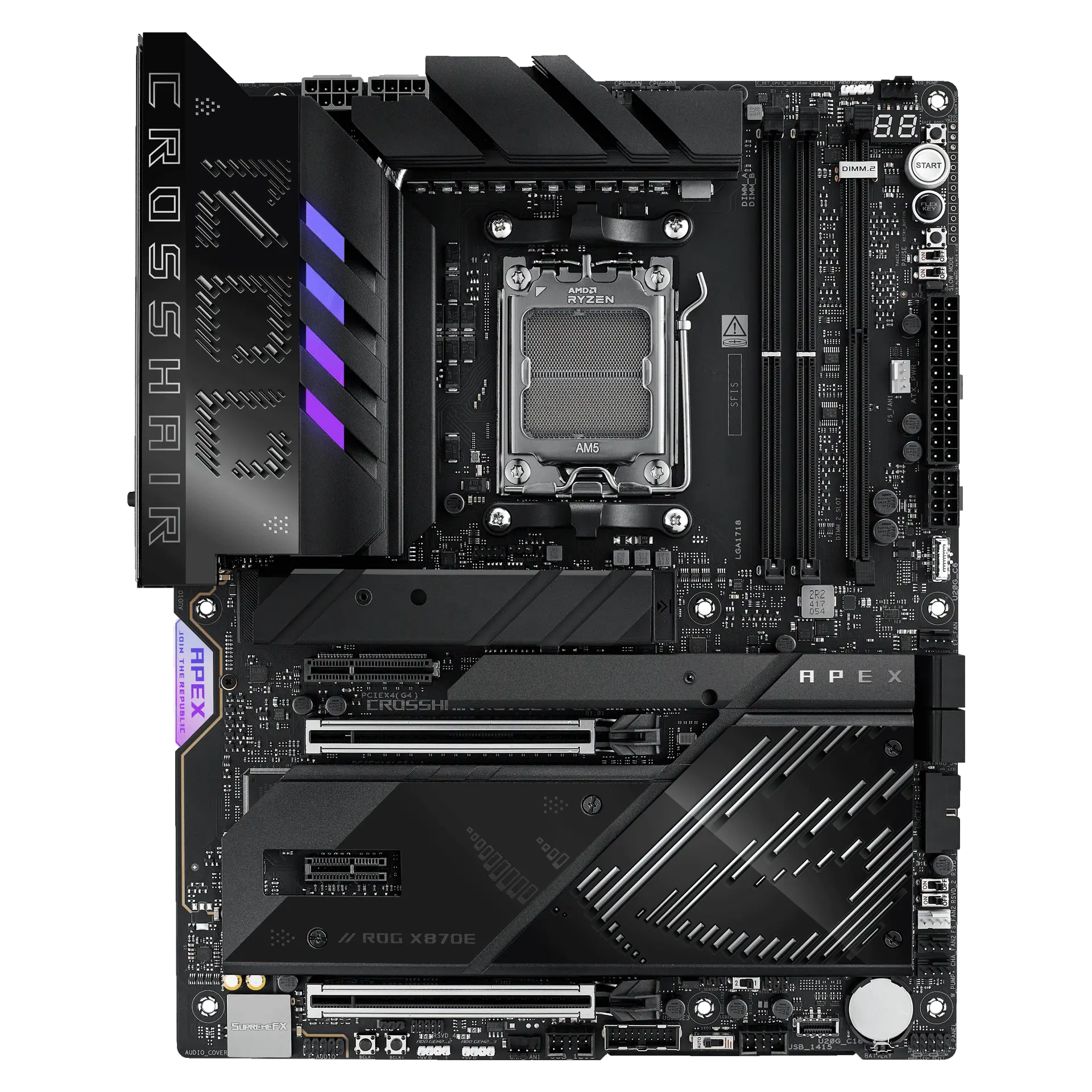
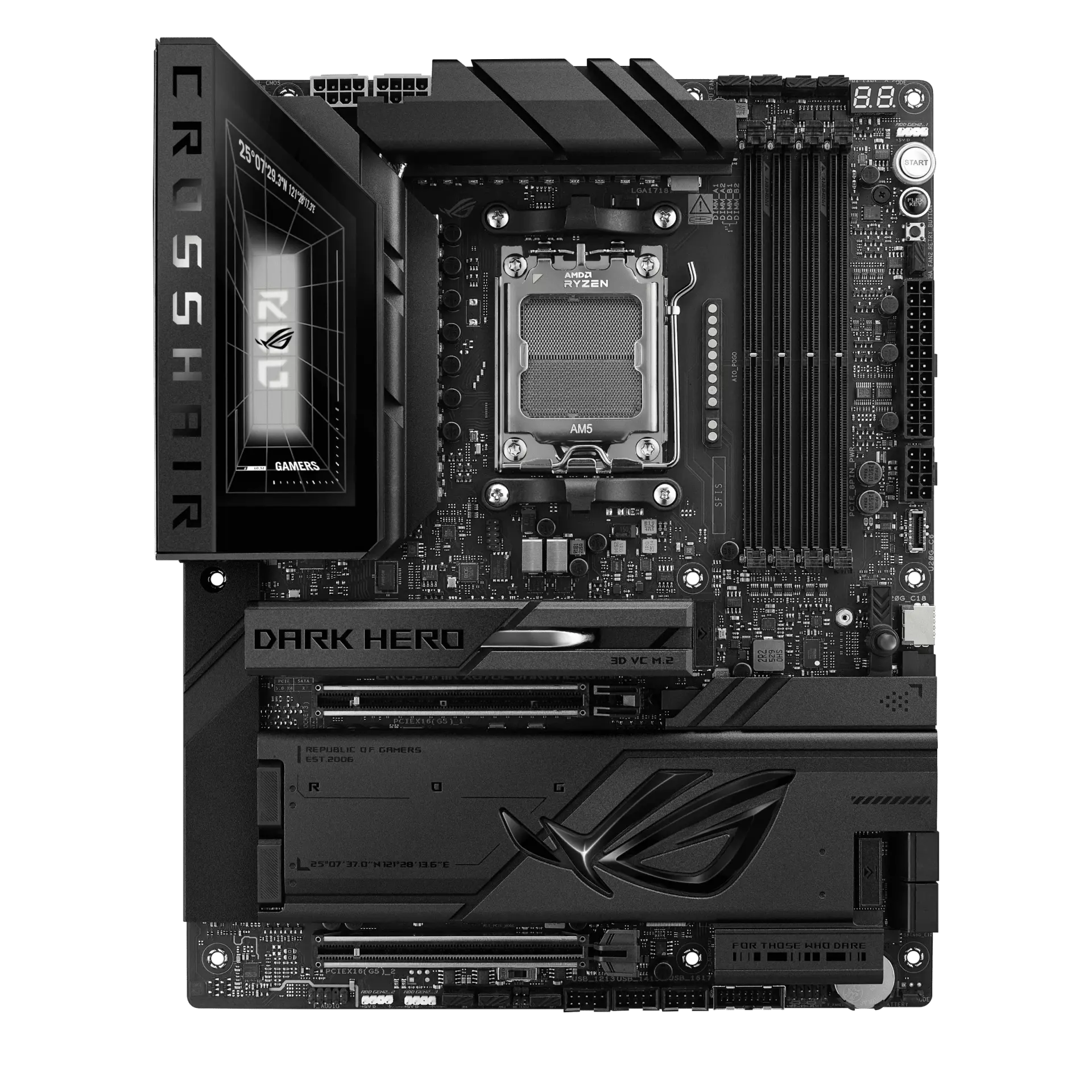
ASUS ROG CROSSHAIR X870E APEX2 slots
Manufacturer specification · Physical DDR5 module positions; this count is not a guarantee of capacity or profile speed.
Plan the complete platform. Check the exact CPU-support list, required BIOS and memory validation before buying. PCIe generations and lane allocations can change with the processor. A socket match or slot count is not a guarantee that every component works together at its highest advertised setting.
10 verified differences, most decision-relevant first. 7 are also drawn in Visual facts above. 1 manufacturer description restating separately listed fields is grouped below. Missing information stays separate.
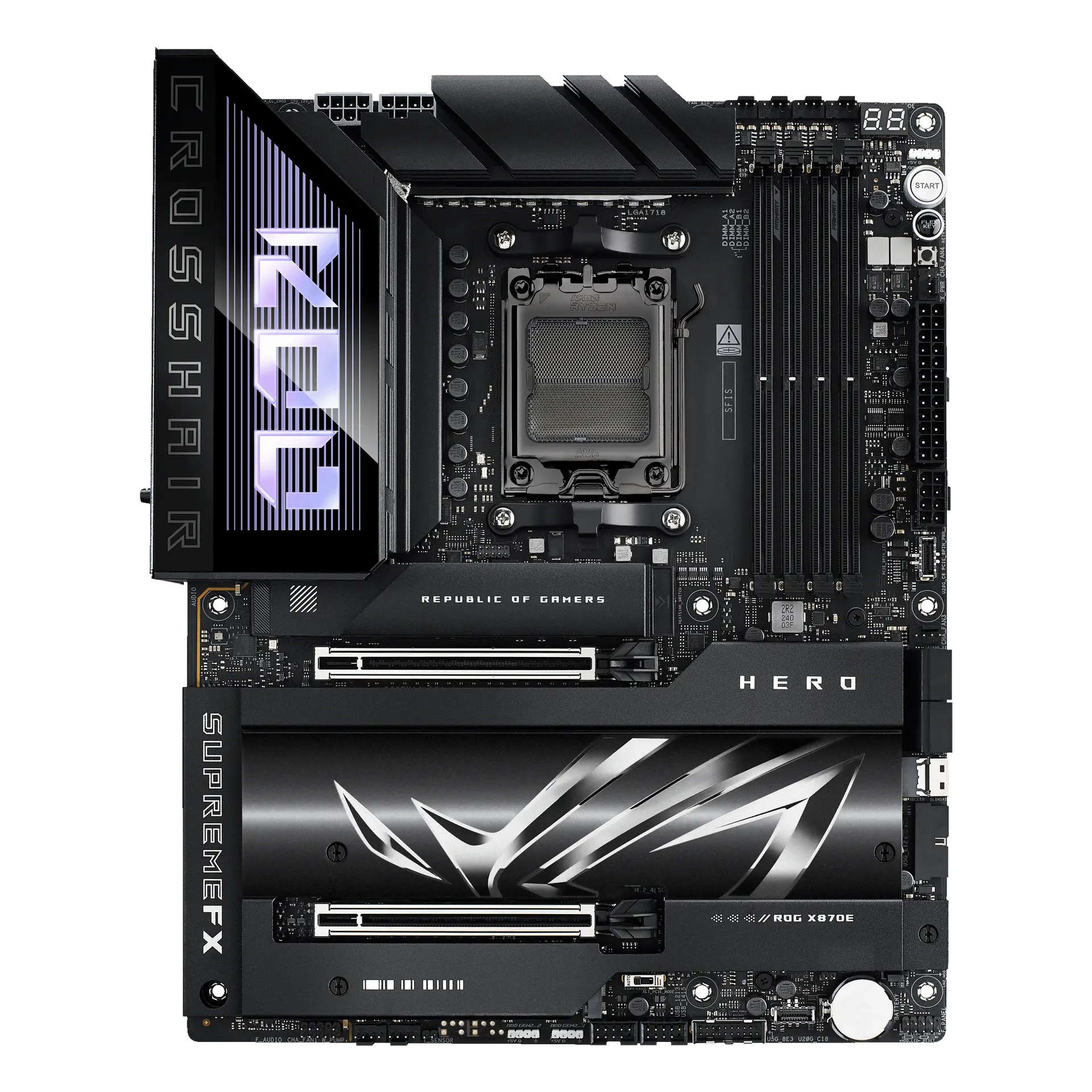
ASUS ROG CROSSHAIR X870E APEXASUS ROG CROSSHAIR X870E HERO
ASUS ROG CROSSHAIR X870E APEXAMD Ryzen 9000 & 7000 Series Desktop Processors 2 × PCIe 5.0 × 16 slots with Q-Release Slim (supports x16 or x8/x8 or x8/x4/x4 modes) AMD Ryzen 8700 & 8600 & 8400 Series Desktop Processors 2 × PCIe 4.0 × 16 slots with Q-Release Slim (only supports PCIEx16_1 & total bandwidth for x8, PCIEx16_2 will be disabled) AMD Ryzen 8500 & 8300 Series Desktop Processors 2 × PCIe 4.0 × 16 slots with Q-Release Slim (only supports PCIEx16_1 & total bandwidth for x4, PCIEx16_2 will be disabled) AMD X870E Chipset 1 × PCIe 4.0 × 4 slot 1 × PCIe 3.0 × 1 slot Please check the PCIe bifurcation table on the support site (https://www.asus.com/support/FAQ/1037507/). When both PCIEX16_1 and PCIEX16_2 are in use, they will each run in x8 mode. When M.2_2 is enabled, but M.2_3 is not in use, PCIEX16_1 will run in x8 mode and PCIEX16_2 will be disabled. When M.2_3 is enabled, but M.2_2 is not in use, PCIEX16_1 will run in x8 mode and PCIEX16_2 will run in x4 mode. When both M.2_2 and M.2_3 are enabled, PCIEX16_1 will run in x8 mode and PCIEX16_2 will be disabled. - To ensure compatibility of the device installed, please refer to https://www.asus.com/support/ for the list of supported
ASUS ROG CROSSHAIR X870E HEROAMD Ryzen 9000 & 7000 Series Desktop Processors 2 × PCIe 5.0 × 16 slots with Q-Release Slim (supports x16 or x8/x8 or x8/x4/x4 modes) AMD Ryzen 8700 & 8600 & 8400 Series Desktop Processors 2 × PCIe 4.0 × 16 slots with Q-Release Slim (only supports PCIEx16_1 & total bandwidth for x8, PCIEx16_2 will be disabled) AMD Ryzen 8500 & 8300 Series Desktop Processors 2 × PCIe 4.0 × 16 slots with Q-Release Slim (only supports PCIEx16_1 & total bandwidth for x4, PCIEx16_2 will be disabled) Please check the PCIe bifurcation table on the support site (https://www.asus.com/support/FAQ/1037507/). When both PCIEX16_1 and PCIEX16_2 are in use, they will each run in x8 mode. When M.2_2 is enabled, but M.2_3 is not in use, PCIEX16_1 will run in x8 mode and PCIEX16_2 will be disabled. When M.2_3 is enabled, but M.2_2 is not in use, PCIEX16_1 will run in x8 mode and PCIEX16_2 will run in x4 mode. When both M.2_2 and M.2_3 are enabled, PCIEX16_1 will run in x8 mode and PCIEX16_2 will be disabled. - To ensure compatibility of the device installed, please refer to https://www.asus.com/support/ for the list of supported
Sources
ASUS ROG CROSSHAIR X870E APEX
Manufacturer specification · Three M.2 positions are onboard; two use the supplied ROG DIMM.2 card. With Ryzen 8000, M.2_2 and M.2_3 are unavailable and M.2_1 uses PCIe 4.0. Using M.2_2 or M.2_3 reduces the primary graphics slot to x8. M.2_2 disables the second graphics slot; M.2_3 alone leaves that slot at x4.
Manufacturer specification · With Ryzen 8000, M.2_2 and M.2_3 are unavailable and M.2_1 uses PCIe 4.0. Using M.2_2 or M.2_3 reduces the primary graphics slot to x8. M.2_2 disables the second graphics slot; M.2_3 alone leaves that slot at x4. The separate SlimSAS connector supports PCIe 4.0 x4.
Manufacturer specification · Wireless bands and channel widths depend on local rules, the operating system and the installed module. Full Wi-Fi 7 features require Windows 11 24H2 or later where stated by ASUS; Bluetooth versions may vary by module.
Manufacturer specification · Wireless bands and channel widths depend on local rules, the operating system and the installed module. Full Wi-Fi 7 features require Windows 11 24H2 or later where stated by ASUS; Bluetooth versions may vary by module.
ASUS ROG CROSSHAIR X870E APEXALC4080 codec; manufacturer-listed 7.1-channel configuration
ASUS ROG CROSSHAIR X870E HEROALC4082 codec; manufacturer-listed 7.1-channel configuration
Sources
ASUS ROG CROSSHAIR X870E APEX
Manufacturer specification · Channel configuration and spatial-audio support depend on the connected outputs, chassis audio wiring and software. A codec name is not an independent sound-quality measurement.
Manufacturer specification · Channel configuration and spatial-audio support depend on the connected outputs, chassis audio wiring and software. A codec name is not an independent sound-quality measurement.
ASUS ROG CROSSHAIR X870E APEX2 × USB4 (40Gbps) ports support USB Type-C display outputs Graphics specifications may vary between CPU types. Please refer to AMD CPU specifications. VGA resolution support depends on processors' or graphic cards' resolution. Supports max. 4K@60Hz as specified in DisplayPort 1.4a
ASUS ROG CROSSHAIR X870E HERO1 × HDMI port 2 × USB4 (40Gbps) ports support USB Type-C display outputs Graphics specifications may vary between CPU types. Please refer to AMD CPU specifications. VGA resolution support depends on processors' or graphic cards' resolution. Supports 4K@60Hz as specified in HDMI 2.1. Supports max. 4K@60Hz as specified in DisplayPort 1.4a
Sources
ASUS ROG CROSSHAIR X870E APEX
Manufacturer specification · These are manufacturer-listed configurations, not measured display performance. A compatible processor with graphics, suitable cable and supported display mode are required.
Manufacturer specification · These are manufacturer-listed configurations, not measured display performance. A compatible processor with graphics, suitable cable and supported display mode are required.
Check the exact configuration and source conditions for your use.
Listed memory overclocking profiles
ASUS ROG CROSSHAIR X870E APEXRyzen 9000: up to 8200+ MT/s (OC); Ryzen 8000: up to 9600+ MT/s (OC); Ryzen 7000: up to 8000+ MT/s (OC)
ASUS ROG CROSSHAIR X870E HERORyzen 9000: up to 8200+ MT/s (OC); Ryzen 8000: up to 8600+ MT/s (OC); Ryzen 7000: up to 8000+ MT/s (OC)
Sources
ASUS ROG CROSSHAIR X870E APEX
Manufacturer specification · These are manufacturer-listed overclocking configurations, not guaranteed stock transfer rates or tested performance. CPU family and DIMM layout remain material.
Manufacturer specification · These are manufacturer-listed overclocking configurations, not guaranteed stock transfer rates or tested performance. CPU family and DIMM layout remain material.
Check the exact configuration and source conditions for your use.
Rear connections
ASUS ROG CROSSHAIR X870E APEX2 × USB4 (40Gbps) ports (2 × USB Type-C ) 6 × USB 10Gbps ports (5 × Type-A + 1 × USB Type-C ) 2 × USB 5Gbps ports (2 × Type-A) 1 × Wi-Fi module 1 × Realtek 5Gb Ethernet port 1 × PS/2 keyboard/mouse combo port 2 × Gold-plated audio jacks 1 × Optical S/PDIF out port 1 × BIOS FlashBack button 1 × Clear CMOS button
ASUS ROG CROSSHAIR X870E HERO2 × USB4 (40Gbps) ports (2 × USB Type-C ) 8 × USB 10Gbps ports (6 × Type-A + 2 × USB Type-C ) 1 × HDMI port 1 × Wi-Fi module 1 × Intel 2.5Gb Ethernet port 1 × Realtek 5Gb Ethernet port 2 × Gold-plated audio jacks 1 × Optical S/PDIF out port 1 × BIOS FlashBack button 1 × Clear CMOS button
Sources
ASUS ROG CROSSHAIR X870E APEX
Manufacturer specification · Connector count and listed modes describe the rear panel. USB-C display and charging capability depends on the specific port; display output also depends on the CPU and source configuration.
Manufacturer specification · Connector count and listed modes describe the rear panel. USB-C display and charging capability depends on the specific port; display output also depends on the CPU and source configuration.
Check the exact configuration and source conditions for your use.
Manufacturer wording of separate fields (1)
Combined manufacturer descriptions whose values are listed as separate differences. Kept here so every verified difference stays in one list.
Memory type, slots and limit
ASUS ROG CROSSHAIR X870E APEX2 DDR5 DIMM slots; up to 128 GB; dual channel; AMD EXPO
ASUS ROG CROSSHAIR X870E HERO4 DDR5 DIMM slots; up to 256 GB; dual channel; AMD EXPO
Sources
ASUS ROG CROSSHAIR X870E APEX
Manufacturer specification · Supported capacity, module population and profile speeds depend on the exact CPU, installed BIOS and validated memory kit. Profile support does not guarantee an overclock.
Manufacturer specification · Supported capacity, module population and profile speeds depend on the exact CPU, installed BIOS and validated memory kit. Profile support does not guarantee an overclock.
Check the exact configuration and source conditions for your use.
Missing or non-comparable evidence (2)
Storage interfaces
ASUS ROG CROSSHAIR X870E APEX5 M.2 storage positions (3 onboard + 2 on supplied DIMM.2 card); 4 SATA 6 Gb/s ports
ASUS ROG CROSSHAIR X870E HERO5 M.2 storage positions; 4 SATA 6 Gb/s ports
Sources
ASUS ROG CROSSHAIR X870E APEX
Manufacturer specification · Three M.2 positions are onboard; two use the supplied ROG DIMM.2 card. With Ryzen 8000, M.2_2 and M.2_3 are unavailable and M.2_1 uses PCIe 4.0. Using M.2_2 or M.2_3 reduces the primary graphics slot to x8. M.2_2 disables the second graphics slot; M.2_3 alone leaves that slot at x4.
Manufacturer specification · With Ryzen 8000, M.2_2 and M.2_3 are unavailable and M.2_1 uses PCIe 4.0. Using M.2_2 or M.2_3 reduces the primary graphics slot to x8. M.2_2 disables the second graphics slot; M.2_3 alone leaves that slot at x4. The separate SlimSAS connector supports PCIe 4.0 x4.
Three M.2 positions are onboard; two use the supplied ROG DIMM.2 card. With Ryzen 8000, M.2_2 and M.2_3 are unavailable and M.2_1 uses PCIe 4.0. Using M.2_2 or M.2_3 reduces the primary graphics slot to x8. M.2_2 disables the second graphics slot; M.2_3 alone leaves that slot at x4.
Check the exact processor, BIOS and memory kit before purchase. The 128 GB ceiling and listed overclocking profiles are configuration limits, not a tested build guarantee.
With Ryzen 8000, M.2_2 and M.2_3 are unavailable and M.2_1 uses PCIe 4.0. Using M.2_2 or M.2_3 reduces the primary graphics slot to x8. M.2_2 disables the second graphics slot; M.2_3 alone leaves that slot at x4. The separate SlimSAS connector supports PCIe 4.0 x4.
Check the exact processor, BIOS and memory kit before purchase. The 256 GB ceiling and listed overclocking profiles are configuration limits, not a tested build guarantee.
Manufacturer specification · A shared socket and processor-family listing do not confirm that a particular BIOS revision supports every processor in that family.
Manufacturer specification · A shared socket and processor-family listing do not confirm that a particular BIOS revision supports every processor in that family.
Manufacturer specification · Use the exact model firmware and follow ASUS instructions; a button does not establish the currently installed BIOS version.
Manufacturer specification · Use the exact model firmware and follow ASUS instructions; a button does not establish the currently installed BIOS version.
Manufacturer specification · These are manufacturer-listed overclocking configurations, not guaranteed stock transfer rates or tested performance. CPU family and DIMM layout remain material.
Manufacturer specification · These are manufacturer-listed overclocking configurations, not guaranteed stock transfer rates or tested performance. CPU family and DIMM layout remain material.
Ryzen 9000: up to 8200+ MT/s (OC); Ryzen 8000: up to 9600+ MT/s (OC); Ryzen 7000: up to 8000+ MT/s (OC)
Ryzen 9000: up to 8200+ MT/s (OC); Ryzen 8000: up to 8600+ MT/s (OC); Ryzen 7000: up to 8000+ MT/s (OC)
Storage interfacesSources
ASUS ROG CROSSHAIR X870E APEX
Manufacturer specification · Three M.2 positions are onboard; two use the supplied ROG DIMM.2 card. With Ryzen 8000, M.2_2 and M.2_3 are unavailable and M.2_1 uses PCIe 4.0. Using M.2_2 or M.2_3 reduces the primary graphics slot to x8. M.2_2 disables the second graphics slot; M.2_3 alone leaves that slot at x4.
Manufacturer specification · With Ryzen 8000, M.2_2 and M.2_3 are unavailable and M.2_1 uses PCIe 4.0. Using M.2_2 or M.2_3 reduces the primary graphics slot to x8. M.2_2 disables the second graphics slot; M.2_3 alone leaves that slot at x4. The separate SlimSAS connector supports PCIe 4.0 x4.
5 M.2 storage positions (3 onboard + 2 on supplied DIMM.2 card); 4 SATA 6 Gb/s ports
5 M.2 storage positions; 4 SATA 6 Gb/s ports
M.2 storage positionsSources
ASUS ROG CROSSHAIR X870E APEX
Manufacturer specification · Three M.2 positions are onboard; two use the supplied ROG DIMM.2 card. With Ryzen 8000, M.2_2 and M.2_3 are unavailable and M.2_1 uses PCIe 4.0. Using M.2_2 or M.2_3 reduces the primary graphics slot to x8. M.2_2 disables the second graphics slot; M.2_3 alone leaves that slot at x4.
Manufacturer specification · With Ryzen 8000, M.2_2 and M.2_3 are unavailable and M.2_1 uses PCIe 4.0. Using M.2_2 or M.2_3 reduces the primary graphics slot to x8. M.2_2 disables the second graphics slot; M.2_3 alone leaves that slot at x4. The separate SlimSAS connector supports PCIe 4.0 x4.
AMD Ryzen 9000 & 7000 Series Desktop Processors 2 × PCIe 5.0 × 16 slots with Q-Release Slim (supports x16 or x8/x8 or x8/x4/x4 modes) AMD Ryzen 8700 & 8600 & 8400 Series Desktop Processors 2 × PCIe 4.0 × 16 slots with Q-Release Slim (only supports PCIEx16_1 & total bandwidth for x8, PCIEx16_2 will be disabled) AMD Ryzen 8500 & 8300 Series Desktop Processors 2 × PCIe 4.0 × 16 slots with Q-Release Slim (only supports PCIEx16_1 & total bandwidth for x4, PCIEx16_2 will be disabled) AMD X870E Chipset 1 × PCIe 4.0 × 4 slot 1 × PCIe 3.0 × 1 slot Please check the PCIe bifurcation table on the support site (https://www.asus.com/support/FAQ/1037507/). When both PCIEX16_1 and PCIEX16_2 are in use, they will each run in x8 mode. When M.2_2 is enabled, but M.2_3 is not in use, PCIEX16_1 will run in x8 mode and PCIEX16_2 will be disabled. When M.2_3 is enabled, but M.2_2 is not in use, PCIEX16_1 will run in x8 mode and PCIEX16_2 will run in x4 mode. When both M.2_2 and M.2_3 are enabled, PCIEX16_1 will run in x8 mode and PCIEX16_2 will be disabled. - To ensure compatibility of the device installed, please refer to https://www.asus.com/support/ for the list of supported
AMD Ryzen 9000 & 7000 Series Desktop Processors 2 × PCIe 5.0 × 16 slots with Q-Release Slim (supports x16 or x8/x8 or x8/x4/x4 modes) AMD Ryzen 8700 & 8600 & 8400 Series Desktop Processors 2 × PCIe 4.0 × 16 slots with Q-Release Slim (only supports PCIEx16_1 & total bandwidth for x8, PCIEx16_2 will be disabled) AMD Ryzen 8500 & 8300 Series Desktop Processors 2 × PCIe 4.0 × 16 slots with Q-Release Slim (only supports PCIEx16_1 & total bandwidth for x4, PCIEx16_2 will be disabled) Please check the PCIe bifurcation table on the support site (https://www.asus.com/support/FAQ/1037507/). When both PCIEX16_1 and PCIEX16_2 are in use, they will each run in x8 mode. When M.2_2 is enabled, but M.2_3 is not in use, PCIEX16_1 will run in x8 mode and PCIEX16_2 will be disabled. When M.2_3 is enabled, but M.2_2 is not in use, PCIEX16_1 will run in x8 mode and PCIEX16_2 will run in x4 mode. When both M.2_2 and M.2_3 are enabled, PCIEX16_1 will run in x8 mode and PCIEX16_2 will be disabled. - To ensure compatibility of the device installed, please refer to https://www.asus.com/support/ for the list of supported
Rear connectionsDifferentSources
ASUS ROG CROSSHAIR X870E APEX
Manufacturer specification · Connector count and listed modes describe the rear panel. USB-C display and charging capability depends on the specific port; display output also depends on the CPU and source configuration.
Manufacturer specification · Connector count and listed modes describe the rear panel. USB-C display and charging capability depends on the specific port; display output also depends on the CPU and source configuration.
2 × USB4 (40Gbps) ports (2 × USB Type-C ) 6 × USB 10Gbps ports (5 × Type-A + 1 × USB Type-C ) 2 × USB 5Gbps ports (2 × Type-A) 1 × Wi-Fi module 1 × Realtek 5Gb Ethernet port 1 × PS/2 keyboard/mouse combo port 2 × Gold-plated audio jacks 1 × Optical S/PDIF out port 1 × BIOS FlashBack button 1 × Clear CMOS button
2 × USB4 (40Gbps) ports (2 × USB Type-C ) 8 × USB 10Gbps ports (6 × Type-A + 2 × USB Type-C ) 1 × HDMI port 1 × Wi-Fi module 1 × Intel 2.5Gb Ethernet port 1 × Realtek 5Gb Ethernet port 2 × Gold-plated audio jacks 1 × Optical S/PDIF out port 1 × BIOS FlashBack button 1 × Clear CMOS button
Internal USB connectionsSources
ASUS ROG CROSSHAIR X870E APEX
Manufacturer specification · Headers need compatible case ports or accessories; they are not additional rear sockets. Follow the stated power and cable requirements.
Manufacturer specification · Headers need compatible case ports or accessories; they are not additional rear sockets. Follow the stated power and cable requirements.
Front USB (Total 10 ports) 1 × USB 20Gbps (supports USB Type-C with up to 60W PD/QC4+) 1 × USB 20Gbps connector (supports USB Type-C ) 2 × USB 5Gbps headers support 4 additional USB 5Gbps ports 2 × USB 2.0 headers support 4 additional USB 2.0 ports USB Type-C power delivery output: max. 5V/3A USB Type-C power delivery output: 5/9/15/20V max. 3A, PPS:3.3–21V max. 3A
Front USB (Total 10 ports) 1 × USB 20Gbps (supports USB Type-C with up to 60W PD/QC4+) 1 × USB 20Gbps connector (supports USB Type-C ) 2 × USB 5Gbps headers support 4 additional USB 5Gbps ports 2 × USB 2.0 headers support 4 additional USB 2.0 ports USB Type-C power delivery output: max. 5V/3A USB Type-C power delivery output: 5/9/15/20V max. 3A, PPS:3.3–21V max. 3A
Manufacturer specification · These are manufacturer-listed configurations, not measured display performance. A compatible processor with graphics, suitable cable and supported display mode are required.
Manufacturer specification · These are manufacturer-listed configurations, not measured display performance. A compatible processor with graphics, suitable cable and supported display mode are required.
2 × USB4 (40Gbps) ports support USB Type-C display outputs Graphics specifications may vary between CPU types. Please refer to AMD CPU specifications. VGA resolution support depends on processors' or graphic cards' resolution. Supports max. 4K@60Hz as specified in DisplayPort 1.4a
1 × HDMI port 2 × USB4 (40Gbps) ports support USB Type-C display outputs Graphics specifications may vary between CPU types. Please refer to AMD CPU specifications. VGA resolution support depends on processors' or graphic cards' resolution. Supports 4K@60Hz as specified in HDMI 2.1. Supports max. 4K@60Hz as specified in DisplayPort 1.4a
Audio hardwareDifferentSources
ASUS ROG CROSSHAIR X870E APEX
Manufacturer specification · Channel configuration and spatial-audio support depend on the connected outputs, chassis audio wiring and software. A codec name is not an independent sound-quality measurement.
Manufacturer specification · Channel configuration and spatial-audio support depend on the connected outputs, chassis audio wiring and software. A codec name is not an independent sound-quality measurement.
Manufacturer specification · Wireless bands and channel widths depend on local rules, the operating system and the installed module. Full Wi-Fi 7 features require Windows 11 24H2 or later where stated by ASUS; Bluetooth versions may vary by module.
Manufacturer specification · Wireless bands and channel widths depend on local rules, the operating system and the installed module. Full Wi-Fi 7 features require Windows 11 24H2 or later where stated by ASUS; Bluetooth versions may vary by module.
Manufacturer specification · Wi-Fi 7; 320 MHz listed. Wireless bands and channel widths depend on local rules, the operating system and the installed module. Full Wi-Fi 7 features require Windows 11 24H2 or later where stated by ASUS; Bluetooth versions may vary by module.
Manufacturer specification · Wi-Fi 7; 320 MHz listed. Wireless bands and channel widths depend on local rules, the operating system and the installed module. Full Wi-Fi 7 features require Windows 11 24H2 or later where stated by ASUS; Bluetooth versions may vary by module.
Manufacturer specification · Check the complete connector list and the PSU cable type. Additional graphics-card, front-panel fast-charge and cooling connections can have separate requirements.
Manufacturer specification · Check the complete connector list and the PSU cable type. Additional graphics-card, front-panel fast-charge and cooling connections can have separate requirements.
1 × 24-pin Main Power connector 2 × 8-pin +12V CPU Power connector 1 × 8-pin PCIe Power connector
1 × 24-pin Main Power connector 2 × 8-pin +12V CPU Power connector 1 × 8-pin PCIe Power connector
Specification marketSources
ASUS ROG CROSSHAIR X870E APEX
Manufacturer specification · UK and US buying links are searches, not proof of stock, identical regional wireless modules, bundles or warranty. Confirm the exact model and part identifier with the retailer.
Manufacturer specification · UK and US buying links are searches, not proof of stock, identical regional wireless modules, bundles or warranty. Confirm the exact model and part identifier with the retailer.
Manufacturer wording (1)Combined manufacturer rows whose values are listed above as separate fields.
Manufacturer wording for facts listed as separate rows
Memory type, slots and limitDifferentSources
ASUS ROG CROSSHAIR X870E APEX
Manufacturer specification · Supported capacity, module population and profile speeds depend on the exact CPU, installed BIOS and validated memory kit. Profile support does not guarantee an overclock.
Manufacturer specification · Supported capacity, module population and profile speeds depend on the exact CPU, installed BIOS and validated memory kit. Profile support does not guarantee an overclock.
Each record represents an explicitly checked model and configuration. Original import: 5 Sept 2026; this is not its verification date. This is not a list of current offers or a popularity ranking.