5 verified differences, led by Touch controls, manufacturer-listed box contents and supported audio sources and streaming inputs. Compared in full below. Not a rating.
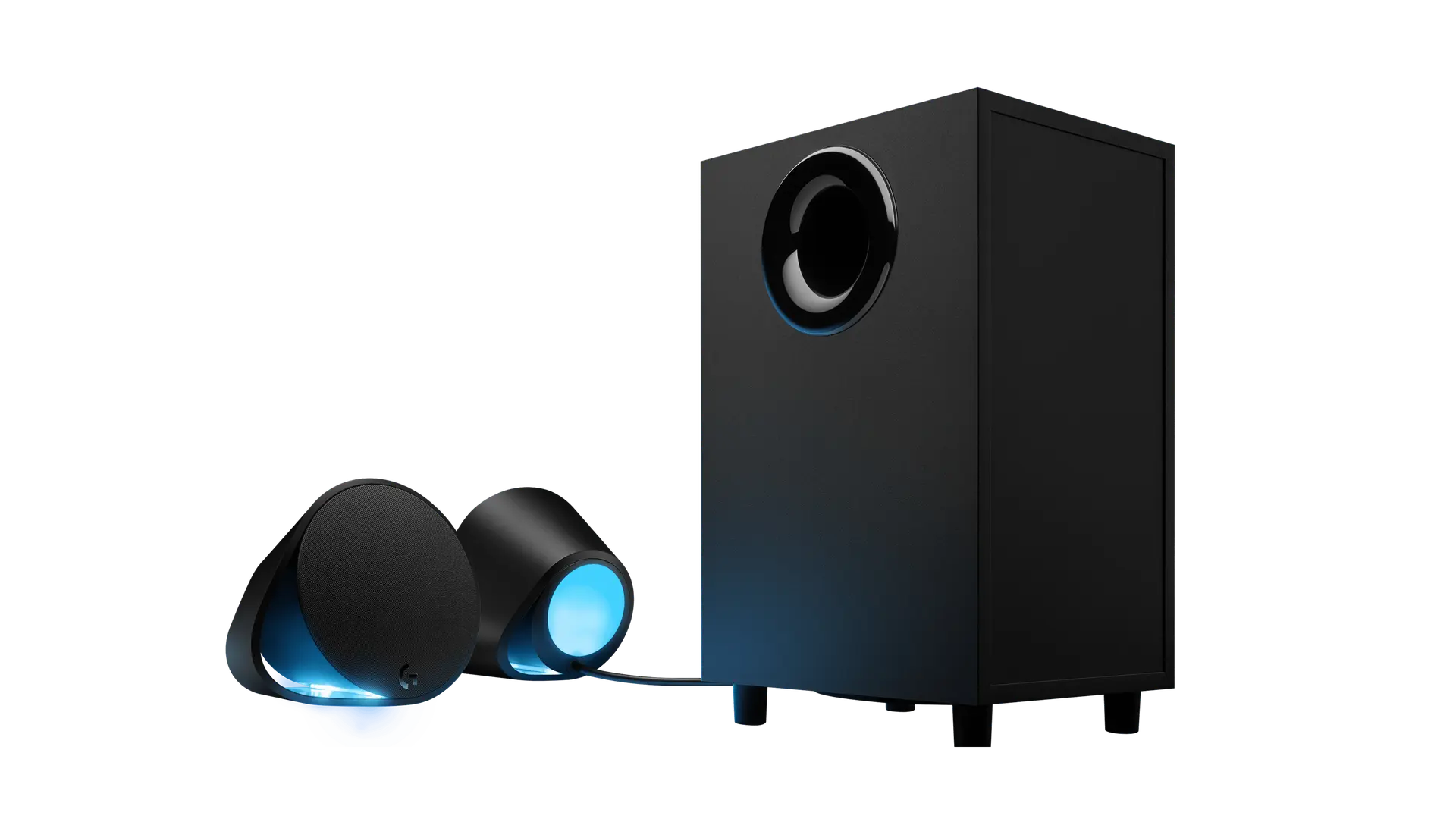
The G560 is Logitech G's 2.1 gaming system, rated at 120 W RMS (240 W peak) with a 6.5-inch subwoofer and front/back lighting zones on the satellites. It plays over USB from a PC, Bluetooth 4.1 or a 3.5 mm AUX input, and G HUB software controls the full lighting over USB.
Specifications checked 26 Sept 2026.
Amazon links open search results. Check the exact variant, current price and availability with the retailer.
Search links open retailer results, not a matched listing; eBay listings are checked daily. As an Amazon Associate I earn from qualifying purchases. As an eBay Partner, we may be compensated if you make a purchase.
THE DIFFERENCES, MADE VISIBLE
Visual facts
Differences first. Select a topic for its graphic, sources and conditions.
How to read this comparison
Manufacturer facts for the exact models shown. Not a quality rating or a test result.
“Different” means the known values differ, not that one is better.
Missing or conflicting evidence is marked and never counts as a difference. Source chips hold each fact’s sources and conditions.
SPECIFICATIONS SIDE BY SIDE5 topics
SELECTED TOPIC
01 / 05
Touch controls
Check the exact configuration and source conditions for your use.
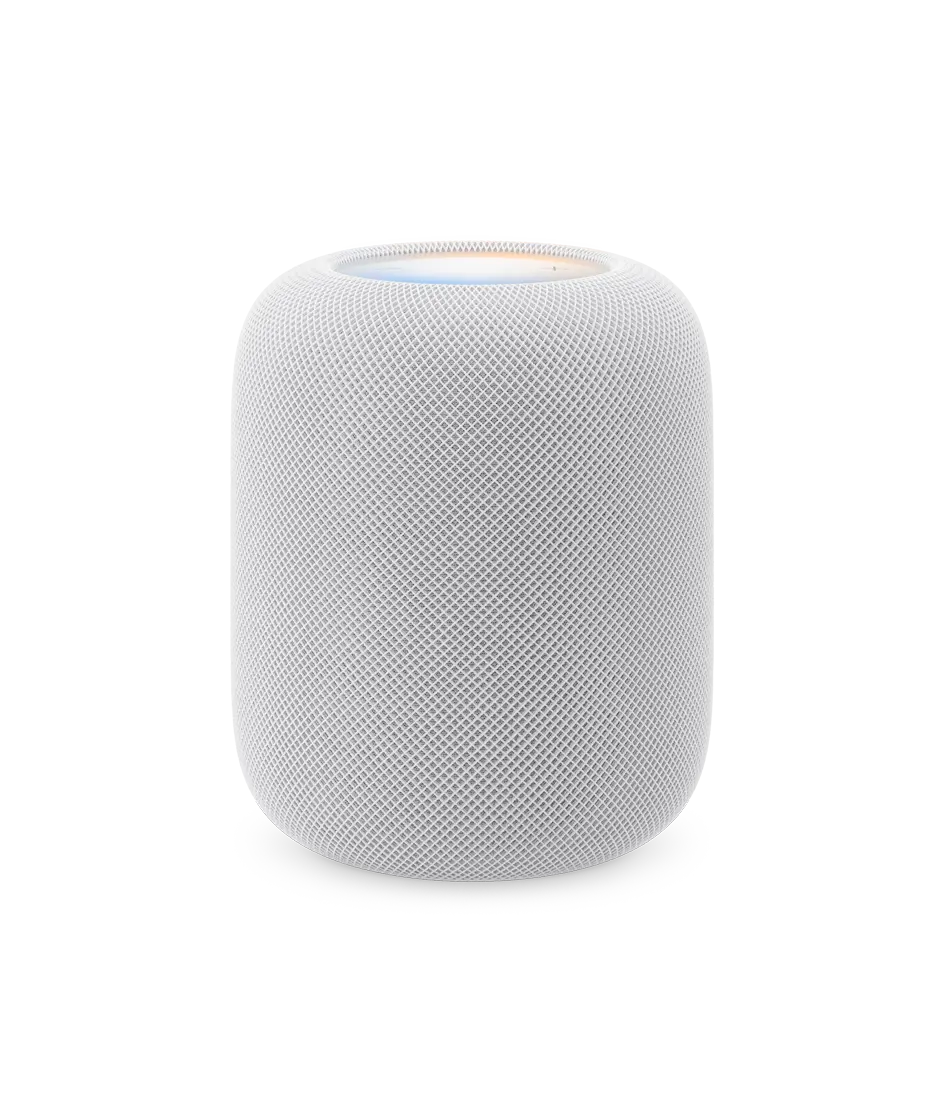
Apple HomePodTap Play/Pause Double-tap Skip Triple-tap Skip back Touch and hold Siri Tap or hold + or - Volume up/down
Logitech G560Power, volume, G-key and Bluetooth pairing on the right satellite
Manufacturer specification · The G-key cycles lighting brightness by default and can be programmed in G HUB to trigger applications or in-game macros. The power button is on the back of the right satellite.
Check the exact configuration. Manufacturer specifications describe the listed variant. Confirm compatibility and the seller’s exact model before buying; no overall winner is inferred from incomplete evidence.
Manufacturer specification · The G-key cycles lighting brightness by default and can be programmed in G HUB to trigger applications or in-game macros. The power button is on the back of the right satellite.
Apple HomePodApple Music iTunes music purchases iCloud Music Library with an Apple Music or iTunes Match subscription Third-party music services Apple Music Radio or episodes on demand Radio stations from TuneIn, Capital FM, LBC UK, Heart UK and Smooth UK Apple Podcasts News briefings Remastered ambient sounds AirPlay to share other content to HomePod from iPhone, iPad, Apple TV or Mac
Logitech G560USB (to a PC), Bluetooth 4.1 and one 3.5 mm analogue AUX input on the back of the subwoofer
Sources
Apple HomePod
Manufacturer specification · A subscription is required for Apple Music. A subscription may be required for music streaming services.
Manufacturer specification · Logitech says the G560 connects to and mixes USB, 3.5 mm and Bluetooth sources, and Easy-Switch switches between up to four connected devices. USB is required for true digital audio, LIGHTSYNC RGB and DTS:X Ultra surround sound. Bluetooth can be disabled with a recessed button next to the AUX port on the subwoofer. Input impedance >10 kΩ. 3.5 mm cable not included; USB cable included. No optical input listed; no codec published.
Apple HomePodLine voltage: 100V to 240V AC Frequency: 50Hz to 60Hz Operating temperature: 0° to 35° C (32° to 95° F) Relative humidity: 5% to 90% non-condensing Operating altitude: tested up to 3,000 metres (10,000 feet)
Logitech G560Mains AC via the subwoofer's power cord
Sources
Apple HomePod
Manufacturer specification · Adapter/input ratings are requirements, not measured consumption or audio output.
Manufacturer specification · Voltage, frequency, consumption and regional plug are not published; power cable length 2200 mm per support. UK (980-001302) and US (980-001300) are separate part numbers.
Manufacturer specification · Only the dimensions explicitly labelled by the manufacturer are listed; no missing axis is inferred. Size and weight vary by manufacturing process.
Evidence is missing or conflicting on at least one side. This is not a verified difference.
Phone, software and network requirements
Apple HomePodHomePod with the latest software version iPhone SE (2nd generation or later) or iPhone 8 or later with the latest version of iOS; or iPad Pro, iPad (5th generation or later), iPad Air (3rd generation or later) or iPad mini (5th generation or later) with the latest version of iPadOS 802.11 Wi-Fi internet access
Evidence is missing or conflicting on at least one side. This is not a verified difference.
Rated channel configuration
Apple HomePodNot verified
Logitech G5602.1: two satellite speakers and a subwoofer
Sources
Apple HomePod
Not listed by the manufacturer in the cited technical specifications. · Manufacturer specification · Driver layout and supported audio formats are listed separately; neither establishes a rated channel configuration for one unit.
Evidence is missing or conflicting on at least one side. This is not a verified difference.
Wireless connections
Apple HomePod802.11n Wi-Fi Peer-to-peer discovery for easy guest access Bluetooth 5.0 Thread networking technology Ultra Wideband chip for device proximity
Logitech G560Not verified
Sources
Apple HomePod
Manufacturer specification · Bluetooth presence alone does not establish Bluetooth audio input; supported audio sources are listed separately. Peer-to-peer AirPlay requires a Mac (2012 or later) with OS X Yosemite or later, or an iOS device (late 2012 or later) with iOS 8 or later. Compatible with HomeKit- or Matter-enabled Thread accessories only. Thread-based accessories require a Thread-enabled home hub, such as Apple TV 4K, HomePod (2nd generation), HomePod mini or a third-party Thread border router. Requires a U1‑equipped iPhone with iOS 16.2 or later.
Evidence is missing or conflicting on at least one side. This is not a verified difference.
Driver layout and audio processing
Apple HomePod4-inch high-excursion woofer Array of five horn-loaded tweeters, each with its own neodymium magnet Internal low-frequency calibration microphone for automatic bass correction Advanced computational audio with system sensing for real-time tuning Room sensing Spatial Audio with Dolby Atmos for music and video Four-microphone design for far-field Siri Sound Recognition for smoke and carbon monoxide alarm sounds Multi-room audio with AirPlay Stereo pair capable
Logitech G560Not verified
Sources
Apple HomePod
Manufacturer specification · Spatial Audio works with compatible content in supported apps on HomePod (1st and 2nd generation). Not all content is available in Dolby Atmos. Requires Apple TV 4K. Apple TV 4K sold separately. Sound Recognition may detect smoke and carbon monoxide alarm sounds and send you notifications when recognised. Sound Recognition should not be relied upon in circumstances where you may be harmed or injured, or in high-risk or emergency situations. Sound Recognition requires the updated Home architecture, which is available as a separate update in the Home app. It requires all Apple devices that access the home to be using the latest software. Requires multiple HomePod speakers or or AirPlay-compatible speakers with the latest AirPlay software. Creating a HomePod stereo pair requires two of the same model HomePod speakers, such as two HomePod mini, two HomePod (2nd generation) or two HomePod (1st generation).
Evidence is missing or conflicting on at least one side. This is not a verified difference.
Lighting
Apple HomePodNot verified
Logitech G560LIGHTSYNC RGB: four lighting zones (two per speaker: front-facing and rear ambient projection), approximately 16.8 million colours; screen-to-speaker colour sampling, Audio Visualizer and developer-programmed game lighting; customised in Logitech G HUB over USB
Sources
Apple HomePod
No source recorded for this side.
Logitech G560
Manufacturer specification · The Audio Visualizer uses the rear lights for bass and the front lights for mids and highs. The G-key dims the lights by default.
Evidence is missing or conflicting on at least one side. This is not a verified difference.
Maximum sound pressure level
Apple HomePodNot verified
Logitech G56097 dB@426B
Sources
Apple HomePod
No source recorded for this side.
Logitech G560
Manufacturer specification · Quoted exactly as published (shop 'Max SPL', support 'Sound Pressure Level (SPL Max)'); the '426B' reference is not explained.
Evidence is missing or conflicting on at least one side. This is not a verified difference.
Rated audio output power and measurement basis
Apple HomePodNot verified
Logitech G560120 W RMS total; 240 W peak total
Sources
Apple HomePod
Not listed by the manufacturer in the cited technical specifications. · Manufacturer specification · The manufacturer does not list rated speaker output in watts. An adapter rating or AC input frequency is not audio output power.
Evidence is missing or conflicting on at least one side. This is not a verified difference.
Manufacturer-listed sensors
Apple HomePodTemperature and humidity Accelerometer
Logitech G560Not verified
Sources
Apple HomePod
Manufacturer specification · Temperature and humidity sensing is optimised for indoor domestic settings, when ambient temperatures are around 15º C to 30º C and relative humidity is around 30% to 70%. Accuracy may decrease in some situations where audio is playing for an extended period of time at high volume levels. HomePod requires some time to calibrate the sensors immediately after starting up before results are displayed.
Evidence is missing or conflicting on at least one side. This is not a verified difference.
Sound options
Apple HomePodNot verified
Logitech G560DTS:X Ultra surround sound (USB connection required; not supported on macOS); advanced audio equalizer and subwoofer bass settings in Logitech G HUB
Sources
Apple HomePod
No source recorded for this side.
Logitech G560
Manufacturer specification · Logitech says full bass control needs the latest firmware downloaded through G HUB. The DTS:X software installation needs internet access.
Evidence is missing or conflicting on at least one side. This is not a verified difference.
Satellite weight (pair)
Apple HomePodNot verified
Logitech G5601.79 kg
Sources
Apple HomePod
No source recorded for this side.
Logitech G560
Manufacturer specification · For the pair of satellites: support lists '1790 g (63.14 ounce for the pair)'; the shop dimensions list 1.79 kg under 'Satellites'.
Evidence is missing or conflicting on at least one side. This is not a verified difference.
Subwoofer weight
Apple HomePodNot verified
Logitech G560Conflicting evidence
Sources
Apple HomePod
No source recorded for this side.
Logitech G560
The UK/US shop dimensions list the subwoofer at 5.5 kg (US: 12.13 lbs (5.5 kg)); the Logitech support table lists 5800 g (204.59 ounce). Not resolved by current official sources. · Manufacturer specification
No total system weight is published; Logitech lists the satellite pair and the subwoofer separately (the subwoofer figure conflicts). No figure is summed. · Manufacturer specification
Source-backed specifications for Apple HomePod and Logitech G560
Specification
Apple HomePod
Logitech G560
Rated channel configurationSources
Apple HomePod
Not listed by the manufacturer in the cited technical specifications. · Manufacturer specification · Driver layout and supported audio formats are listed separately; neither establishes a rated channel configuration for one unit.
Manufacturer specification · Quoted exactly as published (shop 'Max SPL', support 'Sound Pressure Level (SPL Max)'); the '426B' reference is not explained.
Manufacturer specification · Logitech says the G560 connects to and mixes USB, 3.5 mm and Bluetooth sources, and Easy-Switch switches between up to four connected devices. USB is required for true digital audio, LIGHTSYNC RGB and DTS:X Ultra surround sound. Bluetooth can be disabled with a recessed button next to the AUX port on the subwoofer. Input impedance >10 kΩ. 3.5 mm cable not included; USB cable included. No optical input listed; no codec published.
Apple Music iTunes music purchases iCloud Music Library with an Apple Music or iTunes Match subscription Third-party music services Apple Music Radio or episodes on demand Radio stations from TuneIn, Capital FM, LBC UK, Heart UK and Smooth UK Apple Podcasts News briefings Remastered ambient sounds AirPlay to share other content to HomePod from iPhone, iPad, Apple TV or Mac
USB (to a PC), Bluetooth 4.1 and one 3.5 mm analogue AUX input on the back of the subwoofer
Wireless connectionsSources
Apple HomePod
Manufacturer specification · Bluetooth presence alone does not establish Bluetooth audio input; supported audio sources are listed separately. Peer-to-peer AirPlay requires a Mac (2012 or later) with OS X Yosemite or later, or an iOS device (late 2012 or later) with iOS 8 or later. Compatible with HomeKit- or Matter-enabled Thread accessories only. Thread-based accessories require a Thread-enabled home hub, such as Apple TV 4K, HomePod (2nd generation), HomePod mini or a third-party Thread border router. Requires a U1‑equipped iPhone with iOS 16.2 or later.
Rated audio output power and measurement basisSources
Apple HomePod
Not listed by the manufacturer in the cited technical specifications. · Manufacturer specification · The manufacturer does not list rated speaker output in watts. An adapter rating or AC input frequency is not audio output power.
Manufacturer specification · Voltage, frequency, consumption and regional plug are not published; power cable length 2200 mm per support. UK (980-001302) and US (980-001300) are separate part numbers.
Line voltage: 100V to 240V AC Frequency: 50Hz to 60Hz Operating temperature: 0° to 35° C (32° to 95° F) Relative humidity: 5% to 90% non-condensing Operating altitude: tested up to 3,000 metres (10,000 feet)
Mains AC via the subwoofer's power cord
Driver layout and audio processingSources
Apple HomePod
Manufacturer specification · Spatial Audio works with compatible content in supported apps on HomePod (1st and 2nd generation). Not all content is available in Dolby Atmos. Requires Apple TV 4K. Apple TV 4K sold separately. Sound Recognition may detect smoke and carbon monoxide alarm sounds and send you notifications when recognised. Sound Recognition should not be relied upon in circumstances where you may be harmed or injured, or in high-risk or emergency situations. Sound Recognition requires the updated Home architecture, which is available as a separate update in the Home app. It requires all Apple devices that access the home to be using the latest software. Requires multiple HomePod speakers or or AirPlay-compatible speakers with the latest AirPlay software. Creating a HomePod stereo pair requires two of the same model HomePod speakers, such as two HomePod mini, two HomePod (2nd generation) or two HomePod (1st generation).
4-inch high-excursion woofer Array of five horn-loaded tweeters, each with its own neodymium magnet Internal low-frequency calibration microphone for automatic bass correction Advanced computational audio with system sensing for real-time tuning Room sensing Spatial Audio with Dolby Atmos for music and video Four-microphone design for far-field Siri Sound Recognition for smoke and carbon monoxide alarm sounds Multi-room audio with AirPlay Stereo pair capable
HomePod with the latest software version iPhone SE (2nd generation or later) or iPhone 8 or later with the latest version of iOS; or iPad Pro, iPad (5th generation or later), iPad Air (3rd generation or later) or iPad mini (5th generation or later) with the latest version of iPadOS 802.11 Wi-Fi internet access
Not provided
Manufacturer-listed sensorsSources
Apple HomePod
Manufacturer specification · Temperature and humidity sensing is optimised for indoor domestic settings, when ambient temperatures are around 15º C to 30º C and relative humidity is around 30% to 70%. Accuracy may decrease in some situations where audio is playing for an extended period of time at high volume levels. HomePod requires some time to calibrate the sensors immediately after starting up before results are displayed.
Manufacturer specification · The G-key cycles lighting brightness by default and can be programmed in G HUB to trigger applications or in-game macros. The power button is on the back of the right satellite.
Tap Play/Pause Double-tap Skip Triple-tap Skip back Touch and hold Siri Tap or hold + or - Volume up/down
Power, volume, G-key and Bluetooth pairing on the right satellite
Sound optionsSources
Apple HomePod
No source recorded.
Logitech G560
Manufacturer specification · Logitech says full bass control needs the latest firmware downloaded through G HUB. The DTS:X software installation needs internet access.
DTS:X Ultra surround sound (USB connection required; not supported on macOS); advanced audio equalizer and subwoofer bass settings in Logitech G HUB
LightingSources
Apple HomePod
No source recorded.
Logitech G560
Manufacturer specification · The Audio Visualizer uses the rear lights for bass and the front lights for mids and highs. The G-key dims the lights by default.
LIGHTSYNC RGB: four lighting zones (two per speaker: front-facing and rear ambient projection), approximately 16.8 million colours; screen-to-speaker colour sampling, Audio Visualizer and developer-programmed game lighting; customised in Logitech G HUB over USB
Manufacturer-listed dimensions and massDifferentSources
Apple HomePod
Manufacturer specification · Only the dimensions explicitly labelled by the manufacturer are listed; no missing axis is inferred. Size and weight vary by manufacturing process.
No total system weight is published; Logitech lists the satellite pair and the subwoofer separately (the subwoofer figure conflicts). No figure is summed. · Manufacturer specification
Manufacturer specification · For the pair of satellites: support lists '1790 g (63.14 ounce for the pair)'; the shop dimensions list 1.79 kg under 'Satellites'.
The UK/US shop dimensions list the subwoofer at 5.5 kg (US: 12.13 lbs (5.5 kg)); the Logitech support table lists 5800 g (204.59 ounce). Not resolved by current official sources. · Manufacturer specification
Each record represents an explicitly checked model and configuration. Original import: 5 Sept 2026; this is not its verification date. This is not a list of current offers or a popularity ranking.